TFT Unlock Tool 6.2.1.1 Fixed Loader Free Download 2026
TFT Unlock Tool 6.2.1.1

Introduction
The field of Android smartphone repair has been growing, keeping pace with the increasing number of people who rely on their mobile devices for daily activities. In particular, Android-based smartphones are common with software-related issues like FRP locks, screen issues, firmware problems, boot loops, and total hardware shutdown. Using such software, which includes the capacity for navigation, unlocking, and maintenance, requires tools with advanced capabilities. The TFT Unlock Tool 6.2.1.1, the latest release, has more performance enhancements, and the device compatibility has been extended as well.
TFT Unlock Tool is a Windows-based professional program that offers smartphone unlocking, firmware updating, and repairing facilities. The application is compatible with most Android manufacturers, so technicians, specifically repair shops, as well as advanced users, can use it by reading the appropriate sections in the user’s guide.
This is remarkable for its functional oneness—a user can combine multiple repair processes in one place without the need to switch between different applications. This tool is appreciated for its communication engine, which has been streamlined to operate optimally, and the interface is so light, ensuring that operational efficiency is enhanced.
The stable communication, device recognition, and support for newer Android devices have been experienced in the 6.2.1.1 version. The software update features make it smoother for technicians to finish their job and improve the accuracy of in-operation repairs.
In this SEO-optimized article, we will talk about the TFT Unlock Tool 6.2.1.1. The basic details required for using this are an introduction, an overview, a description, key features, an installation process, and system requirements.
Overview
TFT Unlock Tool 6.2.1.1 leads in Android repair utilities meant to bear the daily chores when it comes to maintaining a smartphone. The program bonds unlocking procedures and flash technology together, with the same platform offering servicing features.
The tool built-in connections with Android systems through Android Debug Bridge (ADB), fastboot mode, and the chipset protocols. These connections are indispensable for efficient work with the more advanced Android operations.
The tool is able to work on multiple devices from various manufacturers that are powered by MediaTek, Qualcomm, and many more leading chipsets. The app also functions on the devices of other known Android manufacturers apart from these, including Xiaomi, Samsung, Motorola, LG, Apple, Alcatel, and more.
The interface utilizes defined organizational principles, well-structured navigation, and progressive layouts. Goods are sub-categorized for quick individual access.
TFT Unlock Tool allows both people starting their journey with Android devices and professional mobile services experts to work with a modern device of this genre.
Description
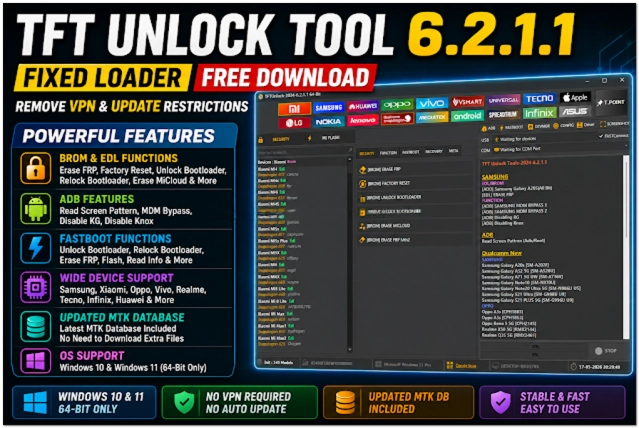
The function of TFT Unlock Tool 6.2.1.1 is to resolve Android software difficulties and offer simple smartphone mending iterations. A number of issues may result from using an Android mobile, like FRP locks, firmware melting, crashing, looping, or its entire freezing.
It is common that these problems may cause the user to lose access to the mobile phone or the phone tends to be unstable. TF Tool comes with some of the most advanced repair features, providing quick, technically possible repairs.
An important part of the TFT Unlock Tool is the device unlocking facility. This helps to get those screen lock types removed that are supported, like pattern locking, passwords, and much more.
This is because the chance exists to bypass the device protection in a factory (FRP–factory reset protection), so you can restore the device without the need for a Google account.
The software to be installed also has such functions as Droid boot or Fastboot mode. Technicians can install or reinstall firmware to repair corrupted operating systems and restore smartphones to working condition.
TFT Unlock Tool offers a device information reading option, which enables technicians to get details such as the Android version, the firmware info, the model number, and the chipset data before they undertake the manipulation.
Moreover, you can find a set of repair and enhancement tools that dramatically accelerate the repair work performance and raise the efficiency grade of the smartphone.
By and large, TFT Unlock Tool 6.2.1.1 becomes a stable, beneficial solution for phone servicing, particularly for smartphone service centers.
Key Features
There are also some new advanced features in TFT Unlock Tool 6.2.1.1, an Android servicing program.
Device Unlocking
Unlock supported screen locks such as PINs, passwords, and patterns.
FRP Removal
Unlock Factory Reset Protection tools for experts using this Android feature.
Firmware Flashing
Firmly install or reinstall the firmware running on supported smartphones.
Multi-Brand Support
It is operational with almost any smartphone running the Google operating system.
ADB and Fastboot Support
It can be commanded with fastboot and ADB.
Device Information Reader
Provides the user with comprehensive device information.
Maintenance Utilities
It includes a complete lineup of fixing procedures.
Fast Processing Engine
This is planned for the purpose of excellent and reliable occasional performance.
How to Install TFT Unlock Tool 6.2.1.1
The TFT Unlock Tool 6.2.1.1 installation steps are relatively straightforward and only a few.
Step 1
You can download TFT Unlock Tool 6.2.1.1 from a credible source on the internet dealing with mobile repair software.
Step 2
Unpack the ZIP or RAR archive downloaded from the net using WinRAR or 7-Zip.
Step 3
Click on the folder icon and select the file marked setup.
Step 4
USB and ADB drivers, therefore, need to be installed and configured properly.
Step 5
Activate the installation software and follow the information that emerges on the screen.
Step 6
Start the software as an administrator after installation.
Step 7
Activate the USB debugging function in Developer Mode through your smartphone’s settings.
Step 8
Link the device through a USB cable and commence knowledge-repair exercises.
When the setup is done, TFT Unlock Tool 6.2.1.1 can be used for Android jobs.
Download Link: HERE
Your File Password: Gsmlabsolution.com
File Version & Size: | 652.23 MB || V6.2.1.1 |
File type: compressed / Zip & RAR (Use 7-Zip or WINRAR to unzip the file)
Support OS: All Windows (32-64 Bit)
Virus Status: 100% Safe. Scanned By Avast Antivirus