Introduction
Being a technological world nowadays,
LG smartphones, despite their powerful hardware and software features, can still experience issues. In case a user faces any of these problems, technical support from experts is required. In such cases, people responsible rely on the RDPower LG tool.
The tool supports multiple LG Android devices and offers features such as flashing, removal, unlocking, and device repair.
Such targeted support improves the rate of repair success and helps in maintaining stable communication during the servicing procedure.
Overview
The tool utilizes the ADB and fastboot modes of LG Android devices to operate on them. These communication methods take control of the Android operating system and perform a lot of other tasks in the process.
The biggest benefit of the RDPower LG tool is its LG-focused compatibility. In contrast to general Android repair software, it basically works with LG smartphones first, and therefore it could improve the operation stability and repair performance.
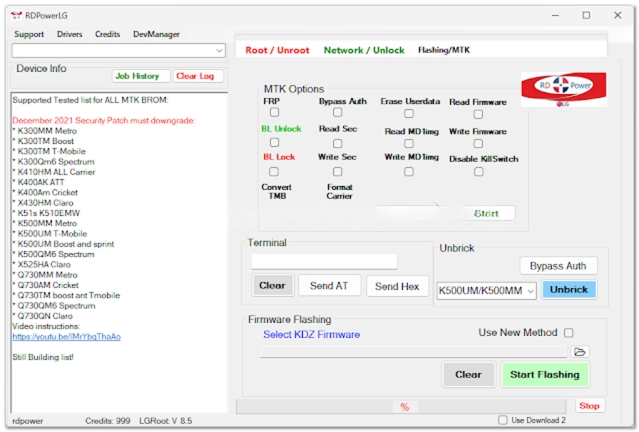
With an uncluttered and neat layout, the interface of this mobile phone services app makes navigation easy.
Description
A significant feature of this software is that it allows firmware flashing, which in turn will enable the user to install (or reinstall the firmware) on recent LG smartphones. The process resolves the corrupted operating system and gives the device a new life purpose of working as intended.
The software also includes device unlocking functionalities, allowing for the following: using pullers of PINs, passwords, and pattern logins.
This minimizes errors in the operation and increases the level of performance of the entire mechanism.
It is lightweight, allowing it to run smoothly on the majority of Windows systems without requiring a top-notch device.
Key Features
RDPower LG took people that provide Android services.
FRP, which means Factory Reset Protection, was meant to secure users’ accounts from theft. This device removes the factory reset protection on compatible LG devices.
LG Device Support is a support software formulated specifically for LG smartphones and tablets.
A tool for ADB and fastboot protocols is implemented and uses stable communication on the device.
Device Information Reader consisting of reporting and descriptive functions to show device and firmware versions, etc.
A quick engine characterized by fast and efficient processing that arrives at the best result.
Stable performance helps clothe the area of stable trade operation and credible messages subvention.
How to Install RDPower LG Tool
By following this guide, you can have RDPower LG Tool up and running on your system in no time.
Step 1: Obtain the current RDPower LG took installation package from a verified and reliable Android repair software site.
Step 2: Next, unravel the ZIP or RAR archive with the help of built-in programs like WinRAR or 7-Zip.
Step 3: After opening the unzipped directory, you will find an appropriate verification file.
Step 4: To ensure successful communication with connected devices, ensure the proper installation of the LG USB and ADB drivers.
Step 5: To achieve the instruction, download the app through its setup file and follow the setup process one by one in the provided instruction set.
Step 6: This allows them to make any necessary edits.
Step 7: Turning on USB debugging in Developer Options on the LG smartphone will enable advanced troubleshooting and modification of your device’s user interface.
Step 8: Now, you need to connect your phone to the computer using the USB cable, and after you have done that, back up your data. However, continue using the tool.
Download Link: HERE
Your File Password: Gsmlabsolution.com
File Version & Size: | 86.42 MB |
File type: compressed / Zip & RAR (Use 7-Zip or WINRAR to unzip the file)
Support OS: All Windows (32-64 Bit)
Virus Status: 100% Safe. Scanned By Avast Antivirus