Introduction
MediaTek (MTK) smartphones have become increasingly popular due to their affordability, performance, and wide availability across leading Android brands. However, users and mobile repair technicians often need to unlock the bootloader before performing advanced software modifications such as installing custom ROMs, flashing custom recoveries, rooting devices, or testing firmware. MTK Bootloader Unlock Tool is a Windows-based utility designed to simplify the bootloader unlocking process for supported MediaTek-powered Android devices.
The latest version provides a streamlined interface, improved compatibility, and enhanced communication with supported MTK smartphones. Whether you’re a professional mobile technician, Android developer, or advanced user working on your own device, MTK Bootloader Unlock Tool helps prepare compatible devices for authorized development and maintenance tasks.
With its lightweight design and user-friendly workflow, the software reduces the complexity of bootloader unlocking while providing a reliable environment for supported service operations.
Overview
MTK Bootloader Unlock Tool is a professional Android servicing utility created specifically for MediaTek-powered smartphones and tablets. The software enables users to communicate with supported devices through Fastboot and other compatible service modes, allowing them to unlock the bootloader where permitted by the device manufacturer.
An unlocked bootloader is often required before installing custom recovery images, flashing compatible firmware, testing software builds, or performing advanced development work. Instead of using lengthy command-line procedures, this tool provides an intuitive graphical interface that simplifies the unlocking workflow.
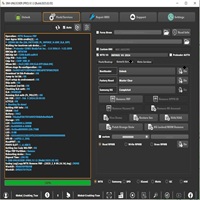
Designed for Windows operating systems, the application integrates automatic device detection, bootloader status verification, and stable USB communication into one easy-to-use package. Its optimized performance makes it suitable for both repair workshops and individual users who need a dependable bootloader management solution.
Description
MTK Bootloader Unlock Tool is developed to make the bootloader unlocking process faster, safer, and more accessible. Modern Android devices use a locked bootloader to protect the operating system from unauthorized modifications. While this security mechanism enhances device protection, developers and technicians often require bootloader access for legitimate purposes such as firmware testing, software recovery, and custom development.
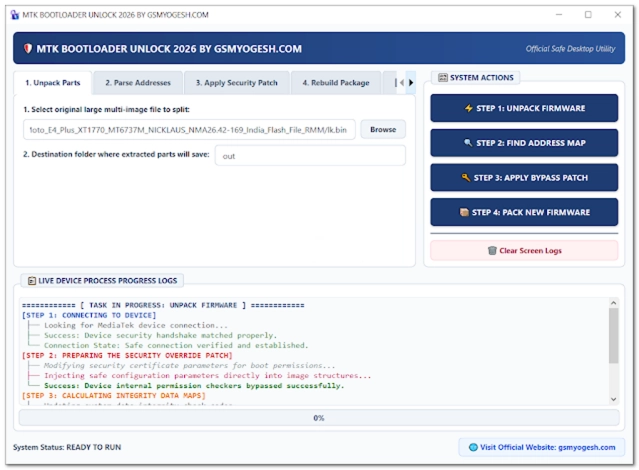
The software establishes communication with supported MediaTek devices and guides users through the unlocking process using a simple graphical interface. Automatic device recognition minimizes setup time, while integrated status checks help verify whether a device is ready for bootloader operations.
In addition to bootloader management, the application may include basic device information functions and service mode utilities that improve overall workflow efficiency. Its lightweight architecture allows the program to operate smoothly on most Windows computers without requiring extensive system resources.
Before using the tool, users should verify that bootloader unlocking is supported by the device manufacturer. Unlocking a bootloader generally performs a factory reset and may affect warranty coverage or security features.
Key Features
1. MediaTek Bootloader Unlock
Unlock the bootloader on supported MTK-powered Android smartphones where authorized by the manufacturer.
2. Fastboot Mode Support
Communicates with compatible devices through Fastboot for reliable bootloader operations.
3. Automatic Device Detection
Instantly identifies supported MediaTek devices connected through USB.
4. Bootloader Status Verification
Check whether the device bootloader is currently locked or unlocked.
5. User-Friendly Interface
Simple graphical layout designed for beginners, developers, and professional technicians.
6. Stable USB Communication
Optimized USB connectivity reduces communication failures during supported operations.
7. Device Information Reader
View basic hardware and software information before starting maintenance tasks.
8. Lightweight Application
Runs efficiently without consuming excessive CPU or RAM resources.
9. Firmware Preparation
Helps prepare supported devices for firmware installation, custom recovery deployment, and software development.
10. Improved Compatibility
Supports a wide range of MediaTek-powered Android smartphones, depending on manufacturer policies.
11. Fast Processing
Optimized performance minimizes waiting time during bootloader management tasks.
12. Regular Updates
Future software releases may introduce expanded compatibility, improved stability, and additional maintenance functions.
How To Install MTK Bootloader Unlock Tool
Installing the MTK Bootloader Unlock Tool is quick and straightforward.
Step 1: Download the Tool
Download the latest version of MTK Bootloader Unlock Tool from a trusted source.
Step 2: Extract the Files
Extract the downloaded ZIP or RAR archive using WinRAR or 7-Zip.
Step 3: Install Required Drivers
Install MediaTek USB Drivers along with Android USB Drivers, ADB Drivers, and Fastboot Drivers.
Step 4: Disable Antivirus (Optional)
Some servicing tools may trigger false-positive antivirus warnings. Temporarily disable antivirus software if necessary.
Step 5: Launch the Application
Run the software with administrator privileges to ensure proper system access.
Step 6: Enable Developer Options
If required, enable Developer Options, USB Debugging, and OEM Unlocking on the supported Android device.
Step 7: Connect the Device
Connect the smartphone to the PC using a reliable USB cable and boot into the required service mode if instructed.
Step 8: Verify Device Detection
Allow the tool to recognize the connected device and verify bootloader status.
Step 9: Follow the On-Screen Instructions
Proceed with the supported bootloader management operation by carefully following the application’s prompts.
Download Link: HERE
Your File Password: Gsmlabsolution.com
File Version & Size: | 35.08 MB |
File type: compressed / Zip & RAR (Use 7zip or WINRAR to unzip File)
Support OS: All Windows (32-64 Bit)
Virus Status: 100% Safe Scanned By Avast Antivirus