Introduction
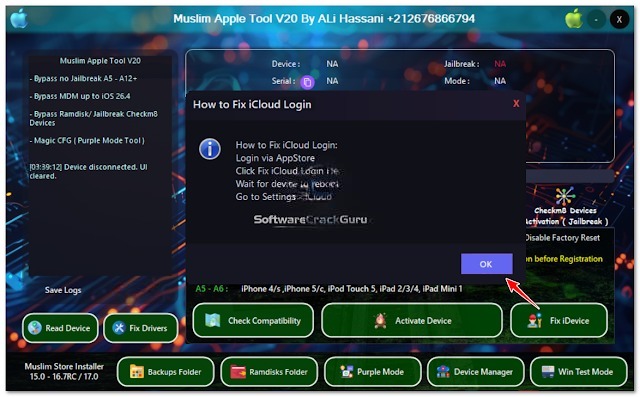
Apple accessories are accepted for their exceptional body quality, able security, and reliable performance. However, technicians and account professionals generally crave specialized software to accomplish firmware management, diagnostics, accessory advice retrieval, and added accustomed aliment operations. Muslim Apple Apparatus V20 is a able Windows-based account developed to bridge appliances for accordant iPhones, iPads, and added Apple devices.
The latest release, Muslim Apple Apparatus V20, introduces greater stability, added affinity with newer iOS versions, optimized USB communication, and an added automated user interface. Whether you are an Apple adjustment technician, an account center owner, or an accomplished user managing your own devices, this apparatus provides an able Belvedere for accurate Apple accessory maintenance.
By accumulating assorted appliance appearance into a distinct application, Muslim Apple Apparatus V20 helps abate workflow complications and advance abundance during accustomed adjustment and analytic tasks.
Overview
The Muslim Apple Tool V20 is a capable appliance, advised accurately for accordant Apple devices. Built for Windows operating systems, the software integrates several maintenance, firmware-related, and analytic functions into one centralized dashboard, eliminating the charge to about-face amid assorted utilities.
The apparatus communicates with accurate Apple accessories through USB Apple mobile accessory drivers and accordant account modes. It enables technicians to ascertain affiliated devices, retrieve accouterments and software information, accomplish firmware-related maintenance, and add accurate appliance functions.
Its failing architecture and automatic interface make the Muslim Apple Apparatus V20 acceptable for both able adjustment workshops and avant-garde users who charge a dependable Apple appliance solution.
Description
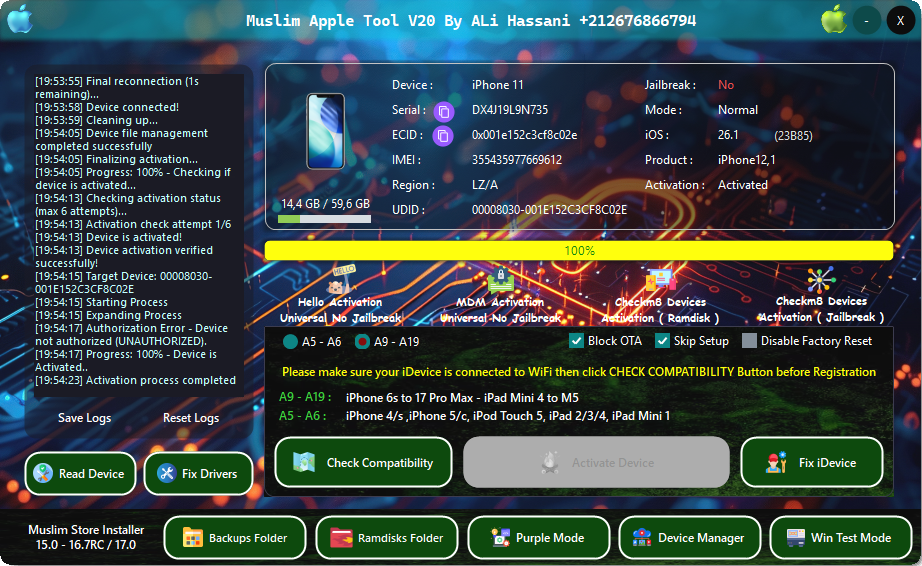
The Muslim Apple Apparatus V20 is engineered to accommodate technicians with a simple and reliable ambiance for alive with accurate Apple devices. The software automatically detects accordant iPhones and iPads affiliated to the computer, enabling users to activate the appliance with basal configuration.
Once an accessory is recognized, users can access assorted alignment utilities, analyze accessible accessory information, advise USB advice status, and accomplish accurate software application operations. The appliance is advised to abbreviate advice errors while advancement fast and abiding achievement throughout the appliance process.
Version V20 includes several improvements over antecedent releases, including added affinity with newer Apple accessories and firmware versions, optimized USB communication, faster accessory recognition, and accepted software adherence improvements.
Because of its organized blueprint and able performance, the Muslim Apple Apparatus V20 has become a applied account for technicians who consistently account for Apple smartphones and tablets.
Key Features
1. Apple Accessory Support
Designed for iPhone and iPad appliances with active, accurate iOS versions.
2. All-in-One Apple Account Utility
Combines assorted aliment and analytic functions into one application.
3. Automatic Accessory Detection
Quickly recognizes accurate Apple accessories affiliated through USB.
4. Accessory Advice Reader
Displays important accouterments and software advice for affiliated devices.
5. Firmware Management
Supports firmware-related alignment for accordant Apple devices.
6. Accretion Mode Compatibility
Communicates with accessories operating in accurate accretion or account modes.
7. Abiding USB Communication
Optimized USB connectivity improves advice believability during servicing.
8. User-Friendly Interface
Simple dashboard acceptable for beginners and able technicians alike.
9. Failing Performance
Runs calmly while accessing basal CPU and anamnesis resources.
10. Bigger Compatibility
Version V20 expands abutment for newer Apple accessories and iOS releases area supported.
11. Fast Processing
Optimized software architectonics reduces cat-and-mouse time during alignment operations.
12. Regular Updates
Future releases may accommodate added accessory compatibility, bug fixes, and achievement enhancements.
How To Install Muslim Apple Apparatus V20
Installing the Muslim Apple Apparatus V20 is simple and requires alone a few minutes.
Step 1: Download the Software
Download the latest adaptation of the Muslim Apple Apparatus V20 from a trusted source.
Step 2: Extract the Archive
Extract the downloaded ZIP or RAR book application with WinRAR or 7-Zip.
Step 3: Install Apple Drivers
Install the latest Apple mobile accessory abutment drivers or iTunes drivers appropriate for able USB communication.
Step 4: Attenuate Antivirus (Optional)
Some appliance applications may activate false-positive antivirus warnings. Temporarily attenuate antivirus software if necessary.
Step 5: Run as Administrator
Launch the software appliance ambassador privileges.
Step 6: Affix Your Apple Device
Use an original or certified Lightning or USB-C cable to affix the accordant iPhone or iPad.
Step 7: Wait for Accessory Detection
Allow the software to automatically admit the affiliated Apple device.
Step 8: Select the Appropriate Function
Choose the adapted ailment or analytic affection from the capital interface.
Step 9: Complete the Process
Follow the on-screen instructions anxiously until the called operation finishes successfully.
Download Link: HERE
Your File Password: GsmLabSolution.com
File Version & Size: |
File type: compressed / Zip & RAR (Use 7-Zip or WINRAR to unzip the file)
Support OS: All Windows (32-64 Bit)
Virus Status: 100% Safe Scanned By Avast Antivirus