Introduction
Qualcomm GPT Tool is a specialized Android servicing utility designed to repair and manage GPT (GUID Partition Table) structures on Qualcomm-powered devices. In the GSM repair industry, partition corruption is one of the most serious software issues that can cause bootloop, dead boot, or flashing failures. When the GPT structure becomes damaged, the device may not recognize partitions correctly, resulting in severe operational problems.
The Qualcomm GPT Tool provides technicians with the ability to read, repair, back up, and restore GPT partition tables safely. This makes it an essential solution for advanced Android repair tasks, especially when dealing with Qualcomm Snapdragon chipsets.
If you are searching for a reliable Qualcomm partition repair tool for Windows PC, the Qualcomm GPT Tool is a powerful and practical option for professional mobile repair environments.
Overview
The Qualcomm GPT Tool is Windows-based repair software developed to manage and fix GUID Partition Tables on Qualcomm devices. GPT is responsible for defining how storage partitions are structured inside a smartphone. If the GPT becomes corrupted due to failed flashing, incorrect firmware installation, or power interruption, the device may stop booting completely.
This tool works primarily in:
-
EDL Mode (Emergency Download Mode)
-
Qualcomm 9008 Mode
-
Fastboot Mode (limited support)
It allows technicians to restore partition layouts, repair corrupted GPT sectors, and ensure the device storage is structured correctly before firmware flashing.
The Qualcomm GPT Tool is widely used in GSM repair shops where Qualcomm devices such as Xiaomi, Vivo, Oppo, Samsung (Qualcomm variants), and Realme are frequently serviced.
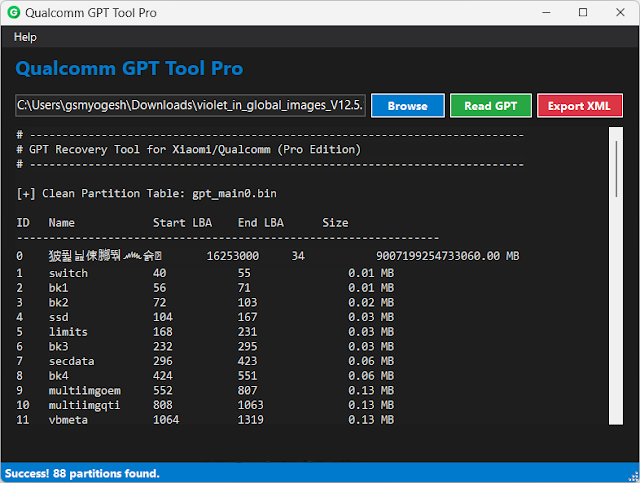
Description
The Qualcomm GPT Tool is designed to solve advanced partition-related problems. GPT (GUID Partition Table) is a modern partitioning system that replaces older MBR structures. It stores information about partition layout, size, and location.
When GPT corruption occurs, devices may show symptoms such as:
-
Device not detected properly
-
Stuck in EDL 9008 mode
-
Flashing failure errors
-
No boot or dead boot condition
-
Storage read/write errors
The Qualcomm GPT Tool allows users to:
-
Backup original GPT before modification
-
Restore GPT from a working device
-
Repair corrupted partition tables
-
Write new GPT structures safely
By fixing the partition table first, technicians can then flash firmware successfully without further errors.
The tool uses Firehose loaders to communicate securely with Qualcomm chipsets. This ensures safe low-level operations without causing additional damage.
Key Features:
Below are the main features of the Qualcomm GPT Tool:
1. GPT Backup Function
Create a complete backup of the original partition table before making changes.
2. GPT Restore Option
Restore GPT from backup or from a compatible working device.
3. Partition Repair
Fix corrupted or damaged partition structures.
4. EDL 9008 Mode Support
Perform deep-level operations via Emergency Download Mode.
5. Safe Flash Preparation
Repair GPT before firmware flashing to avoid errors.
6. Firehose Loader Compatibility
Supports various Qualcomm loaders for secure communication.
7. Multi-Brand Support
Works with Xiaomi, Oppo, Vivo, Samsung (Qualcomm), Realme, and more.
8. Lightweight Interface
Simple dashboard with clear operation buttons.
9. Error Logging System
Provides detailed logs for troubleshooting.
10. Improved Stability
Designed for stable performance during low-level repair tasks.
How To Install OF Qualcomm GPT Tool Pro
Follow these steps to properly install and use the tool:
Step 1: Download the Tool
Download the Qualcomm GPT Tool from a trusted GSM source.
Step 2: Extract the File
If the tool is compressed (ZIP/RAR), extract it using WinRAR or 7-Zip.
Step 3: Install Qualcomm Drivers
Install Qualcomm USB drivers to ensure proper detection in EDL mode.
Step 4: Disable Antivirus (If Needed)
Some repair tools may be flagged as false positives.
Step 5: Run as Administrator
Right-click the executable file and choose “Run as Administrator.”
Step 6: Connect Device in EDL Mode
Boot the Qualcomm device into EDL 9008 mode.
Step 7: Load Firehose File
Select the appropriate Firehose loader for your device model.
Step 8: Backup GPT
Before repairing, always create a GPT backup.
Step 9: Repair or Restore GPT
Choose the repair or restore option as required.
Download Link: HERE
Your File Password: 123
File Version & Size: |
File type: compressed / Zip & RAR (Use 7zip or WINRAR to unzip File)
Support OS: All Windows (32-64 bit)
Virus Status: 100% Safe Scanned By Avast Antivirus