Android Multi Tool v1.3.5.5 Released (Free Auth)
Android Multi Tool v1.3.5.5

Introduction
In the constantly booming market providing smartphone services, it is irrefutable that technical experts require efficient and trustworthy tools to fix complicated issues, which often involve Android’s system. As smartphones shift to have more advanced and customized software solutions, normal recovery tools may not be adequate in tackling crashes of various kinds. Among them, Android Multi Tool is perhaps the most reliable, and its new version is Android Multi Tool v1.3.5.5, which upgraded performance and compatibility as well as added new functions.
This update ensures that users can handle modern transmissions in a user-friendly manner.
Overview
The software talks to devices over Android Debug Bridge or Android bootloader. These communication methods allow accessing the Android system directly, for example to refresh the firmware.
The navigation is straightforward, as the interface is clean and uncomplicated.
Enhance device detection; your Android Multi Tool version 1.3.5.5 update brings acceleration twofold. These enhancements fortify the multiply and augment its cost-effectiveness.
Description
At certain times, users are prone to blockage of their phone access privileges, denying proper functionality of the phone itself. Android Multi Tool gives technicians a set of options that help them solve these issues with simplicity.
The key part of the tool is unlocking the device, and the mere user can do it in seconds.
This is a typical purpose within the scope of mobile maintenance.
Its low footprint guarantees the performance running smoothly on almost all versions of Windows.
Ultimately, Android Multi Tool v1.3.5.5 is the most comprehensive way to repair, modify, clean, restore, and sustain your device.
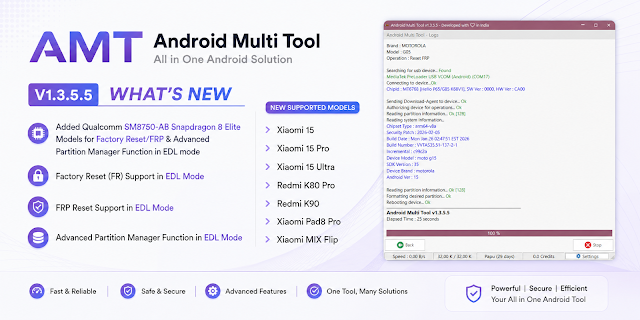
Key Features of Android Multi Tool v1.3.5.5
Device Unlocking
Helps screen blockage removal like PINs, passwords, and patterns.
FRP Lock Removal
Compatible with activating Google account verification and canceling.
Firmware Flashing
Provides the characteristic to repair the software issues by installing or reinstalling the firmware.
Multi-Brand Support
It is compatible with a plethora of Android-based smartphones, being used for a wide range of tasks.
ADB and Fastboot Support
Ensure the system’s reliability by utilizing protocols such as ADB and Fastboot for communication.
Device Information Reader
Deliver an outline of the properties of the device to be dealt with prior to its being utilized.
Fast Processing Engine
Adjusted and reduced the duration of fixing, making it faster and efficient.
User-Friendly Interface
Good for all kinds of users; clear layout for everyone.
How to install Android Multi Tool v1.3.5.5
Setting up the antivirus is easy and does not require many steps.
Step 1:
Download Android Multi Tool v1.3.5.5 setup from a mobile service tools webpage known for having the best tools.
Step 2:
Extract the ZIP or RAR archive located on the local file system with an associated unpacker like WinRAR or 7-Zip.
Step 3:
Once it is extracted, the files can be opened, and the desired installation file can be found.
Step 4:
Install the drivers that control your USB port and work in ADB mode.
Step 5:
Upon saving them, make sure to read the screen instruction package, as it is prompting what needs to be followed until installation completes.
Step 6:
After its setup procedure, the start-in process has to be made as a running one as the administrator.
Step 7:
USB debugging is activated by activating the developer’s option on Android by examining an option named “USB debugging.”
Step 8:
To pair a smartphone and computer, use a functional USB data cable and figure it out using the tool.
Once you get one operational, you can use it for opening the phone and performing repairs.
Download Link: HERE
Your File Password: Gsmlabsolution.com
File Version & Size: | 65.08 MB || V1.3.5.5 |
File type: compressed / Zip & RAR (Use 7-Zip or WINRAR to unzip the file)
Support OS: All Windows (32-64 Bit)
Virus Status: 100% Safe. Scanned By Avast Antivirus