SamFw FRP Tool V5.5.1 Latest Version Free Download
SamFw FRP Tool V5.5.1

Introduction
Android smartphones have become increasingly secure over the years, thanks to advanced protection mechanisms such as Factory Reset Protection (FRP). While these security features help protect user data from unauthorized access, they can also create challenges during legitimate device servicing and maintenance. Mobile technicians frequently encounter devices that require software troubleshooting, device management, and post-reset configuration assistance. To streamline these tasks, professionals often rely on trusted utilities like SamFw FRP Tool V5.5.1.
SamFw FRP Tool V5.5.1 is a popular Windows-based Android servicing utility designed to assist technicians with device management, software maintenance, and various Samsung-related service operations. The software is widely recognized for its user-friendly interface, lightweight design, and practical set of maintenance features.
The latest version introduces improved compatibility, enhanced device communication, optimized performance, and support for newer Android devices. These enhancements make SamFw FRP Tool V5.5.1 an excellent choice for GSM technicians, repair centers, and advanced Android users.
Whether you are managing Samsung devices, performing software maintenance, reading device information, or handling routine servicing tasks, SamFw FRP Tool V5.5.1 provides a convenient and efficient working environment.
In this article, we will discuss the introduction, overview, description, key features, how to install, and system requirements of SamFw FRP Tool V5.5.1.
Overview
SamFw FRP Tool V5.5.1 is a multifunction Android servicing application primarily known for its Samsung device support and maintenance capabilities.
The software provides technicians with a centralized platform for managing Android devices through various communication methods, including:
ADB Mode
MTP Mode
USB Communication
Android Service Interfaces
These communication methods allow users to interact with supported devices efficiently and perform various maintenance procedures.
One of the key strengths of SamFw FRP Tool is its simplicity. The software features a clean and organized interface that enables users to access important functions without requiring extensive technical expertise.
The tool is designed to help technicians save time by automating many common service procedures. It supports multiple Android versions and offers compatibility with a wide range of Samsung smartphones and tablets.
Version 5.5.1 focuses on improving operational stability, expanding compatibility, and enhancing the overall user experience.

Description
SamFw FRP Tool V5.5.1 is designed to simplify Android servicing and maintenance procedures commonly performed in repair shops and service centers.
Modern Android devices may experience issues such as:
Software instability
Device communication problems
System maintenance requirements
Configuration management challenges
Firmware-related troubleshooting
Device information access needs
Post-reset servicing requirements
The software provides a collection of utilities that help technicians manage these situations more efficiently.
One of the primary functions of SamFw FRP Tool is device communication management. The software establishes stable connections with supported Android smartphones and allows users to access various maintenance functions.
Another valuable feature is device information reading. Technicians can quickly retrieve important details such as:
Device model
Android version
Build number
Security patch level
Hardware information
Software status
The tool also includes utilities that assist technicians during device setup, diagnostics, and software servicing workflows.
Its optimized communication engine improves connection reliability and helps minimize interruptions during maintenance procedures.
Because of its lightweight architecture, SamFw FRP Tool V5.5.1 runs smoothly on most modern Windows computers without requiring high-end hardware resources.
The software is particularly useful for technicians who regularly work with Samsung smartphones and require a simple yet effective servicing utility.
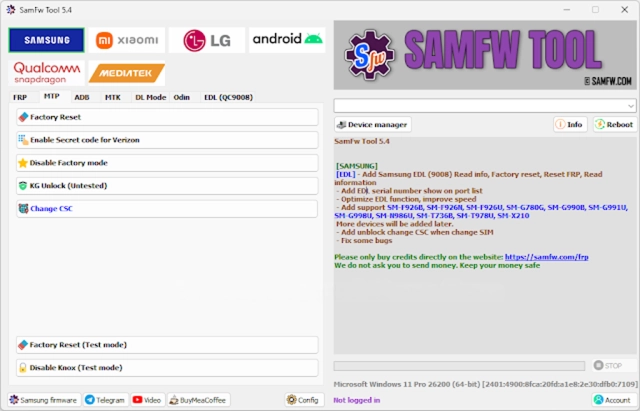
Key Features
Samsung Device Support
Supports a wide range of Samsung smartphones and tablets.
Device Information Reader
Displays detailed software and hardware information.
ADB Communication
Supports Android Debug Bridge operations for device management.
MTP Connectivity
Communicates with supported devices through Media Transfer Protocol.
Maintenance Utilities
Provides tools for routine Android servicing tasks.
User-Friendly Interface
Simple and intuitive design suitable for all skill levels.
Fast Device Detection
Quick recognition of supported Android smartphones.
Lightweight Performance
Consumes minimal system resources during operation.
Improved Compatibility
Enhanced support for newer Android versions and devices.
Stable Communication Engine
Reliable connectivity during servicing procedures.
Service Center Utility
Designed for GSM technicians and mobile repair environments.
How To Install SamFw FRP Tool V5.5.1
Installing SamFw FRP Tool V5.5.1 is simple and can be completed within a few minutes.
Step 1
Download the SamFw FRP Tool V5.5.1 setup package from a trusted GSM software source.
Step 2
Extract the downloaded ZIP or RAR archive using WinRAR or 7-Zip.
Step 3
Open the extracted folder and locate the installation file.
Step 4
Install Samsung USB drivers and ADB drivers on your computer.
Step 5
Run the setup file as administrator.
Step 6
Follow the installation wizard instructions.
Step 7
Complete the installation process.
Step 8
Launch SamFw FRP Tool V5.5.1.
Step 9
Connect a supported Android device using a USB cable.
Step 10
Select the desired service operation and begin working with the device.
After installation, the software will be ready for Samsung device management and servicing tasks.
Download Link: HERE
Your File Password: Gsmlabsolution.com
File Version & Size: | 55. 21 MB || V5.5.1 |
File type: compressed / Zip & RAR (Use 7zip or WINRAR to unzip File)
Support OS: All Windows (32-64 Bit)
Virus Status: 100% Safe Scanned By Avast Antivirus