UMT QcFire Tool V13.8 Latest Version Free Download
UMT QcFire Tool V13.8

Introduction
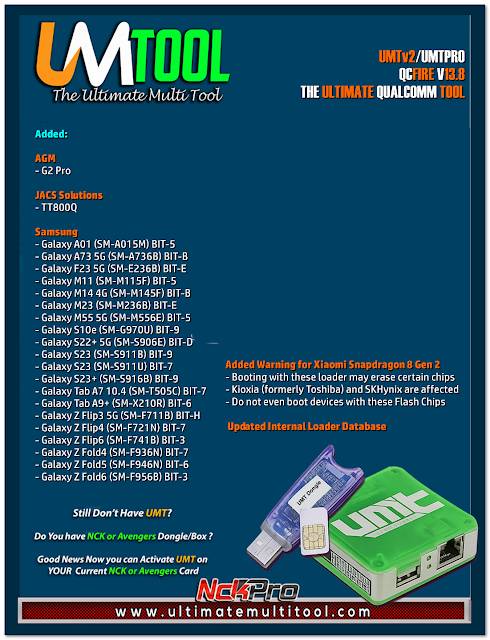
The tool UMT QcFire Tool V13.8 is a tool provided by an expert team from The Ultimate Multi Tool that specializes in Qualcomm devices. The purpose of this software is to give mobile technicians a hand in servicing tasks on Qualcomm-powered devices. These operations involve firmware flashing, FRP services provision, device recovery, and partition management.
The latest update’s main aspects are the communication speed increase, device extension and tuning, and the most important part, the repair. The modifications make UMT QcFire Tool V13.8 a basic part in the armaments of GSM specialists, repair centers, and service houses.
In this article, we will discuss the introduction and provided overview and description, check the main features, determine the necessities, know how to install this particular tool, and understand the system requirements.
Overview
This software tool teaches how to service Android Qualcomm devices in particular, owing to the processing chips they are built with. It is tailored for smartphones and tablets running on the said tool.
The tool comes with support for multiple Qualcomm chipsets and the possibility to execute a a series of operations through a a single interface. This software has been developed to support numerous service protocols used by a given device:
EDL (Emergency Download Mode)
Fast boot Mode
ADB Mode
Qualcomm Diagnostic Mode
Systematic complexity becomes a breeze as the UI simplifies problem-solving and becomes user-friendly. Tasks are clearly classified into modules as categories. So it implies that every service operation can be performed quickly and efficiently.
Description
Many other smartphones have obstacles such as
One of the distinctive features of this powerful tool is manual updates, and in the V13.8 update, this has been enhanced. Techies may load the official device firmware restore package and refurbish malfunctioning operating systems and thus put set the performance.
Yet another capability is partition management, which is essential to both maintenance and repair activities. This is a feature in the software, and users can conduct reading, backup, and restoration of device critical partitions as they do repairs.
This function of recognizing detailed features reading capability from a device is available, which in turn allows the technician to learn the following data:
Device model
Firmware version
Android version
Security patch level
Qualcomm chipset information
Device status information
The slim design, in addition to being compatible with modern computer operating systems, produces computer performance at professional levels.
Key Features
Qualcomm Device Support
Universal function for almost all smart gadgets fitted with Qualcomm processors, even inexpensive devices with this component.
Firmware Flashing
The user can install factory stock firmware, a custom mirrors ROM, or update the existing firmware, as there’s a system-wide feature still in development which will function as a mechanism to calibrate and tweak the GUI.
EDL Mode Operations
Supporting the service modalities enabled by the Qualcomm Emergency Download Mode repeatedly.
FRP Servicing
It allows the conducting of factory reset protection shielding necessary processes such as the ones for the complete or partial restoration of the data.
Device Recovery
Retrieve mobiles that have irregularly heavy software faults such as impairments to the boot as well as those caused by boot protection.
Partition Management
This feature will be useful in rewriting and erasing the complete storage, which will help you free up the memory of your phone.
ADB Functions
Enables the troubleshooting, maintenance, and debugging of a device. What summarizes this device information to show detailed information about the configured hardware and software of this device, as well as the information of the available sensors?
Improved Device Detection
Enables faster connection of the smartphone through the improved connection management system.
Optimized Performance
Proceeding further, by Version 13.8, add flower chugs into your dough by delivering new public homes.
The baked cookies will be one of a kind.
User-Friendly Interface
Conveniently available weather at one’s disposal wherever in controlled conditions.
How to Install UMT QcFire Tool V13.8
The guide presented below will direct you on the step-by-step method of installing UMT QcFire Tool V13.8.
Step 1
Firstly, attempt cooperation with the utility where the UMT QcFire Tool V13.8 is sourced.
Step 2
Extract the supplied TAR file utilizing the given instructions of the essential extraction tools, e.g., WinZip.
Step 3
Choose the folder that was un-zipped to and go to this folder.
Step 4
Go to the computer where your program will execute, and after scanning that USB, download the device driver as well as the ADB drivers.
Step 5
Locate the setup file and do as the installation wizard instructs you.
Step 6
Proceed with the installation procedure according to the procedure.
Step 7
Connect the UMT Dongle or dongle activation device if necessary.
Step 8
You can do this by right-clicking on the software icon and authorizing as the administrator.
Step 9
For this, a smartphone with a Qualcomm CPU must be connected to a laptop using a standard USB wire.
Step 10
Click on the feature you want, and the software will proceed to work on the issue.
Download Link: HERE
Your File Password: Gsmlabsolution.com
File Version & Size: | 201.81 MB | | V13.8 |
File type: compressed / Zip & RAR (Use 7-Zip or WINRAR to unzip the file)
Support OS: All Windows (32-64 Bit)
Virus Status: 100% Safe. Scanned By Avast Antivirus