BMT PRO Android Module V3.8 Free Download
BMT PRO Android Module V3.8

Introduction
Yet the growing demand for Android smartphone repair services is inevitable as devices become more complex to secure and undergo more changes in terms of their software architecture. Foremost Pro© frequently becomes a nightmare for technicians who repair mobile devices. To troubleshoot such malfunctions efficiently, one requires concurrent fixing tools that would accomplish diverse service operations simultaneously using one platform. The tool at hand is the BMT PRO Android Module, as the newcomer in this series brings an improvised hand in the compatibility, performance, and repair functionality sections.
The software offers a plethora of repair tools while enabling technicians to perform required operations on their devices.
It is notably one of the number one features of the BMT PRO Android Module, which has built a virtual all-in-one environment that allows a user to perform various functions without needing to call all those applications.
Supporting version 3.8 (omit), users now have an added advantage in compatibility, processing speed, and general performance in the maintenance process. Technicians become faster and more precise in their servicing by adopting these improvements.
This tutorial focuses on an in-depth look into the introduction, overview, description, key features, how to install, and system requirements of the BMT PRO Android Module V3.8 through the eyes of SEO writing.
Overview
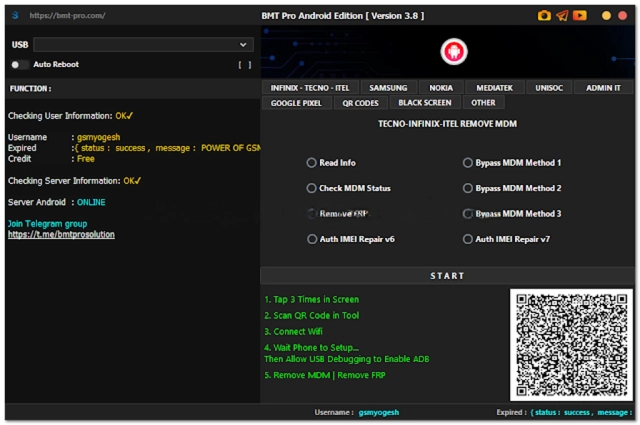
BMT PRO Android Module V3.8 is a comprehensive Android repair software module that has morphed into an easy-to-use program for smartphone maintenance.
Thus, the software combines various cell phone mending duties, and this reduces workflow disturbing factors among the repair people to achieve a higher level of effectiveness.
Through these communication channels, the app is easily able to interact with the smartphone.
Brand compatibility is one of the key standout features of BMT PRO Android Module V3.8.
The solution relies on many Android providers and chipsets such as Qualcomm and MediaTek to software their products.
BMT PRO Android Module V3.8 is a platform accessible to all levels of users, whether they are beginners or serious GSM technicians.
Description
BMT PRO Android Module was the outcome of a creative solution to software problems, contributing massively to unveiling new technological concepts.
FRP locks
Incompatibility issues
Viruses and malware
Early-version software
Lock screen errors
The possibility of system instability
Thus, such abnormalities lead to a blockage of access from devices and eventually disallow operations on handsets.
The exiting device unlocking tab represents the key utility.
A secret trick to (omit) Google account removal is to wedge it out.
After a factory reset, the software application bypasses one Google account verification.
Engineers carry the installation or rebooting of firmware to fix the device systems, assault and renew device weakness reopening.
Firmware restoration is vital to fixing issues such as
Boot loops
Software crashes
Corrupted partitions
Failed updates
System errors
The BMT PRO-sourced mechanism allows for reading of device specifications; hence, the client can view information as follows:
Android version
Firmware version
Device name
Chipset model
Software status
It performs phases to offer high-level communication during repair, thus reducing flashing failure rates.
It ensures that this is one of the best Windows systems that can support a lightweight structure.
By this, the BMT PRO Android Module V3.8 becomes a legal Android spare that you can use for mobile services.
Key Features
Device Unlocking
Remove supported screen locks such as passwords, PINs, and patterns.
FRP Removal
Bypass Factory Reset Protection on compatible Android devices.
Firmware Flashing
Flashing firmware on the supported devices to do repair work.
Multi-Brand Support
Highly compatible with several Android manufacturers.
Qualcomm and MediaTek Support
Approval from multiple chipset controllers.
ADB and fastboot communication
Use standard Android communication techniques.
Device Information Reader
Presents a variety of information related to the phone, including its model.
Maintenance Utilities
Demonstrates various diagnostic and repair functions.
Fast Processing Engine
It is engineered with a processing unit that guarantees smooth operation even after long hours, keeping you comfortable throughout the repair process.
User-Friendly Interface
It has a quite simple design, allowing it to be useful for even a newbie user.
How to Install BMT PRO Android Module V3.8
BMT PRO Android Module V3.8 is not a complex program to install and maybe requires a few steps at maximum.
Step 1
Source the BMT PRO V3.8 setup package from a reliable mobile phone service website.
Step 2
You will be required to use Windar for RAR or 7-Zip for ZIP to open the downloaded folder from an online website
Step 3
On the unpacked folder menu in your working directory, you will have to click on the file that has the setup identifier name.
Step 4
If your phone’s USB device driver has been deemed necessary or ADB drivers are available, then install them right away.
Step 5
Download the installation kit, click on the installation wizard to open the file and continue following the prompting dialog boxes until the software installation component is complete and the BMT PRO V.3.8 software package is fully installed on your computer.
Step 6
Fire the software up by using administrator privileges by right-clicking on the software icon and choosing “Run as administrator.”
Step 7
To proceed with USB debugging, activate your Android Developer Options settings.
Step 8
Connect the handset with the mentioned cable, and the technical work can begin for you.
Download Link: HERE
Your File Password: Gsmlabsolution.com
File Version & Size: |
File type: compressed / Zip & RAR (Use 7zip or WINRAR to unzip File)
Support OS: All Windows (32-64 Bit)
Virus Status: 100% Safe Scanned By Avast Antivirus