Introduction
SamFw FRP Tool V5.4 is one of the most popular and widely used solutions for removing Factory Reset Protection (FRP) from Samsung Android devices. In the modern Android ecosystem, FRP security is designed to protect user data after a factory reset. However, many users and technicians face challenges when devices become locked due to forgotten Google account credentials. SamFw FRP Tool provides a reliable and user-friendly method to bypass FRP on supported Samsung models.
With the release of version 5.4, the tool introduces improved compatibility with the latest Samsung security patches, faster ADB communication, and enhanced stability. For GSM technicians and mobile repair professionals, SamFw FRP Tool V5.4 has become an essential utility for safe and efficient Samsung FRP unlocking.
If you are searching for a free Samsung FRP bypass tool for Windows PC, SamFw FRP Tool V5.4 is one of the best solutions available today.
Overview
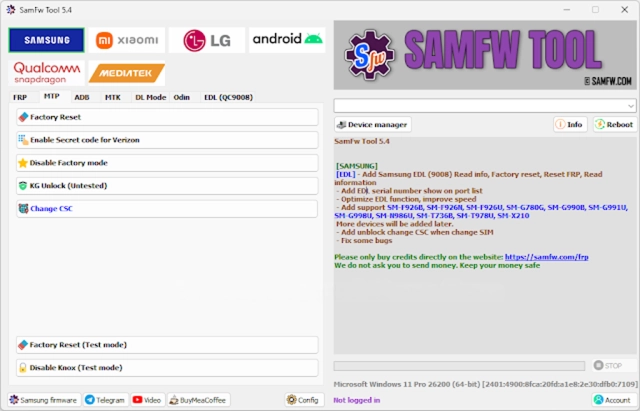
SamFw FRP Tool V5.4 is a Windows-based utility designed primarily for Samsung smartphones and tablets. It focuses on bypassing the Google FRP lock, performing factory reset operations, and enabling hidden service modes without requiring advanced technical skills.
The tool works through:
-
ADB Mode
-
MTP Mode
-
Download Mode (for supported models)
Version 5.4 improves support for newer Samsung devices running recent Android versions and updated security patches. It offers a simplified interface where technicians can execute complex tasks with just a few clicks.
Unlike many complicated flashing tools, SamFw FRP Tool is lightweight and easy to use, making it suitable for both beginners and professional repair shops.
Description
SamFw FRP Tool V5.4 is specifically optimized for Samsung devices powered by Exynos and Qualcomm processors. The tool allows users to remove Google account verification after a factory reset without requiring full firmware flashing in most cases.
FRP (Factory Reset Protection) is activated automatically when a Google account is added to an Android device. After a reset, the system demands the previously synced Google account credentials. If forgotten, the device becomes inaccessible.
SamFw FRP Tool V5.4 solves this issue by:
-
Enabling ADB operations even when FRP is active
-
Triggering hidden test modes
-
Removing Google account locks safely
-
Performing emergency factory reset
The latest update also enhances compatibility with newer Samsung firmware builds and fixes previous connection bugs. The tool runs smoothly on Windows systems and does not require a dongle or paid activation for basic FRP operations.
Key Features:
Here are the main features of SamFw FRP Tool V5.4:
1. Samsung FRP Bypass
Quickly remove Google account verification from supported Samsung devices.
2. One-Click FRP Removal
Simple interface allows fast FRP unlocking with minimal steps.
3. Factory Reset via ADB
Perform safe reset operations directly through ADB mode.
4. Enable Secret Codes
Activate hidden Samsung service codes when blocked.
5. Disable Samsung Knox (Limited Support)
Manage certain Knox-related restrictions on compatible devices.
6. ADB Enable Function
Automatically enable ADB in specific scenarios for repair access.
7. Remove Samsung Account (Supported Models)
Clear the Samsung account lock where applicable.
8. Read Device Information
Displays model number, Android version, and connection status.
9. Lightweight & Fast
Small file size with quick installation and smooth performance.
10. Free to Use
No dongle required for basic FRP bypass features.
How To Install SamFw FRP Tool V5.4
Follow these steps to properly install and use the tool:
Step 1: Download the Tool
Download SamFw FRP Tool V5.4 from a trusted source.
Step 2: Extract the File
If downloaded in ZIP or RAR format, extract using WinRAR or 7-Zip.
Step 3: Install Samsung USB Drivers
Install the latest Samsung USB drivers to ensure proper device detection.
Step 4: Disable Antivirus (If Needed)
Some security software may flag the tool as a false positive.
Step 5: Run as Administrator
Right-click on the SamFw tool executable file and select “Run as Administrator.”
Step 6: Connect Device
Connect the Samsung device to your PC using a USB cable.
Step 7: Select FRP Remove Option
Click the “Remove FRP” button and follow on-screen instructions.
Step 8: Wait for Completion
Allow the tool to process. The device will reboot after successful FRP removal.
Download Link: HERE
Your File Password: 123
File Version & Size: | 46.51 MB || V5.4 |
File type: compressed / Zip & RAR (Use 7zip or WINRAR to unzip File)
Support OS: All Windows (32-64 bit)
Virus Status: 100% Safe Scanned By Avast Antivirus