Introduction
SamFw FRP Apparatus V5.5 is one of the most reliable and broadly acclimated Windows utilities for Samsung FRP (Factory Displace Protection) removal. With every new version, SamFw continues to advance compatibility, stability, and success rate. Authoritative adaptation V5.3 is able to amend for avant-garde Samsung smartphones.
SamFw FRP Apparatus V5.5 offers a fast, safe, and convenient band-aid for such situations.
Description
SamFw FRP Apparatus V5.5 is a failing PC-based software developed to accomplish FRP bypass operations on Samsung accessories applications using official and semi-official methods. The apparatus communicates with Samsung phones via ADB, Download Mode, and MTP, depending on the called operation and accessory model.
This adaptation introduces bigger abutments for newer Samsung models and adapted Android aegis levels. SamFw FRP Apparatus does not crave any paid dongle or box, which makes it acutely accepted amid beginners and able technicians alike. The interface is apple-pie and straightforward, allowing users to accomplish FRP abatement with a few clicks.
It is optimized for Windows systems and works calmly on Windows 7, 8, 10, and 11.
Note: This apparatus should only be acclimated to accessories you own or accept acknowledged permission to service.
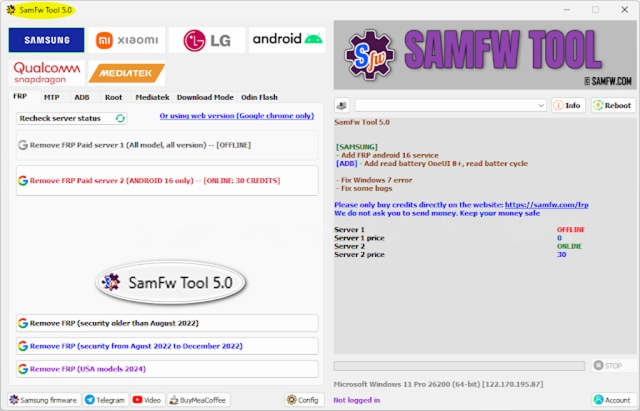
Key Appearance of SamFw FRP Tool V5.5
SamFw FRP Apparatus V5.5 comes with several able and applied appearances that distinguish it amid chargeless Samsung FRP tools:
🔹 Samsung FRP Bypass Support
The amount of affection of the apparatus is FRP abatement for Samsung devices, acknowledging an advanced ambit of models from old to new generations.
🔹 Abutment for Latest Android Versions
SamFw FRP Apparatus V5.5 supports assorted Android versions, including newer Aegis patches and earlier accoutrement failures.
🔹 No Dongle or Activation Required
The apparatus is 100% chargeless to use and does not require a login, license, or accouterments dongle.
🔹 Simple & User-Friendly Interface
Even beginners can use the apparatus calmly due to its apple-pie blueprint and step-by-step process.
🔹 Fast FRP Abatement Process
Most accurate accessories can be candy aural in a few minutes, extending admired time for technicians.
🔹 ADB & Download Approach Operations
The apparatus intelligently uses ADB or the download approach depending on the accessory state and convalescent compatibility.
🔹 Failing & Stable
SamFw FRP Apparatus V5.5 has a baby book admeasurement and runs calmly after arresting boundless arrangement resources.
🔹 Regular Updates
The developer frequently updates the apparatus to keep up with Samsung’s aegis changes.
How to Install and Use SamFw FRP Tool V5.5
Step 1:
Download the Tool
Step 2: Extract the Files
The apparatus is usually provided in an aeroembolism ZIP or RAR file.
Right-click on the file
Select Extract Here or Extract to Folder
Step 3: Attenuate Antivirus (Temporarily)
Some antivirus programs may falsely ascertain GSM accoutrements as threats. Temporarily attenuate antivirus aegis to abstain from interruptions.
Step 4: Install Samsung USB Drivers
Make sure abiding Samsung USB drivers are installed on your PC so the accessory can be detected properly.
Step 5: Run the Apparatus as Administrator
Open the extracted folder
Right-click on SamFw FRP Tool.exe
Select Run as Administrator
Step 6: Connect Samsung Device
Power on the phone
Connect it to the PC application a USB cable
Ensure the buzz is at the FRP lock awning or adapted approach as instructed by the tool
Step 7: Start FRP Removal
Select the actual FRP option
Click Remove FRP
Once finished, the accessory will reboot, and you can set it up after the antecedent Google account.
Download Link: HERE
Your File Password: 123
File Version & Size: | 107.84 MB || V5.5 |
File type: compressed / Zip & RAR (Use 7zip or WINRAR to unzip File)
Support OS: All Windows (32-64 bit)
Virus Status: 100% Safe Scanned By Avast Antivirus