ZeroKnox Removal 2.3 Free Download Android 16 FRP Added
ZeroKnox Removal

Introduction
ZeroKnox Removal 2.3 is a unique commercial software solution that assists mobile technicians and smartphone repair professionals in working with the limitations of Samsung Knox security on Samsung Android devices. ZeroKnox Removal 2.3 ensures effectiveness by solving these drawbacks, and it makes Knox-related operations easy for skilled specialists.
Description
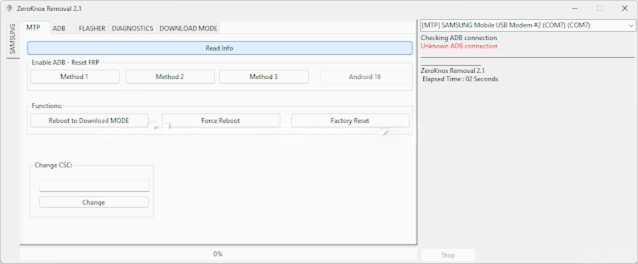
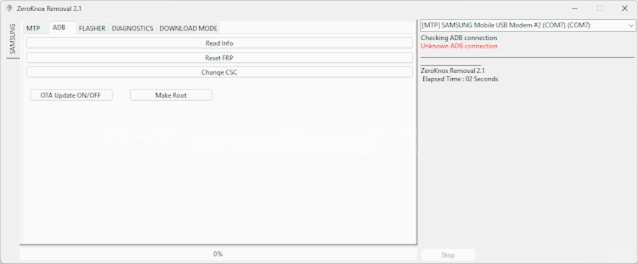
The program automatically scans and reveals the connected Samsung model and the available settings, leading to a reduced number of incorrect operations.
Version 2.3 ameliorates the general productivity on, among others, the most recent Samsung firmware and Android versions. Accurate display of the on-screen instructions and the logs shows the technicians the process and lets them identify any issues that may come up.
Key Features of ZeroKnox Removal 2.3
✔ Knox Complexity
It has the capability to annihilate Knox-related enactments on already permitted Samsung models.
✔ Debtor browns mode BitTorrent
The normal service outlets that are deliberately targeted for the enabled models are the means of entry.
✔ Automatic Mode recognition
It can singly only auto distinguish the model being connected and the system status.
✔ Improved Compatibility
Tailored for the Android’s latest versions and security updates introduced by Samsung lately into the market.
✔ Intuitive Interface
Easy-to-use touchscreen design that caters to every need of professional repairs.
✔ Real-Time Process Logs
Lists serve to display detailed status message lines for the meaning of regular and performance supervision.
✔ Nimble Windows Tool
Runs nearly smoothly without a standing system requirement load.
✔ Stamina Improvements
Refinement of the user experience via bug fixes and overall performance enhancement in future releases.
How to Install ZeroKnox Removal 2.3
Step 1:
Download the Tool
Step 2: Add the ZIP/RAR Files
Practice opening up the file using WinRAR or 7-Zip.
Step 3: Drivers Installed
Samsung USB Driver
ADB and ADB Fastboot Drivers
Step 4: Enable USB Debugging
Go for the “USB Debugging” option through the Developer section in the phone settings of the Samsung device.
Step 5: Launch the Tool
Run ZeroKnox Removal.exe in the unpacked “ZeroKnox Removal” folder with the “Run as Administrator” privilege mode.
Step 6: Tie the Device to the Samsung OS Device
Use the original USB cord and plug it into the given port on the ADB or Download Mode that’s why required to enter.
Step 7: Indicate the Procedure Needed
Make the selection of the necessary Knox-adjusted function from the tool’s interface.
Step 8: Take the Striving
Tap on the commence button and allow the process to terminate; be patient. Follow the directions suggested precisely.
Download Link: HERE
Your File Password: 123
File Version & Size: | 72.82 MB || V2.3 |
File type: compressed / Zip & RAR (Use 7zip or WINRAR to unzip File)
Support OS: All Windows (32-64 bit)
Virus Status: 100% Safe Scanned By Avast Antivirus