Introduction
The software covers mobile brands and chipset types to support Android mobile devices and mobile device electronics learners and engineers.
This SEO-optimized article will focus on presenting the introduction, general information, advantages, what it is like to work with, and its compatibility with other devices.
Overview
The tool interacts with local data on the phone using technical means such as Android Debug Bridge and fast boot. These protocols are hidden in Android’s platform affair with the operating system and allow secure swapping of system elements such as unlocking, flashing, and system modification.
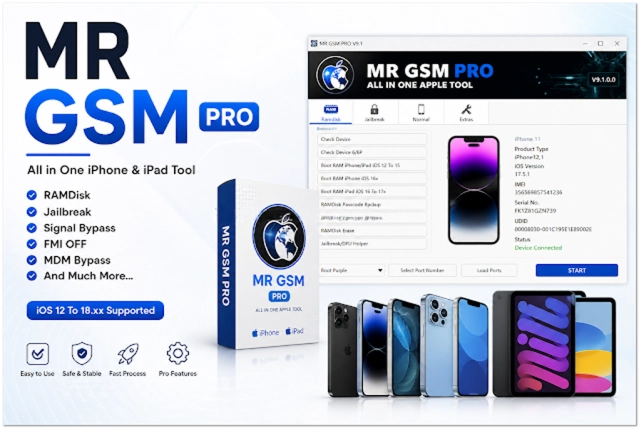
The update has v9.1.0.0 with the option to detect devices, which can then be utilized to increase performance and lessen faults while in operation. These improvements ensure better performance, making the tool more dependable for users to apply.
Description
MR GSM PRO v9.1.0.0 is developed with the versatility to reconstruct and unravel the weird maintenance issues with Android smartphones.
Such emergencies can lead to a user being unable to use their devices properly or gain access to them. This tool offers a range of devices that can diagnose different technical problems and fix them with velocity and diligence. One of the essential operations of the tool is device unlocking, which enables users to remove screen locks such as your chosen PIN, pattern, or password.
With FRP, one can bypass Google account protection. Its moderate design helps it to be operational on most available Windows systems.
Key Features
Device Unlocking
For bypassing the security lock of the screen, methods like PIN locks, passwords, or patterns.
FRP Removal
This is performed by bypassing factory reset protection and goes through Android devices on its path.
Firmware Flashes
Here is where one can reload or modify the system to solve issues related to software.
Multi-Brand Support
It took a range of devices running Android but varying in technical features.
ADB and fastboot provisions
Relies on copyrighted platforms and also fast transfer of data.
Device Information Reader
Displays device details that need to be checked before the commencement of some tasks.
Quick Repair Engine
Crafted to be lightning-fast to minimize waiting time.
How to Install MR GSM PRO v9.1.0.0
The process of installing MR GSM PRO v9.1.0.0 requires a few steps.
Step 1:
Download the MR GSM PRO v9.1.0.0 installer from a trustworthy mobile repair tools website.
Step 2:
On desktop, use a Windows desktop tool, such as WinRAR or 7-Zip, to decompress/extract the downloaded file.
Step 3:
Go to the unzipped folder and select an installation file.
Step 4:
Get the necessary USB and ADB drivers for efficient data exchange.
Step 5:
Go to the downloaded setup file on the computer and follow the instructions displayed on the window.
Step 6:
After installation, you are ready to launch the tool as the administrator.
Step 7:
Go to the Developer options in the Android device and enable USB debugging.
Step 8:
Connect a computer to the device you need to repair without a USB to be able to update and work with the new software.
Download Link: HERE
Your File Password: Gsmlabsolution.com
File Version & Size: | 171.6 MB || v9.1.0.0 |
File type: compressed / Zip & RAR (Use 7-Zip or WINRAR to unzip the file)
Support OS: All Windows (32-64 Bit)
Virus Status: 100% Safe. Scanned By Avast Antivirus