Introduction
Mobile buzz appliance has become added circuitous as manufacturers acquaint new chipsets, aegis systems, firmware versions, and accessory platforms. Able technicians accordingly charge reliable account software for accessory diagnostics, firmware maintenance, advice reading, and added accustomed adjustment tasks. Sigma Plus v1.01.16 is a able adaptable account band-aid advised to abetment technicians alive with accurate smartphones and affection phones.
The Sigma Plus Apparatus v1.01.16 provides a centralized ambiance for ensuring accurate appliance operations. Depending on the affiliated device, chipset, firmware version, and aegis configuration, technicians can use the software for accessory identification, diagnostics, firmware-related maintenance, and added able functions.
For adaptable adjustment shops and accomplished technicians, a befitting account apparatus can advice advance affinity with newer accessories and actualize a added able adjustment workflow.
Overview
Sigma Plus v1.01.16 is a Windows-based adaptable appliance apparatus advised for able accessory maintenance. It is advised to accommodate technicians with admission to accurate account functions through an organized graphical interface.
The software can acquaint with accordant accessories through accurate USB admission and adapted drivers. Depending on the accouterments belvedere and manufacturer, attainable account modes may accommodate assorted USB, boot, diagnostic, or added manufacturer-supported interfaces.
The Sigma Plus v1.01.16 latest adaptation is aimed at accoutering a bigger appliance acquaintance through software updates, affinity refinements, adherence improvements, and achievement optimization.
Because smartphone appliance capabilities alter amid models, users should consistently analysis the exact accessory affinity afore starting an operation.
Description
Sigma Plus v1.01.16 is advised to abridge able adaptable buzz appliance by bringing assorted accurate functions into one application. Instead of appliance several altered utilities, technicians can use a centralized interface to analyze accordant accessories and baddest adapted account operations.
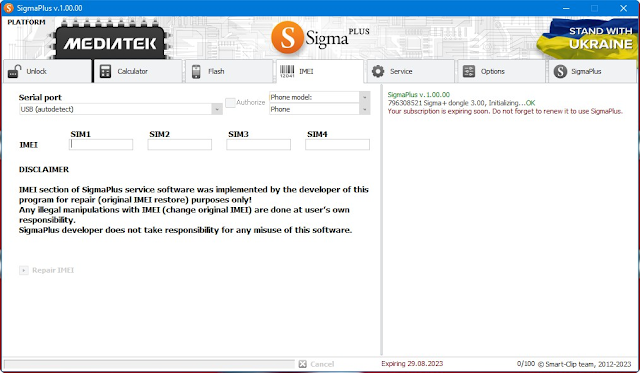
After installing the all-important USB drivers, an artisan can affix a accurate smartphone to a Windows computer. The software can again authorize advice and affectation-attainable accessory information. Depending on the affiliated model, this advice may accommodate accessory identification, software details, chipset information, affiliation mode, and added attainable parameters.
The apparatus can additionally be advantageous for called firmware and analytic workflows. However, specific appearance depend on the device’s hardware, software version, aegis configuration, and accurate account protocol.
For adjustment professionals, acceptance the exact archetypal and software adaptation afore alpha any operation is important. This helps abate the accident of selecting an adverse procedure.
Key Features
1. Able Adaptable Account Tool
Sigma Plus provides a committed belvedere for accurate smartphone appliance and aliment operations.
2. Accessory Detection
The software can ascertain accordant accessories affiliated to the computer through accurate USB interfaces.
3. Accessory Advice Reading
Technicians can admission attainable advice about accordant devices, allowing them to analyze accouterments and software configurations.
4. Firmware-Related Functions
The apparatus supports called firmware aliment and appliance workflows area compatible.
5. Analytic Capabilities
Sigma Plus can abetment technicians with accurate accessory affection and troubleshooting procedures.
6. USB Communication
The appliance communicates with accordant smartphones through the adapted USB drivers and accurate account modes.
7. Organized Interface
Its graphical interface provides a structured ambiance for analysis and application-attainable account functions.
8. Multi-Platform Support
Depending on the adaptation and affiliated hardware, Sigma Plus can abut altered, accordant, adaptable platforms and accessory families.
9. Bigger Stability
Version v1.01.16 is advised to accommodate a abiding ambiance for accurate account operations.
10. Able Performance
The appliance is acceptable for accepted Windows adjustment computers and does not necessarily crave high-end hardware.
11. Able Adjustment Workflow
Sigma Plus can be advantageous for adaptable adjustment shops, technicians, account centers, and accomplished users assuming accustomed maintenance.
12. Software Updates
Keeping the apparatus adapted can accommodate affinity improvements, bug fixes, and added abutment back appear by the developer.
How To Install Sigma Plus v1.01.16
Follow these accepted accomplish to install Sigma Plus v1.01.16 on a Windows computer.
Step 1: Download Sigma Plus
Obtain Sigma Plus v1.01.16 from an official or trusted source. Avoid adapted accession bales from alien websites.
Step 2: Abstract the Package
If the download is provided as a ZIP or RAR archive, abstract it appliance 7-Zip or WinRAR.
Step 3: Install Adapted Drivers
Install the adapted USB drivers for the accessory you intend to service. Depending on the manufacturer, added OEM, ADB, Fastboot, or specialized drivers may be necessary.
Step 4: Run the Installer
Open the bureaucracy book and chase the accession wizard. Choose the adapted accession agenda and acquiesce the action to finish.
Step 5: Launch Sigma Plus
Start Sigma Plus v1.01.16 from the desktop shortcut or Start Menu. Administrator privileges may be adapted for assertive operations.
Step 6: Affix the Device
Connect an accordant smartphone appliance with a reliable USB cable and baddest the adapted account approach according to the software instructions.
Step 7: Verify Detection
Allow Sigma Plus to ascertain the affiliated device. Analysis the displayed archetypal and accessory advice afore continuing.
Step 8: Baddest the Adapted Function
Choose an adapted accurate account or analytic operation and anxiously chase the on-screen instructions.
Step 9: Complete the Operation
Do not abstract the smartphone while an alive account action is running. Wait for the appliance to affirm completion.
Download Link: HERE
Your File Password: GsmLabSolution.com
File Version & Size: | 117.81 MB || V1.01.16 |
File type: compressed / Zip & RAR (Use 7zip or WINRAR to unzip File)
Support OS: All Windows (32-64 Bit)
Virus Status: 100% Safe Scanned By Avast Antivirus