RDPowerPlus Tool Free Download – 2026 (Tested by me)
RDPowerPlus Tool

Introduction
In the present smartphone repair sector, this kind of software helps to execute Android repair services effectively via a technician doing the job. It is common for an Android device to face a firmware locking issue, boot loops, firmware corruption, forgotten screen locks, or system crashes. For the adept resolution of such issues, the professionals capitalize on cutting-edge service tools like the RDPowerPlus tool.
An RDPowerPlus Tool product is an exemplary Windows-based platform specifically for Android repair service staff. Its sleek interface and efficient optimization engine serve to enhance service quality and improve work efficiency as well.
Overview
The RDPowerPlus tool is an overall Android tool driven by the idea of making the daily tech life of a technician easier by providing detailed hands-on instruction on how to take a problematic situation and transform it into a fix below. This application offers a unified toolkit that serves as a platform for resolving usual Android software-related cases more successfully.
The royalty-free interface and the higher number of features will assist the user in easily navigating and performing the required functions with the tool effectively. These tabs enable users to lean on the most-used functions, thereby increasing the tool’s effectiveness and efficiency.
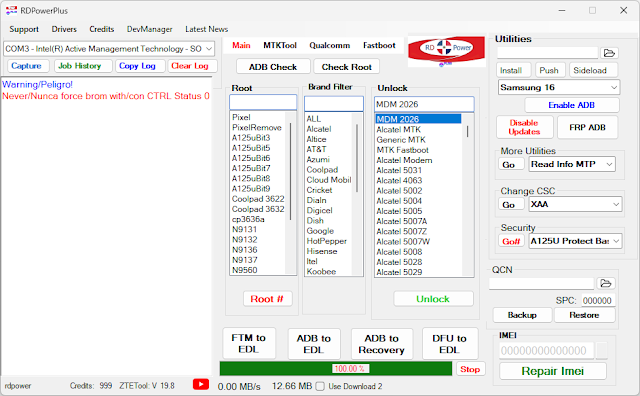
Description
An app like RDPowerPlus Tool aims to relieve the burden caused by buggy software apps on the general platform. Phones encounter tricky problems like firmware failure or system freezes, either being stuck in a boot loop, having an FRP lock, or having a forgotten password.
A very appealing attribute of the platform is firmware flashing, indeed, which gives power to the customer even to install and reinstall Android firmware. This way, an easily corrupted operating system is fixed, and devices are returned to their proper working state.
The RDPowerPlus tool does not ignore those taps, but it goes further by providing device information reading functionality.
The optimally processed engine evokes timely commutation of desired repaired performances and the software-connected smartphones. This makes the operational errors significantly decrease, not only but also helps the overall repair results to improve.
In conclusion, the RDPowerPlus Tool is a functional and standalone instrument for modern smartphone fixing.
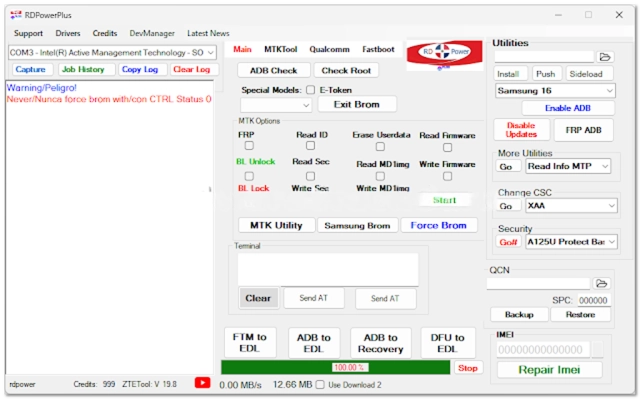
Key Features
Here, we shall cover a few of the several sophisticated Android management features of the RDPowerPlus tool.
Firmware Flashing
Firmware being corrupt is a problem you stop either by installing or reinstalling the Android firmware.
Device Unlocking
The screen comprises lock support that can demystify itself if you are using a pattern, pin, or password.
FRP Removal
Factory Reset Protection is bypassed using a process that is simplified and yet more effective when dealing with supported Android devices.
Multi-Brand Support
Manufacturers of different Android smartphones find it to be a property that aligns with their phones.
Device Information Reader
Reveals the whole shebang about Android phone features; lines up all the details that are relevant.
Fast Processing Engine
Can replace slow, long queues with a quick process that works smoothly.
Stable Performance
Provides constant contact and ceaseless activities that play a substantial role in the end result.
User-Friendly Interface
Not really taxing to understand, which makes it practically easy for starters and experts in the industry to use.
How to Install RDPowerPlus Tool
Step 1:
Download the preferred source of this program setup package from the most relevant Android repair software site.
Step 2:
In the following paragraphs, you will be introduced to how to implement these activities, starting with the extraction of the ZIP or RAR archive using Windar or 7-Zip.
Step 3:
Find the ‘installation’ or ‘install’ option and double-click on it to start the program (omit) whenever and wherever you need it.
Step 4:
Ensure proper driver installation and ADB drivers for this exact purpose.
Step 5:
However, as soon as you have executed the file, many other tools may come that will require similar devices.
Step 6:
And now, the RDPowerPlus is on with its auto-user mode, and the admin completes the command with enthusiasm.
Step 7:
You should activate USB debugging in the smartphone via Developer Options by following the same steps in the Device Manager.
Step 8:
After installing the RDPowerPlus Tool, run the app first so that you can learn its various functions.
Download Link: HERE
Your File Password: Gsmlabsolution.com
File Version & Size: | 139.78 MB |
File type: compressed / Zip & RAR (Use 7-Zip or WINRAR to unzip the file)
Support OS: All Windows (32-64 Bit)
Virus Status: 100% Safe Scanned By Avast Antivirus