Introduction
Now, in the wake of the enterprise-oriented era of mobile devices, the commonly used Mobile Device Management (MDM) systems on smartphones have become a prominent part of everyday routine. Employers usually use them in an organization to control the usage of devices, implement security rules, and protect sensitive company information.
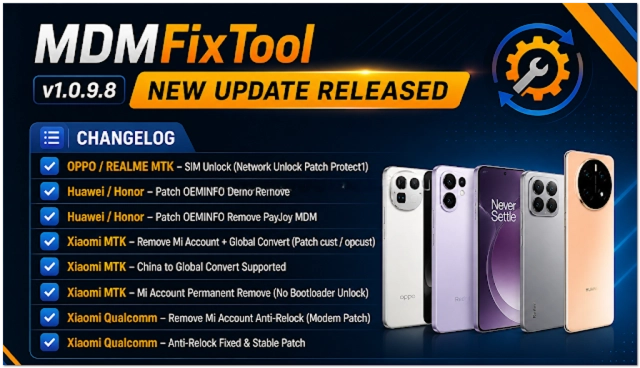
This update sustains smooth performance and increased reliability for technicians. This article will introduce MDM Fix Tool V1.0.9. 8.
Overview
The MDM Fix Tool offers an interface for technicians to establish a connection with a computer and carry out manipulations (detecting new drivers, etc.) designed to overcome any MDM-related restrictions.
These can foster good communication between the device’s SOS and the user, thus enabling extensive activities.
A straightforward tool eliminates the formidable, boring stage for mastering new tasks because there is no need for learning operations. It also opened the door to novices and experienced users.
Description
In MDM Fix Tool V1.0.9.8, the focus is on addressing problems linked to the management of mobile devices in case they malfunction. The restrictions are the scenarios where the MDM Fix Tool is most critical.
By employing the tool, the technicians are allowed to disable or remove the MDM limitations on supported devices. Such measures allow facilitating access to the device in an appropriate circumstance (ownership has changed) and return a possibility for it to function.
This software, which is carefully tuned to provide stability, thus ensures both effective communication between the computer and the device and, consequently, reliable performance. It is then suitable to be run on any given Windows system with increased efficiency.
Key Features of MDM Fix Tool V1.0.9.8
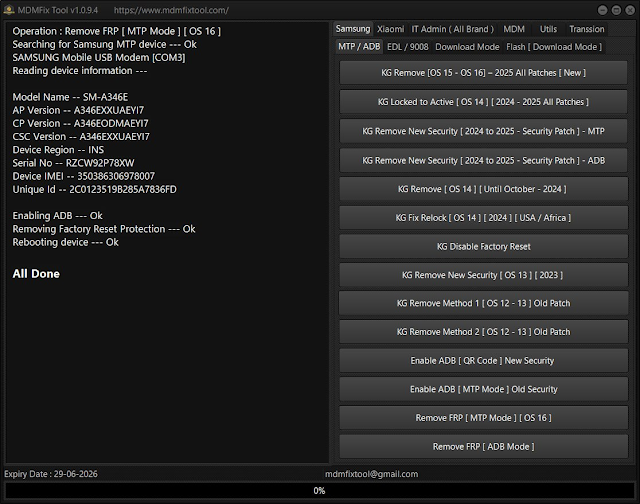
MDM Bypass
Allows unlocking application restrictions on supported devices.
MDM Removal
Permits: This offering removes the MDM profiles according to the conditions that it should be appropriate to do so.
Device Information Reader
Present the decisive features of the device, which cover the model and system status as well.
ADB and Fastboot Support
Underpin utilization of ADB and Fastboot protocols for dependable device yielding.
User-Friendly Interface
Straightforward yet intuitive interface for swift actions.
Fast Processing
The existence of this function is because all user actions will be performed in less time.
Stable Performance
Stability becomes stable again, which means that easier operation will happen and the error rate is decreasing.
Lightweight Software
Works quickly on standard systems of the Windows operating system.
How to Install MDM Fix Tool V1.0.9.8
Step 1:
Download the MDM Fix Tool V1.0.9.8 setup package from a reputable mobile repair tools website.
Step 2:
Unpack the digital ZIP or RAR archived folder using software such as 7-Zip or WinRAR.
Step 3:
Navigate to the extracted folder and observe the installation file.
Step 4:
Install the necessary USB drivers in addition to the ADB driver to make the connection right away.
Step 5:
Run the installation package and persist to the directions given on the screen.
Step 6:
Once the tool has been installed, simply open it as the administrator.
Step 7:
Plug the phone into the PC by way of a USB cable and initialize its operation with the app.
Once installed, this device will be ready to use in no time.
Download Link: HERE
Your File Password: Gsmlabsolution.com
File Version & Size: | 129.29 MB || V1.0.9.8 |
File type: compressed / Zip & RAR (Use 7-Zip or WINRAR to unzip the file)
Support OS: All Windows (32-64 Bit)
Virus Status: 100% Safe. Scanned By Avast Antivirus