Introduction
Universal Patcher V1.0 is a powerful utility designed for Android developers, GSM technicians, and advanced users who need to modify, patch, or customize firmware and system files. In the modern Android ecosystem, patching tools are essential for bypassing restrictions, fixing system errors, enabling hidden features, and preparing firmware for flashing.
With increasing security updates and device protection mechanisms, working directly with stock firmware can be challenging. Universal Patcher V1.0 simplifies this process by offering automated patching options that reduce manual editing and minimize risk. Whether you are repairing smartphones, customizing ROMs, or modifying boot images, this tool provides a reliable solution.
If you are searching for a lightweight firmware patching tool for Windows PC, Universal Patcher V1.0 is designed to improve workflow efficiency and repair accuracy.
Overview
Universal Patcher V1.0 is a Windows-based software tool that allows users to patch Android firmware files, system images, and configuration files before flashing them onto devices. It is widely used in GSM repair shops and development environments where firmware modification is required.
The tool supports:
-
Boot image patching
-
System file modification
-
FRP-related configuration edits
-
Security patch adjustments (where supported)
-
Script-based patch integration
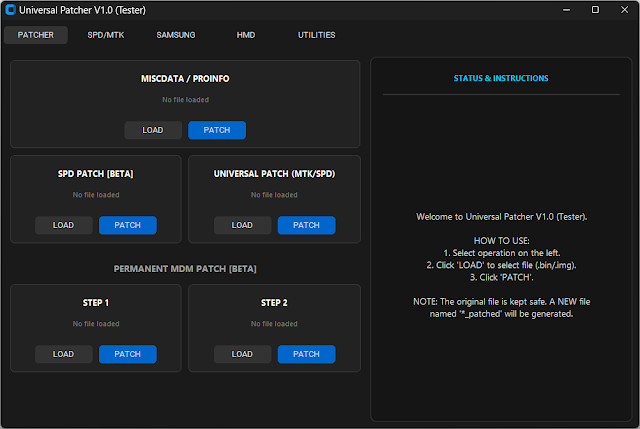
Unlike complex development platforms, Universal Patcher V1.0 provides a simplified interface that enables quick modifications without deep coding knowledge. It is compatible with many Android brands and chipsets, including Qualcomm, MediaTek, and others, depending on firmware structure.
Version 1.0 focuses on stability, clean output generation, and fast processing speed, making it suitable for daily professional use.
Description
Universal Patcher V1.0 is designed to modify firmware components safely before flashing. Android firmware packages often include multiple partition images, such as
-
boot.img
-
system.img
-
vendor.img
-
vbmeta.img
-
recovery.img
Editing these files manually requires advanced tools and technical knowledge. Universal Patcher automates specific modification processes, helping users avoid syntax errors and corruption.
For example, technicians may need to:
-
Disable forced encryption
-
Modify verification settings
-
Adjust configuration parameters
-
Prepare patched images for root or custom recovery
Universal Patcher V1.0 scans selected files, applies chosen patches, and generates updated images ready for flashing. It also keeps backup copies of original files to prevent data loss.
The tool is especially useful in situations where standard flashing tools fail due to security restrictions or verification errors.
Key Features:
Below are the main features of Universal Patcher V1.0:
1. Boot Image Patching
Modify boot images to adjust verification or enable custom configurations.
2. System File Editing
Patch configuration files within system partitions.
3. Automatic Backup Creation
Creates backup copies before applying changes.
4. Security Parameter Adjustment
Modify specific firmware settings (where supported).
5. Lightweight Design
Small file size with minimal resource consumption.
6. Fast Processing Speed
Applies patches quickly without long waiting times.
7. User-Friendly Interface
Simple dashboard suitable for beginners and professionals.
8. Multi-Brand Compatibility
Works with various Android firmware packages.
9. Error Log System
Provides clear logs for troubleshooting and tracking changes.
10. Safe Modification Process
Reduces risk of firmware corruption compared to manual editing.
How To Install Universal Patcher V1.0
Follow these steps to install the tool properly:
Step 1: Download the Tool
Download Universal Patcher V1.0 from a trusted or official source.
Step 2: Extract the File
If the file is compressed (ZIP or RAR), extract it using WinRAR or 7-Zip.
Step 3: Install Required Drivers
Install ADB and Fastboot drivers if firmware flashing is planned afterward.
Step 4: Disable Antivirus (If Needed)
Some patching tools may be flagged as false positives.
Step 5: Run as Administrator
Right-click the executable file and select “Run as Administrator.”
Step 6: Load Firmware File
Select the boot or system image you want to patch.
Step 7: Choose Patch Option
Select the desired modification from available options.
Step 8: Generate Patched File
Click “Apply” or “Patch” and wait for the process to complete.
Step 9: Flash the Patched Firmware
Use a compatible flashing tool to install the modified image.
Download Link: HERE
Your File Password: 123
File Version & Size: | 44.29 MB || V1.0 |
File type: compressed / Zip & RAR (Use 7zip or WINRAR to unzip File)
Support OS: All Windows (32-64 bit)
Virus Status: 100% Safe Scanned By Avast Antivirus