Introduction
In the rapid growth of the mobile repair industry, repair technicians need robust and reliable software solutions that can repair Android smartphones efficiently. It’s common for devices to develop software-related problems very often, and there is a need for repair tools, such as boot loops, firmware issues, FRP locks, and others, to be able to restore the devices to a normal condition. One of the essential repair tools designed to assist in mobile phone servicing activities is the IML Tool.
Overview
To simplify the testing and maintenance of Android-powered mobile devices, IML Tool offers one of the most complete Android repair software programs. By integrating diverse maintenance operations, this kind of software reduces the need for multiple services.
This utility interacts with smartphones via technologies like Android Debug Bridge (ADB) and fastboot.
The multi-brand IML tool learns from the strength of its quality of work. Professional repair shops and independent repair technicians are among the beneficiaries.
The application will have highlighted groups to show the appropriate feature class for proper resolution of issues.
It has a faster operation speed and provides reliable transmission of data between the computer and connected smartphones.
The software will handle various Android maintenance tasks, which include the storing and management of firmware, the unlocking of the device, and the repair of its systems.
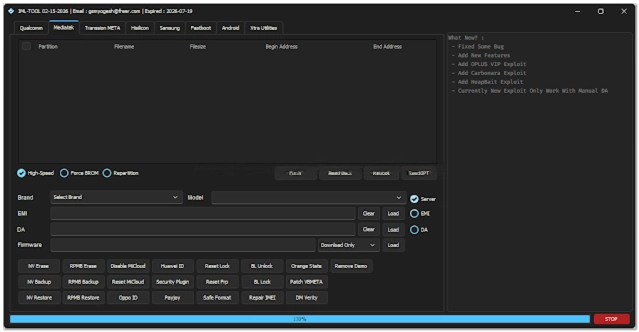
Description
During these issues, not only can repairs be a problem but also non-use of devices and unstable system performance. By this, the IML Tool becomes a complete mobile repairing solution with a a full range of repair utilities to diagnose and troubleshoot these problems efficiently. Lightweight performance and a reliable connection characterize the operation of the software. It has an efficient transmission, and it is quick and easy to use even for novices when using it for operations of flashing, unlocking, and repairing.
In general, the IML Tool is consequently a very powerful solution specifically targeting the modern smartphone repair categories.
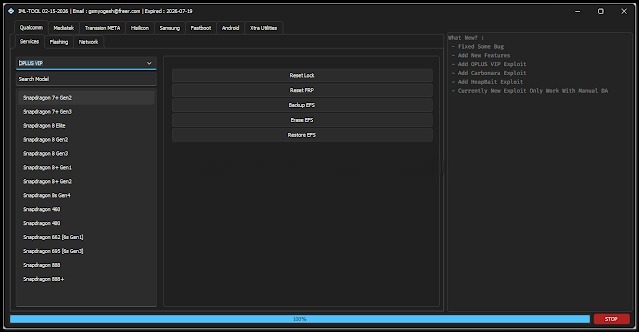
Key Features
The IML Tool contains the most modern functions that technicians can employ when fixing Android dispositive.
Firmware Flashing
Fix the simulated errors by reinstalling the firmware on the chip.
Device Unlocking
It can manipulate weak or standard screen locks, be it PIN, passwords, or pattern locks.
FRP Removal
The application is programmed to bypass FRP (Factory Reset Protection) on the selected Android units.
Multi-Brand Support
The software is compatible with multiple Android phones offered by different phone brands.
ADB and fastboot support
Comes with the ADB and fastboot protocols intended for steady device communication.
Device Information Reader
Provides essential information about the smartphone for properly executing the necessary operations.
Fast Processing Engine
Designed from the start with quick and efficient repair tasks in mind.
Stable Performance
Ensures consistent and error-free communication and flow of data.
User-Friendly Interface
Easy-to-use and neat interface designed for gadgets’ owners.
How to Install IML Tool
Step 1:
Download the IML Tool setup package from a reliable source or mobile repair software website.
Step 2:
Unpack the ZIP or RAR file through an archive tool, such as Windar or 7-Zip.
Step 3:
Open the file extracted from the folder and look for the program for installation.
Step 4:
Install the essential USB drivers and ADB drivers used for communication between your device and your computer.
Step 5:
The program will take you through the installation process with some on-screen instructions.
Step 6:
Right-click the desktop icon and choose “Run as Administrator” to launch the software with privileges.
Step 7:
There is an option in Developer Options called USB Debugging, with which the Android smartphone connects with the computer for data transfer.
Step 8:
Join the two devices with the USN cable and get access to the software interface.
Download Link: HERE
Your File Password: Gsmlabsolution.com
File Version & Size: | 130.85 mb |
File type: compressed / Zip & RAR (Use 7zip or WINRAR to unzip File)
Support OS: All Windows (32-64 Bit)
Virus Status: 100% Safe. Scanned By Avast Antivirus