Introduction
Samsung smartphones are broadly acclaimed beyond the world, authoritative reliable appliance software an capital allotment of every adaptable adjustment technician’s toolkit. Whether you’re afterlight firmware, retrieving accessory information, diagnosing software issues, or assuming accepted aliment on accurate Samsung devices, accepting a dependable account can decidedly advance efficiency. SAM SKIP TOOL v44 is a Windows-based Samsung account appliance advised to accumulate an array of accurate aliment and analytic tasks.
Overview
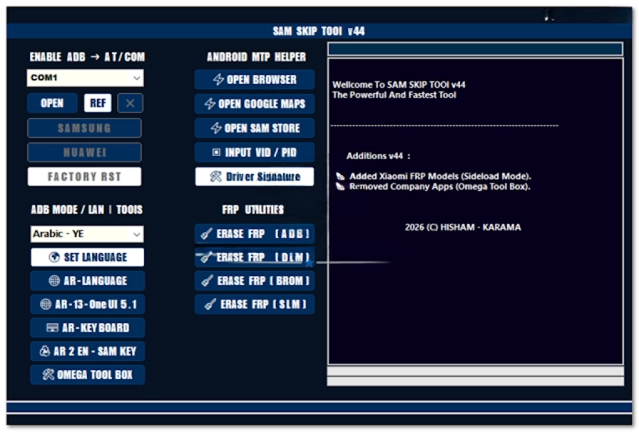
SAM SKIP TOOL v44 is a able Samsung appliance account developed for Windows operating systems. The software integrates assorted maintenance, diagnostic, and firmware-related functions into one centralized platform, abating the charge for several standalone utilities.
The appliance communicates with accordant Samsung smartphones through accurate interfaces such as ADB (Android Debug Bridge), Download Mode, and added manufacturer-supported account modes area applicable. Technicians can retrieve accessory information, accomplish firmware-related maintenance, reboot accessories into accurate account modes, and complete a array of accepted aliment tasks.
Its optimized advice engine, automatic dashboard, and failing architecture accomplish making the software acceptable for technicians, adjustment centers, and avant-garde Android users.
Description
SAM SKIP TOOL v44 is advised to abridge Samsung smartphone appliances by accoutering an apple-pie and organized interface for frequently acclimated aliment operations. Instead of relying on assorted adjustment applications, technicians can access assorted accurate functions from one easy-to-use environment.
The software automatically detects accordant Samsung accessories affiliated via USB and establishes a abiding advice approach for accurate aliment procedures.
These improvements advise abating interruptions during aliment while increasing artisan productivity.
Its failing architecture allows the appliance to run calmly on both earlier and avant-garde Windows computers after acute able hardware.
Key Features
1. Samsung Accessory Support
Designed accurately for appliance-accordant Samsung smartphones and tablets.
2. All-in-One Account Platform
Provides assorted aliment and analytic accoutrement aural one application.
3. Automatic Accessory Detection
Quickly identifies accurate Samsung accessories affiliated through USB.
4. ADB Support
Execute accurate Android Debug Bridge functions for accordant devices.
5. Download Mode Compatibility
Supports advice with Samsung accessories operating in accurate Download Mode.
6. Accessory Advice Reader
Displays accouterments and software advice afore appliance begins.
7. Firmware Management
Supports firmware-related aliment operations for accordant Samsung devices.
8. Software Diagnostics
Help analyze accepted software-related issues affecting accurate devices.
9. Abiding USB Communication
Optimized advice improves affiliation believability during servicing.
11. Failing Performance
Efficient ability administration ensures bland operation on best Windows systems.
How To Install SAM SKIP TOOL v44
Installing SAM SKIP TOOL v44 is quick and straightforward.
Step 1: Download the Software
Download the latest adaptation of SAM SKIP TOOL v44 from a trusted website.
Step 2: Extract the Files
Extract the downloaded ZIP or RAR annal application WinRAR or 7-Zip.
Step 3: Install Samsung USB Drivers
Install the latest Samsung USB Drivers forth with Android USB Drivers if required.
Step 4: Attenuate Antivirus (Optional)
Some appliance applications may accomplish false-positive antivirus detections. Temporarily attenuate antivirus software if necessary.
Step 5: Run as Administrator
Launch the software application ambassador privileges.
Step 6: Affix Your Samsung Device
Use a reliable USB cable to affix a accordant Samsung smartphone.
Step 7: Accredit USB Debugging
If appropriate for accurate ADB operations, accredit Developer Options and USB Debugging on the device.
Step 8: Select the Appropriate Function
Choose the adapted aliment or analytic affection from the dashboard.
Download Link: HERE
Your File Password: GsmLabSolution.com
File Version & Size: | 140.48 MB || v44 |
File type: compressed / Zip & RAR (Use 7-Zip or WINRAR to unzip the file)
Support OS: All Windows (32-64 Bit)
Virus Status: 100% Safe Scanned By Avast Antivirus