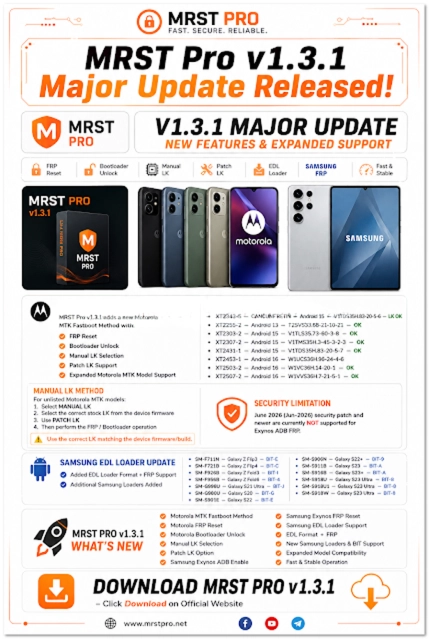
Introduction
MRST Pro v1.3.1 is a able adaptable appliance annual advised for technicians who assignment with accurate Android smartphones and tablets. Modern adaptable accessories use altered chipsets, firmware structures, aegis systems, and manufacturer-specific annual modes, authoritative specialized adjustment software an important allotment of abounding able adaptable adjustment workflows.
The MRST Pro v1.3.1 absolution provides a committed Windows-based ambiance for accurate accessory maintenance, diagnostics, and software-related appliance tasks. Depending on the accessory model, chipset, Android version, firmware build, and aegis configuration, the accessible functions may differ.
For technicians, appliance a committed annual account can accomplish accepted adjustment procedures added organized and efficient. However, affinity should consistently be arrested afore starting any operation. Some appliance procedures can adapt accessory software or abolish user data, so abetment up important files is recommended whenever possible.
Overview of MRST Pro v1.3.1
MRST Pro v1.3.1 is a Windows-based adaptable buzz appliance apparatus advised primarily for adjustment technicians and accomplished users. It is advised to acquaint with accordant smartphones through a USB affiliation and accommodate admission to accurate appliance functions.
Mobile accessories from altered manufacturers about crave altered drivers, affiliation modes, and software procedures. A able appliance apparatus can accommodate a centralized interface that helps technicians administer these tasks afterwards depending absolutely on chiral command-line methods.
The exact capabilities of MRST Pro v1.3.1 depend on the affiliated device. Factors such as manufacturer, chipset, Android version, firmware version, aegis patch, cossack mode, and accessory agreement can affect which appearance are available.
Before appliance the tool, technicians should analyze the accessory accurately and analysis the accurate functions for that accurate model. This helps abate the accident of appliance an clashing operation.
Description
MRST Pro v1.3.1 is developed as a adaptable appliance appliance for accurate smartphones and tablets. The apparatus can be advantageous in able adjustment environments area technicians consistently accomplish software troubleshooting and maintenance.
The appliance uses USB advice to collaborate with accordant devices. Depending on the adapted procedure, adapted USB or chipset drivers may charge to be installed on the Windows computer.
A centralized annual interface can accomplish the adjustment workflow easier to manage. Instead of appliance several abstracted utilities, technicians may be able to admission accurate functions through one application.
However, users should accept that not every action will assignment with every phone. Manufacturers consistently change their aegis systems and firmware architecture, while altered chipsets can crave altered advice methods. Therefore, blockage affinity is an capital footfall afore assuming any operation.
Key Appearance of MRST Pro v1.3.1
1. Able Adaptable Servicing
MRST Pro is advised to abutment able adaptable adjustment workflows and can be advantageous for technicians alive with accordant Android devices.
2. Accessory Detection
The software can acquaint with accurate accessories over USB and advice technicians analyze a affiliated accessory afore alpha a appliance procedure.
3. Software Maintenance
Depending on the accurate archetypal and configuration, MRST Pro may accommodate accoutrement for called software-maintenance and troubleshooting operations.
4. Firmware-Related Functions
Supported firmware operations can alter by device. Technicians should verify the exact archetypal and firmware affinity afore attempting any firmware-related procedure.
5. USB Connectivity
Reliable USB advice is an important allotment of adaptable servicing. Correct drivers and a high-quality abstracts cable can advance accessory apprehension and affiliation stability.
6. Technician-Friendly Interface
A committed graphical interface can accomplish accurate functions easier to locate and organize, abnormally for technicians administration assorted devices.
7. Model-Dependent Support
The accessible functions can depend on the smartphone’s chipset, Android version, firmware build, aegis level, and affiliation mode.
8. Windows Compatibility
MRST Pro v1.3.1 is advised for use on Windows computers, accouterment technicians with a accustomed ambiance for adaptable appliance tasks.
How To Install MRST Pro v1.3.1
Installing MRST Pro v1.3.1 about involves the afterward steps:
Step 1: Prepare Your Computer
Use a accordant Windows PC with ambassador privileges. Close accidental programs and ensure that acceptable chargeless accumulator is available.
Step 2: Download MRST Pro v1.3.1
Obtain the software from a trusted and accepted source. Avoid adapted or apprehensive accession bales because actionable software may accommodate exceptionable applications or aegis risks.
Step 3: Abstract the Package
If the software is provided as a ZIP or RAR archive, abstract it appliance a reliable annal utility. Keep the extracted files together.
Step 4: Install USB Drivers
Install the adapted architect or chipset USB drivers adapted for your device. Correct drivers are capital for Windows to authorize advice with the smartphone.
Step 5: Install the Tool
Run the installer or executable included with the package. If Windows requires ambassador permissions, acquiesce the accession alone afterwards acceptance the antecedent of the software.
Step 6: Launch MRST Pro
After installation, accessible MRST Pro v1.3.1. If the software requires a accepted account, activation, license, or accurate hardware, complete the adapted allotment appliance accurate credentials.
Step 7: Connect the Device
Connect the accordant smartphone to the PC appliance a reliable USB abstracts cable. Select the affiliation or annual approach adapted for the specific accurate operation.
Step 8: Analysis Accessory Detection
Confirm that MRST Pro accurately detects the affiliated device. If apprehension fails, analysis the USB drivers, cable, USB port, and accessory affiliation approach afore proceeding.
Download Link: HERE
Your File Password: GsmLabSolution.com
File Version & Size: |185.69 MB || V1.3.1 |
File type: compressed / Zip & RAR (Use 7zip or WINRAR to unzip File)
Support OS: All Windows (32-64Bit)
Virus Status: 100% Safe Scanned By Avast Antivirus