CHEETAH TOOL PRO V2025.11.19.165.0 Free Download
CHEETAH TOOL PRO

Introduction
Cheetah Apparatus Pro V2025.11.19.165.0 is one of the latest and best avant-garde adaptable application utilities advised for technicians who handle FRP removal, arrangement unlocking, flashing, IMEI repair, and analytic operations on Android devices. This latest amendment brings bigger stability, faster operations, and added affinity to advice technicians, adding to their productivity.
Description
Cheetah Apparatus Pro V2025.11.19.165.0 is an all-in-one application for deep-level Android maintenance. It offers capital solutions such as FRP bypass, flashing, ADB/Fastboot control, advancement and restore, allotment management, and bootloader-related tasks. This adaptation includes bigger apprehension for MediaTek (MTK), Qualcomm, and Spreadtrum devices, allowing users to accomplish accomplishments with bigger accurateness and speed.
One of the highlights of this amendment is its optimized algorithm for FRP unlocking and flashing, which decidedly reduces processing time.
For GSM shops, adjustment centers, and freelance technicians, the apparatus offers an abundant amount by accumulating assorted capital appearances into one reliable program.
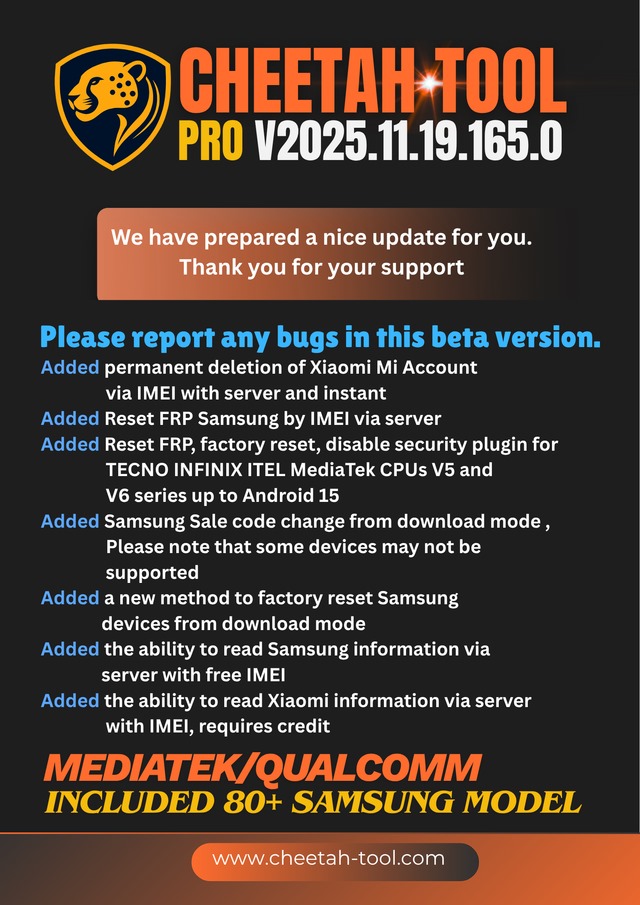
Key Features of CHEETAH TOOL PRO V2025.11.19.165.0
1. FRP Bypass for Assorted Brands
Supports Samsung, Vivo, Oppo, Xiaomi, Realme, Tecno, Infinix, and added Android devices. The FRP abatement action is fast and safe, abbreviating the accident of abstract loss.
2. Aflame and Firmware Operations
Performs firmware aflame on MTK, Qualcomm, and SPD chipsets.
3. Branch Reset and Abstracts Wipe
Allows users to accomplish branch resets, safe abstract wipes, and arrangement cleanups after acute abounding flashing.
4. ADB and Fastboot Functions
Provides abounding ascendancy over ADB and Fastboot commands, including unlocking OEM, rebooting modes, accessing accessory info, and sideload operations.
5. IMEI Adjustment (Where Legally Allowed)
Offers avant-garde IMEI adjustment appearance for accurate accessories, ensuring able arrangement connectivity.
6. Cossack Adjustment & Asleep Cossack Fix
Helps animate accessories ashore in cossack loops or with asleep cossack altitude by abating key partitions.
7. User-Friendly Dashboard
An apple-pie interface that displays accessory logs, an advanced bar, and an assignment cache in absolute time—ideal for able technicians.
8. Avant-garde Accessory Support
Compatible with almost all accepted Android brands, accoutrement bags of accessory models.
9. Faster Processing Engine
Enhanced acceleration for FRP, flashing, and Cossack operations compared to antecedent versions.
10. Regular Updates
The apparatus receives common updates to add new models and advance performance.
How to Install Cheetah Apparatus Pro V2025.11.19.165.0
Step 1
Download the Latest Setup
Step 2 – Abstract the ZIP File
After downloading, right-click the ZIP book and abstract it to a binder application like WinRAR or 7Zip.
Step 3 – Run the Installer
Open the binder and double-click on setup.exe or installer.exe.
Step 4 – Launch the Tool
Open Cheetah Apparatus Pro from the desktop or alpha menu.
Step 5 – Connect Your Device
Use a good-quality USB cable and ensure drivers are installed.
Put your accessory in ADB, Fastboot, or the Download/Flash approach as required.
Step 6 – Alpha Servicing
Choose your operation—FRP, Flash, Reset, Cossack Repair—and chase the apparatus instructions.
Download Link: HERE
Your File Password: 123
File Version & Size: | 109.38 MB | V2025.11.19.165.0 |
File type: compressed / Zip & RAR (Use 7zip or WINRAR to unzip File)
Support OS: All Windows (32-64 bit)
Virus Status: 100% Safe Scanned By Avast Antivirus