Introduction
Howbeit, servicing such units can be a nightmare, given the problems that stem from these devices, including secure boot, preloaded restrictions, and the new Android security layers.
The focused design as well as the back-end optimization of the MTK INJECTOR TOOL v4.0 are two of the things that GSM professionals, who deal with MTK devices, always favor.
The MTK INJECTOR TOOL v4.0 stands as a face-to-face troubleshooting tool dealing with MTK-based smartphones, serving centers and also small repair shops for the sake of smartphone owners.
Description
MTK INJECTOR TOOL V4.0 is a Windows automation application with the capacity to perform a lot of MTK-specific servicing and system-level tasks. The third-party software tool communicates with platforms that are used in MediaTek devices, among which the most important are Preloader, BROM, and USB VCOM modes. Through these interfaces, controlled access to user memory and other device components can be obtained.
Another valuable characteristic of MTK TOOL Injector V4.0 is the fact that the interface of the program is very simple, user-friendly, and streamlined.
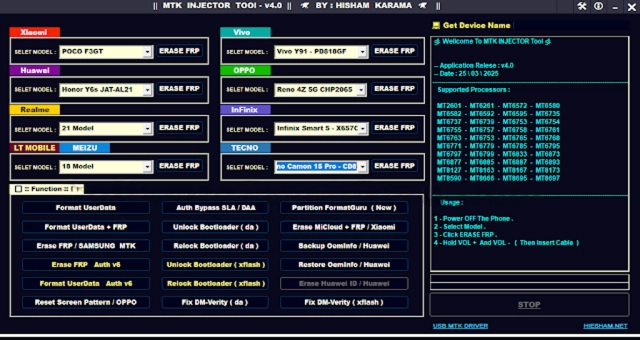
Key features of the MTK Injector Tool V4.0
MTK Injector Tool V4.0 has a unique bundle of so-designed features that no other operating system got much better in the case of v4.0:
Dedicated MediaTek Support
A user-friendly and easily adjustable mode designed specifically to work with MTK-based Android-capable mobile phones and tablets.
Advanced Injection Operations
This is responsible for doing the curated in-sourcing service injections on MTK version devices.
Preloader & BROM Mode Communication
These modes are used for carrying out operations at a low level.
Improved Chipset Compatibility
The compatibility of MTK devices with the latest MTK chipset is heightened in v4.0
High Stability & Success Rate
Stabilization of the background helps to reduce error, freezing, and disconnection of the device
Simple & Clean User Interface
Regularly disposed layouts allow easy navigation and monitoring
No Box and Dongle Required
This utility needs not use external hardware (box or dongle) for work. As a software tool, it works and runs efficiently.
Fast Operation Speed
A quick turnaround of supported tasks is the result of effective information processing.
Lightweight Application
The product creates a minimum workload on the PC even if the PC has average performance
Routine Development Updates
There are periodic modifications that are done to ensure that the device will be able to support new MTK models plus Android editions.
How to install and use MTK Injector Tool V4.0
Complete the following step-by-step tutorial below to install and activate MTK-INJECTOR TOOL V4.0 on your computer with Windows:
Step 1: Download the Tool
Step 2: Extract the Tool Files
The tool is typically provided in ZIP or RAR format.
Right-click on the file
Choose the option, either “Extract Here” or “Extract to Folder.”
Step 3: Disable Antivirus Temporarily
Sometimes you may come across a problem with the running of the program, as your antivirus may not allow it to pass the MTK injector. So, during the usage of the program, be sure to disable the protection of your antivirus.
Step 4: Install Required USB Drivers
Have a look to use those drivers that you may want to install:
MediaTek USB VCOM Drivers
MTK Preloader Drivers
Step 5: Run the Tool as Administrator
Locate where you saved the file
Right-click on the tool file and select ‘Run as Administrator.’
Hit the ‘Yes’ button in the confirmation window, and you are good to go
Step 6: Connect the MTK Device
Turn off the device completely
Preloader or BROM mode will be recognized by the tool
Step 7: Perform the Required Operation
Select the specific MTK task that satisfies the desired outcome
Download Link: HERE
Your File Password: 123
File Version & Size: | 171.69 MB || V4.0 |
File type: compressed / Zip & RAR (Use 7zip or WINRAR to unzip File)
Support OS: All Windows (32-64 bit)
Virus Status: 100% Safe Scanned By Avast Antivirus