Introduction
Fast Unlocker Pro V1.2.3.4 has been made for GSM technicians, professional phone repairers, and Android users with an advanced skill level.
Description
Fast Unlocker Pro V1.2.3.4 is a package-based, self-sufficient program for Windows OS that focuses on the purpose of Android unlocking and maintenance tools.
The automation offered by Fast Unlocker Pro is one of its biggest benefits. An automatic feature identifies the driver and its supported tools and helps to select the user with step-by-step recommendations.
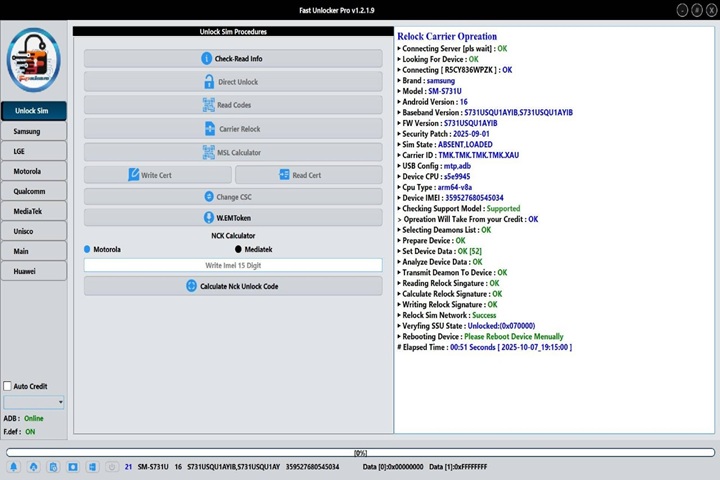
Key Features of Fast Unlocker Pro V1.2.3.4
✔ FRP Lock Removal
Dispose of Google Factory Reset Protection (FRP) for designated Android handsets really quickly and securely.
✔ Screen Lock Unlocking
Detach all screen locks, whether the user knows the password, pattern, or PIN or not, without going through a whole device re-flash, depending on the on-device functionality.
✔ ADB and Fastboot Operations
Provisions help in performing routine commands like reboot, reset, and the reading of device information through the stipulated ADB (Android Debug Bridge) and Fastboot protocols.
✔ Wide Brand Support
It is considered being general among the most popular Android manufacturers, including Samsung, Xiaomi, Oppo, Vivo, Realme, Techno, Infinix, and Motorola, among others.
✔ Automatic device detection
A mechanism for automatic detection of the device model, its Android version, and even the connection mode is present.
✔ Soft brick repair
Lessen the chances of getting errors and crashes of software with the help of this function.
✔ Fast Execution Speed
Advanced scripting results in much faster operations and reduced failures.
✔ Detailed operation Logs
It accompanies the typical appliance that enables you to follow what is happening in real-time, and you can check any associated problems as they come up.
How to Install Fast Unlocker Pro V1.2.3.4
Step 1:
Download the Tool
Step 2: Extract the Files
Extract the archived file (ZIP or RAR) with the help of WinRAR and 7-Zip.
Step 3: Install Required USB Drivers
ADB/Fastboot drivers
Samsung USB driver
Qualcomm USB driver
MTK USB VCOM driver
Step 4: Disable Antivirus
There are chances that antivirus software existing in your system may give you a disturbing reaction.
Step 5: Run the Tool
Browse to the folder containing the extracted file, and open “Fast Unlocker Pro.exe” by right-clicking on the file and executing it as the administrator.
Step 6: Connect the Device
Press ‘Connect’ and hook up the Android gadget to the PC keyboard with a powerful USB data cable. Proceed to ADB, Fastboot, or the mode you have to.
Step 7: Select the Desired Function
Highlight the service of interest, like FRP Remove, Screen Lock, Factory Reset, or Repair.
Step 8: Start the Process
Click the Start button to begin the procedure. Wait for the tool to reboot the phone and the process to finish, after which the phone will reboot automatically.
Download Link: HERE
Your File Password: 123
File Version & Size: | 103.31 MB || V1.2.3.4 |
File type: compressed / Zip & RAR (Use 7zip or WINRAR to unzip File)
Support OS: All Windows (32-64 bit)
Virus Status: 100% Safe Scanned By Avast Antivirus