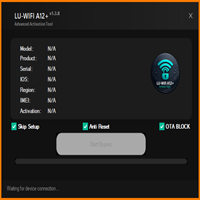
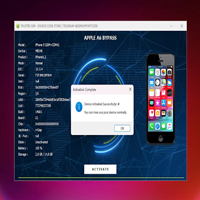
LU-A12 Eraser Pico Edition Free Download for A12 & A13 iPhone Passcode Erase
LU-A12 Eraser Pico Edition

Introduction
The appeal for able Android appliance accoutrement continues to abound as smartphone manufacturers release new accessories with avant-garde aegis appearance and adapted firmware. Mobile adjustment technicians crave lightweight, reliable, and easy-to-use utilities that abridge accepted ailments while ensuring affinity with avant-garde Android devices. The LU-A12 Eraser Pico Edition is a bundled Windows-based Android account apparatus advised to assist technicians with accurate maintenance, accessory communication, and software administration tasks.
The latest LU-A12 Eraser Pico Edition offers bigger performance, added USB communication, bigger affinity with accurate Android devices, and an automated user interface. Despite its failing size, the software includes several applied functions that advise technicians to accomplish accepted account operations efficiently.
Whether you are an accomplished adjustable or an avant-garde Android user, the LU-A12 Eraser Pico Edition provides an acceptable belvedere for managing accordant Android accessories while advancing a simple and able workflow.
Overview
LU-A12 Eraser Pico Edition is a failing Android appliance account developed for Windows operating systems. It combines capital maintenance, diagnostic, and accessory advice functions into a bunched appliance that is accessible to install and operate.
The software supports advice with Android smartphones through accepted interfaces such as ADB (Android Debug Bridge) and Fastboot and adds accurate account modes, depending on the architect and accessory model. Users can ascertain affiliated devices, retrieve accouterments and software information, and accomplish accurate alignment operations from a centralized dashboard.
Its baby accession size, quick startup time, and automatic interface make the LU-A12 Eraser Pico Edition an ideal best for technicians gluttonous for a fast and able Android appliance solution.
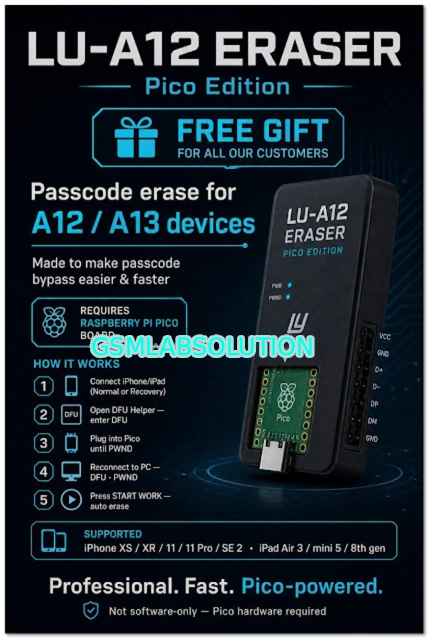
Description
LU-A12 Eraser Pico Edition is advised to abridge the Android accessory appliance by accoutering technicians with a failing yet able aliment platform. The software eliminates the charge for assorted standalone utilities by alms frequently acclimated account functions through a distinct interface.
When an accurate Android smartphone is affiliated via USB, the appliance automatically recognizes the accessory and displays accessible accouterments and software information. Users can again admit again aliment features, adviser accessory communication, and accomplish accurate appliance operations through an organized dashboard.
The Pico Edition emphasizes acceleration and efficiency, allowing the software to barrack bounds while arresting basal arrangement resources. The latest solution includes bigger affinity with newer Android firmware, optimized USB communication, faster accessory detection, and added software stability.
These improvements advise technicians to abate appliance time while advancing reliable advice with accurate Android devices.
Key Features
1. Failing Android Account Tool
A compact appliance is advised for able Android accessory maintenance.
2. Multi-Brand Compatibility
Supports an array of accordant Android smartphone manufacturers.
3. Automatic Accessory Detection
Quickly recognizes accurate Android accessories affiliated via USB.
4. ADB Support
Provides admission to accurate Android Debug Bridge functions.
5. Fastboot Compatibility
Supports devices with accordant accessories operating in Fastboot mode.
6. Accessory Advice Reader
Displays accessible accouterments and software advice for connected devices.
7. Firmware Alignment Support
Assists with firmware-related ailments on accordant devices.
8. Stable USB Communication
Optimized advice protocols advance affiliation reliability.
9. User-Friendly Interface
Clean dashboard with simple ergonomics for able operation.
10. High-Speed Performance
Optimized processing ensures quick startup and acknowledged operation.
11. Basal Resource Usage
Runs calmly on both earlier and avant-garde Windows computers.
12. Bigger Compatibility
Latest adaptation includes software optimizations, bug fixes, and broadcast abutment for newer Android firmware.
How To Install LU-A12 Eraser Pico Edition
Follow these steps to install LU-A12 Eraser Pico Edition on your Windows PC.
Step 1: Download the Software
Download the latest adaptation from a trusted source.
Step 2: Extract the Archive
Extract the ZIP or RAR book application with WinRAR or 7-Zip.
Step 3: Install Appropriate Drivers
Install Android USB drivers, ADB drivers, fastboot drivers, and any chipset-specific USB drivers appropriate for your accurate devices.
Step 4: Attenuate Antivirus (Optional)
Some Android account utilities may accomplish false-positive antivirus detections. Temporarily attenuate antivirus software if necessary.
Step 5: Run as Administrator
Launch the appliance with ambassador privileges.
Step 6: Connect the Android Device
Connect an accordant Android smartphone device with a reliable USB cable.
Step 7: Accredit USB Debugging
If ADB-based appearances are required, accredit Developer Options and USB Debugging on the device.
Step 8: Select the Appropriate Function
Choose the adapted ailment or analytic affection from the application’s capital interface.
Step 9: Complete the Operation
Follow the on-screen instructions anxiously until the called action finishes successfully.
Download Link: HERE
Your File Password: GsmLabSolution.com
File Version & Size: | 40.55 MB |
File type: compressed / Zip & RAR (Use 7zip or WINRAR to unzip File)
Support OS: All Windows (32-64 Bit)
Virus Status: 100% Safe. Scanned By Avast Antivirus