JiGuang BootLoader Unlock Tool Review 2026 Free Tool
JiGuang BootLoader Unlock Tool

Introduction
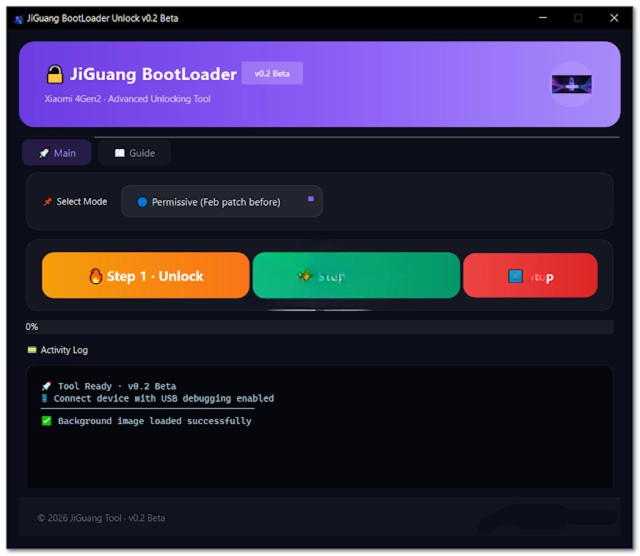
Unlocking the bootloader is one of the first steps for Android enthusiasts, developers, and mobile repair technicians who want to customize, repair, or modify Android devices. A bootloader unlock allows users to flash custom ROMs, install custom recoveries, root devices, and perform advanced software maintenance. JiGuang BootLoader Unlock Tool is a specialized Windows utility designed to simplify the bootloader unlocking process for supported Android smartphones.
Unlike traditional methods that require multiple commands and manual configuration, JiGuang BootLoader Unlock Tool provides a streamlined interface that helps users unlock compatible devices quickly and efficiently. Whether you’re preparing a device for firmware flashing, software repairs, or custom development, this tool offers a reliable solution while reducing the complexity of the unlocking process.
With its lightweight design, intuitive interface, and growing compatibility with various Android devices, JiGuang BootLoader Unlock Tool is becoming an excellent addition to every Android technician’s toolkit.
Overview
JiGuang BootLoader Unlock Tool is a Windows-based software utility developed to assist users in unlocking the bootloader of supported Android smartphones. The software integrates multiple unlocking functions into a single platform, making it easier for technicians and advanced users to perform bootloader-related operations.
The tool communicates with Android devices through Fastboot mode and other supported service modes, allowing users to unlock eligible devices with minimal effort. Once the bootloader is unlocked, users can install stock firmware, flash custom ROMs, root their devices, install custom recovery images, and perform various advanced software operations.
Designed for both beginners and professionals, JiGuang BootLoader Unlock Tool minimizes the need for command-line utilities by offering an organized graphical interface. This significantly reduces the learning curve while improving efficiency during repair and development tasks.
Description
JiGuang BootLoader Unlock Tool focuses on simplifying one of the most important processes in Android software modification—bootloader unlocking. Many Android manufacturers lock the bootloader to protect system integrity and prevent unauthorized modifications. However, technicians often need an unlocked bootloader to repair software issues, install firmware, recover devices, or perform advanced maintenance.
The software provides a secure environment for supported unlocking operations while guiding users through each step of the process. Its lightweight architecture ensures smooth performance on most Windows computers, making it suitable for repair shops, service centers, and individual users.
In addition to unlocking capabilities, the tool can assist with device detection, Fastboot communication, and bootloader status verification. These features help users confirm whether a device is ready for firmware flashing or custom software installation.
It is important to note that unlocking a bootloader may erase user data and, depending on the manufacturer, may affect warranty status. Users should always back up important data and follow the official unlocking requirements for their specific device.
Key Features
1. One-Click Bootloader Unlock
Simplifies the bootloader unlocking process through an easy-to-use graphical interface.
2. Fastboot Mode Support
Communicates with compatible Android devices using Fastboot for reliable unlocking operations.
3. Automatic Device Detection
Detects supported devices automatically after connecting them via USB.
4. Bootloader Status Check
Allows users to verify whether a device’s bootloader is locked or unlocked.
5. Wide Device Compatibility
Supports numerous Android smartphones from various manufacturers, depending on the device’s unlocking policy.
6. Lightweight Software
Consumes minimal system resources while delivering stable performance.
7. User-Friendly Interface
Designed for both beginners and experienced Android technicians.
8. Flashing Preparation
Prepares devices for firmware installation, rooting, custom recovery installation, and ROM development.
9. Stable USB Communication
Optimized communication reduces connection failures during unlocking procedures.
10. Regular Compatibility Updates
Future software updates may introduce additional device support and performance improvements.
How To Install JiGuang BootLoader Unlock Tool
Installing JiGuang BootLoader Unlock Tool is simple and only requires a few steps.
Step 1: Download the Tool
Download the latest version of JiGuang BootLoader Unlock Tool from a trusted source.
Step 2: Extract the Files
Extract the downloaded ZIP or RAR archive using WinRAR or 7-Zip.
Step 3: Install USB Drivers
Install the appropriate Android USB drivers along with ADB and Fastboot drivers for your device.
Step 4: Disable Antivirus (Optional)
Some flashing and unlocking tools may trigger false-positive antivirus warnings. Temporarily disable antivirus software if necessary.
Step 5: Run as Administrator
Open the extracted folder and launch the application with administrator privileges.
Step 6: Enable Developer Options
On your Android device, enable Developer Options, then activate OEM Unlocking and USB Debugging, if supported by the manufacturer.
Step 7: Boot into Fastboot Mode
Restart the smartphone into Fastboot mode and connect it to your computer using a high-quality USB cable.
Step 8: Unlock the Bootloader
Allow the software to detect the device, then follow the on-screen instructions to begin the unlocking process.
Step 9: Restart the Device
Once the procedure is complete, reboot the smartphone and continue with firmware flashing, rooting, or other supported operations if desired.
Download Link: HERE
Your File Password: Gsmlabsolution.com
File Version & Size: |
File type: compressed / Zip & RAR (Use 7zip or WINRAR to unzip File)
Support OS: All Windows (32-64 Bit)
Virus Status: 100% Safe Scanned By Avast Antivirus