Mobile Sea Service Tool V7.8.7 Latest Version
Mobile Sea Service Tool

Introduction
Mobile Sea Service Tool V7.8.7—Mobile-based software unlocking and repair is a professional service tool pair used by mobile technicians all over the world for flashing, repair, and smartphone unlocking.
Description
Mobile Sea Service Tool V7.8.7, a multi-utility Windows-based mobile repair system with integrated support for flashing, Google Account (FRP) removal, and unlocking, as well as proprietary repairs at the system level. The device is able to do servicing on most of the widely used smartphone brands, such as Samsung, Xiaomi, Oppo, Vivo, Realme, Motorola, Nokia, Tecno, Infinix, Huawei, etc.
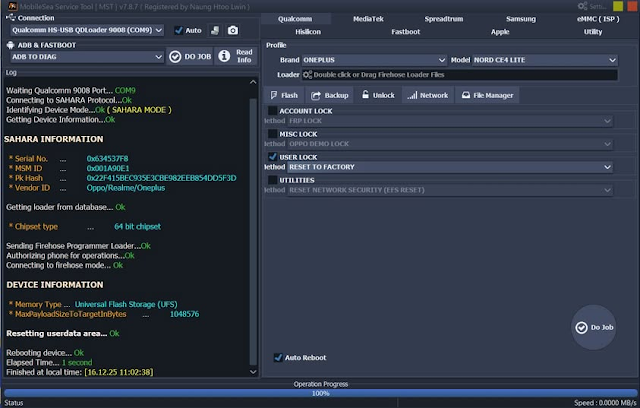
Current step-by-step logging enables users to monitor their moves, resulting in easier troubleshooting and problem-solving.
Reckon something went wrong with your smartphone, like a soft-bricking incident? Or are you facing a Google account lock? Using this tool professionally and consistently provides the perfect and always reliable results. GSM repair industry professionals feel comfortable relying on this.
Key Features of Mobile Sea Service Tool V7.8.7
Multi-Chipset Support
This software is engineered for Qualcomm, MTK, Exynos, SPD, and UniSoc mobiles.
FRP Bypass & Factory Reset
Peace of Mind. Erase Google account locks and reset to factory defaults. Works on some models as well.
Firmware Flashing
Fix turned-on loops, system crashes, and software bricking problems by flashing stock firmware.
Screen Lock Removal
Unlock your loved modern devices locked by catching PINs, patterns, and access passwords.
ADB, Fastboot & EDL Modes
This software enables the user to implement a set of sophisticated operations using various device interaction modes.
Partition Backup & Restore
Protect important partitions like EFS, NVRAM, and MODEM folders from corruption, and modify or delete them with ease.
Dead Boot & Soft Brick Repair
Un-brick your devices that show a logo or don’t boot up.
Auto Device Detection
Makes it easier to find the model and chipset/type in order to work with that.
Real-time Logs
These logs keep you in the loop with what’s happening with real-time logs. It means better monitoring of the progress of work and an error-free session.
Lightweight & Stable Interface
Considering its size, it is very light and works smoothly and without any excessive usage of the system resources in the most typical Windows system.
How to Install Mobile Sea Service Tool V7.8.7
Step 1—Download the Tool
Get the files on Mobile Sea Service Tool V7.8.7 from the website or support sources to GSM that are trusted.
Step 2—Extract the ZIP File
Systematically extract the downloaded ZIP archive by right-clicking the file and choosing “Extract Here” using either WinRAR or 7-Zip.
Step 3—Install Required Drivers
Install specific USB drivers as follows:
Qualcomm HS-USB deluder
MTK USB VCOM / Preloader
Samsung USB Driver
ADB & Fastboot Drivers
These drivers guarantee the device is visible.
Step 4—Run the Tool
Navigate to the folder where the software was extracted and click on MobileSeaServiceTool.exe as an administrator to open the application.
Step 5—Login/Activate
Either log in with the credentials or activate the software program if need be.
Step 6—Connect Your Device
In this step, attach to the device in the demanded mode—ADB, Fastboot, EDL, or Preloader.
Step 7—Choose Operation
Pick the choice of FRP removal from others like Flash Firmware, Unlocking, or Repair, which are basically the same for each different one too, but their names vary.
Step 8—Start Process
Click the Start button, and the process will kick in.
The process is completed, and your device is functioning proficiently with Mobile Sea Service Tool V7.8.7.
Download Link: HERE
Your File Password: 123
File Version & Size: | 121.88 MB || V7.8.7 |
File type: compressed / Zip & RAR (Use 7zip or WINRAR to unzip File)
Support OS: All Windows (32-64 bit)
Virus Status: 100% Safe Scanned By Avast Antivirus