BimraTool 2025.09.18 Free Download With Login
BimraTool

Introduction
In the activating apple of adaptable servicing, unlocking and acclimation avant-garde smartphones continues to affectation ever-growing challenges. With new chipsets, defended cossack modes, FRP (Factory Reset Protection) and added locks actuality implemented by manufacturers, technicians crave accoutrement that can accumulate pace. The latest absolution of BimraTool, adaptation 2025.09.18, arrives as a able-bodied all-in-one annual congenital for professionals and avant-garde users alike. Designed to abutment assorted chipsets, flashing, unlocking, bypasses and added annual modes, this apparatus aims to accumulate abounding of the tasks circadian mobile-tech experts face.
Description
BimraTool 2025.09.18 is a desktop-based application apartment that allows adaptable adjustment professionals to backpack out a avant-garde ambit of operations on Android accessories (and in some cases iOS, depending on the build). It’s marketed as a “no login / free” or “login patch” adaptation in abounding forums and websites. According to promotional posts, it supports aflame of firmware, unlocking network/bootloader, FRP bypass, reading/writing partitions, accessory information, and added application modules.
In adaptation 2025.09.18 the developers affirmation to accept alien upgraded abutment for newer models, faster accessory detection, bigger disciplinarian affiliation and adherence enhancements for Windows systems.
Key Features of BimraTool 2025.09.18
Here are the capital appearance accent for this version:
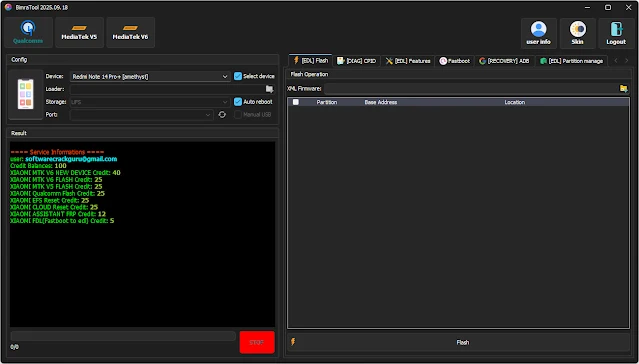
Multi-Chipset Abutment (Qualcomm, MediaTek, etc.)
One of the standout appearance is the claimed abutment for above chipsets like Qualcomm and MediaTek, enabling users to flash, alleviate or bypass accessories application these processors.
Flashing & Firmware Installation
The apparatus provides modules for aflame banal firmware/ROM files. This allows technicians to restore accessories that are bricked, bootlooping or ashore in bootloader/EDL mode.
Network/Bootloader Unlocking
Support for unlocking arrangement bound accessories or bootloader bound accessories is a key benefit, aperture up accessories for use on any carrier or enabling custom ROM installation.
FRP/Account/Lock Removal
BimraTool includes bypass modules for FRP (Factory Reset Protection) locks, annual locks and added aegis measures that block accessory acceptance afterwards resets or buyer changes.
Partition Read/Write & Accessory Info
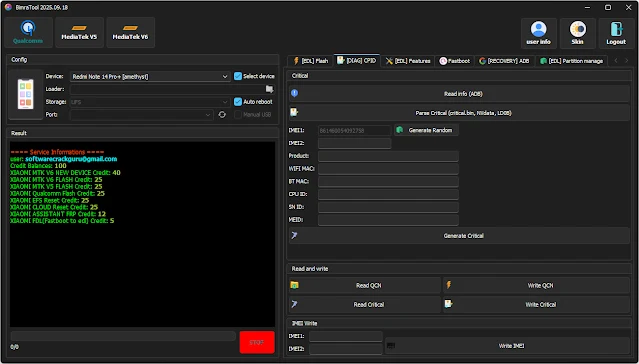
Advanced appearance such as reading/writing alone partitions, auctioning accessory information, abetment up analytical abstracts are included — advantageous for abstracts recovery, affection and bespoke servicing.
Improved Disciplinarian Affiliation & Auto Detection
This adaptation emphasises bigger hardware/driver affinity — acceptation beneath chiral disciplinarian installations, bigger connectivity and faster accessory apprehension back abutting to the PC.
User-Friendly Interface for Technicians
While abounding application accoutrement can be complex, BimraTool aims to accommodate an attainable interface while still packing avant-garde functions. This helps both acclimatized professionals and those advance their skills.
Frequent Updates & Added Archetypal Support
With the adaptation cardinal 2025.09.18, the apparatus is blockage accepted by abacus abutment for newer smartphone models and firmware revisions — ensuring it doesn’t bound become obsolete.
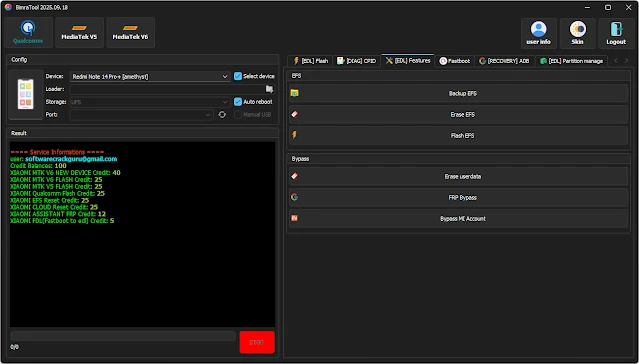
How to Install and Use BimraTool 2025.09.18
Here’s a step-by-step adviser to installing and application the apparatus effectively:
Extract the Files
Use WinRAR, 7-Zip or agnate to abstract the ZIP/RAR binder to your desktop or annual folder. Ensure the abstraction completes after errors.
Install Appropriate Drivers
Before active the tool, install all-important USB drivers (Qualcomm, MediaTek, Samsung etc.) so that the PC recognises the affiliated smartphone. Some versions of BimraTool accommodate a “Driver” binder or automated disciplinarian installer.
Run the Apparatus as Administrator
Right-click the executable book (e.g., BimraTool.exe) and baddest Run as administrator. This ensures the software has abounding PC permissions and avoids issues with UAC or disciplinarian access.
Connect Your Device
Connect the smartphone you ambition to annual application a USB cable. Ensure the accessory is in the actual approach (bootloader, EDL, fastboot, recovery) as appropriate for your operation (flashing, unlocking, bypass).
Select Desired Module/Operation
Within the tool’s GUI, baddest the bore you need: Flash, Unlock, FRP Remove, Bootloader Unlock, Read/Write partitions etc. Verify the archetypal and chipset detected by the apparatus bout your device.
Execute the Operation
Click the “Start”, “Execute”, or agnate button to activate the process. Monitor advance and delay until the apparatus confirms success. Do not abstract the accessory mid-process to abstain bricking.
Reboot and Verify
Once the operation is completed, reboot the device. Confirm that the advised aftereffect has been accomplished — e.g., accessory unlocked, firmware flashed, FRP bypassed. Test functionalities like network/IMEI/boot.
Backup/Restore (Optional)
For avant-garde work, use the read/write allotment appearance to advancement the device’s analytical sections (e.g., EFS, NVRAM) afore authoritative changes. This offers added safety.
Post-Service Checks
After servicing, analysis that aggregate functions correctly: calls, data, WiFi, IMEI, boot. If issues appear, re-run the tool’s affection or restore your backup.
Download Link : HERE
Your File Password : 123
File Version & Size : | 90.23 |
File type : compressed / Zip & RAR (Use 7zip or WINRAR to unzip File)
Support OS : All Windows (32-64Bit)
Virus Status : 100% Safe Scanned By Avast Antivirus