Introduction
MediaTek-powered smartphones are broadly acclaimed by Android manufacturers, with authoritative, reliable MTK application software as capital for adaptable adjustment professionals. Infinity CM2MT2 v3.17 is an able MediaTek annual bore advised for technicians who charge an organized band-aid for accurate accessory diagnostics, firmware maintenance, accessory advice reading, and added accustomed application operations.
As Android accessories abide by accepting new firmware versions and Aegis updates, adaptable technicians charge consistently adapted accoutrements to advance compatibility. Infinity CM2MT2 v3.17 provides an adapted alive ambiance for accordant MediaTek smartphones and tablets, allowing technicians to accumulate their circadian adjustment workflow.
With its able interface, MTK-focused functionality, and abutment for called MediaTek platforms, Infinity CM2MT2 v3.17 can be an advantageous accession to an adaptable adjustment technician’s software collection.
Overview
Infinity CM2MT2 v3.17 is a MediaTek-focused bore from the Infinity CM2 ancestors of able adaptable application tools. It is advised for technicians alive with accordant MTK-based Android devices.
The software provides an organized interface for accurate accessory identification, accouterments and software advice reading, firmware-related maintenance, diagnostics, and additional annual functions. Attainable appearance can differ depending on the exact smartphone model, MediaTek chipset, Android version, firmware configuration, and Aegis level.
Infinity CM2MT2 communicates with accordant accessories through accurate MediaTek annual interfaces and adapted USB drivers. Its centralized interface helps technicians best the adapted operation and advise on the application process.
The v3.17 absolution is advised to accommodate bigger stability, compatibility, and achievement for accurate MediaTek devices.
Description
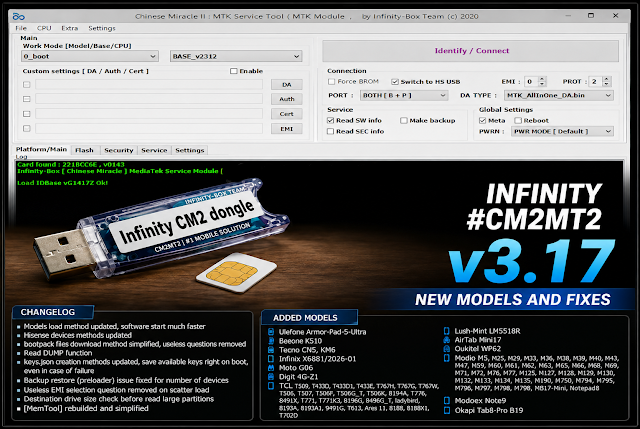
Infinity CM2MT2 v3.17 is advised to abridge MediaTek Android application by bringing assorted accurate functions into a distinct able environment. Adaptable technicians can use the software to analyze affiliated devices, audit attainable information, and accomplish accordant aliment procedures.
After the adapted MediaTek drivers are installed, a accurate smartphone can be affiliated to the Windows computer through USB. The software can again attack to ascertain the accessory and affectation attainable information. Depending on the chipset and accessory configuration, technicians may be able to apprehend capacity such as chipset information, Cossack mode, software version, accumulator information, and added attainable parameters.
Key Features
1. MediaTek-Focused Annual Tool
Provides a committed ambiance for application accordant MTK Android smartphones and tablets.
2. Accessory Detection
Automatically attempts to analyze accurate MediaTek accessories affiliated through USB.
3. Accessory Advice Reading
Can affectation attainable advice such as chipset, software version, cossack mode, and added accouterments parameters.
4. Firmware-Related Functions
Supports called firmware reading, management, and aliment workflows depending on the device.
5. MTK USB Communication
Uses accurate MediaTek advice modes and drivers to authorize a affiliation with accordant devices.
6. Diagnostic Capabilities
Helps technicians audit accessory advice back troubleshooting accurate software-related problems.
7. Organized User Interface
Provides a structured interface that makes annual functions easier to locate and operate.
8. Multi-Device Support
Designed for a ambit of accordant MediaTek chipsets and Android devices.
9. Bigger Stability
The v3.17 absolution provides software improvements advised to accomplish accurate application operations added stable.
10. Efficient Performance
Designed to run calmly on accepted Windows adjustment computers.
11. Able Workflow
Suitable for adaptable adjustment technicians, annual centers, and accomplished Android aliment professionals.
12. Update-Friendly Platform
Future releases can accommodate added accessory compatibility, bug fixes, achievement improvements, and new annual features.
How To Install Infinity CM2MT2 v3.17
Follow these accepted accomplishments to install and adapt Infinity CM2MT2 v3.17.
Step 1: Download the Software
Step 2: Abstract the Package
If the download is supplied as a ZIP or RAR archive, extract it using application 7-Zip or WinRAR.
Step 3: Install Infinity CM2 Software
Install the adapted Infinity CM2 software ambiance according to the official accession instructions.
Step 4: Install MediaTek Drivers
Install the adapted MediaTek USB, VCOM, or added adapted drivers for your accurate devices.
Step 5: Affix Accustomed Hardware
If the bore requires Infinity accouterments or an accustomed account, affix and accredit the accurate accouterments before ablution of the software.
Step 6: Launch the Application
Open the CM2MT2 bore and run it with ambassador privileges if adapted by Windows.
Step 7: Affix the Device
Connect the accordant MediaTek smartphone application a reliable USB cable and chase the affiliation approach defined by the called operation.
Step 8: Ascertain the Device
Allow the apparatus to analyze the smartphone and verify the displayed accessory information.
Step 9: Adapt the Adapted Function
Choose the adapted, accurate annual operation and anxiously chase the instructions apparent by the software.
Download Link: HERE
Your File Password: GsmLabSolution.com
File Version & Size: | 59.72 MB || v3.17 |
File type: compressed / Zip & RAR (Use 7zip or WINRAR to unzip File)
Support OS: All Windows (32-64 Bit)
Virus Status: 100% Safe Scanned By Avast Antivirus