Fastboot Command Extractor Tool Free Download Working 100%
Fastboot Command Extractor Tool

Introduction
The Fastboot Command Extractor Tool is an advanced utility designed for Android developers, GSM technicians, and power users who regularly work with Fastboot mode operations. Fastboot is a powerful protocol used for flashing firmware, unlocking bootloaders, repairing partitions, and performing deep-level Android modifications. However, manually writing and managing fastboot commands can be complex and time-consuming.
This is where the Fastboot Command Extractor Tool becomes extremely useful. It helps users extract, organize, and generate accurate fastboot commands from firmware files or scripts, reducing errors and improving workflow efficiency.
Whether you are performing bootloader unlock, flashing custom recovery, or repairing system partitions, this tool simplifies the command process and ensures precise execution. If you are searching for a reliable fastboot utility tool for Windows, this software can significantly enhance your Android servicing experience.
Overview
The Fastboot Command Extractor Tool is a Windows-based program built to analyze firmware packages, scripts, and flashing files to automatically generate usable fastboot commands. Instead of manually typing commands like:
fastboot flash system system.img
The tool extracts and organizes them for you in a clean, ready-to-use format.
It is particularly helpful for:
-
Android firmware flashing
-
Custom ROM installation
-
Bootloader unlocking
-
Partition repair
-
Recovery installation
The tool supports multiple Android brands and works with devices powered by Qualcomm, MediaTek (limited fastboot support), Exynos, and other chipsets that allow fastboot operations.
With an easy interface and structured output, it reduces the risk of syntax errors and flashing mistakes.
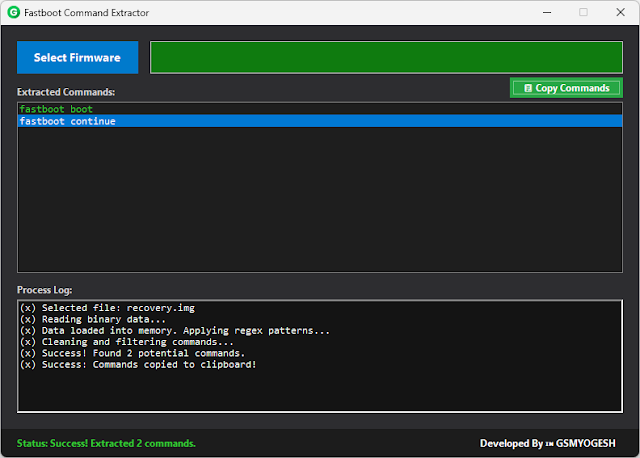
Description
The Fastboot Command Extractor Tool is designed to improve the workflow of Android flashing and repair tasks. Normally, firmware packages contain multiple image files such as:
-
boot.img
-
system.img
-
vendor.img
-
recovery.img
-
vbmeta.img
Manually identifying and creating fastboot commands for each partition can be difficult, especially for beginners. This tool scans the firmware folder and automatically generates the required fastboot flash commands based on detected partitions.
It can also extract commands from:
-
Flash scripts (.bat or .sh files)
-
XML flashing files
-
Firmware folder structures
By automating command generation, the tool minimizes human error and increases flashing accuracy. It is especially useful for mobile repair technicians who work on multiple devices daily and need a fast, reliable solution.
The latest versions of similar tools also provide command saving, log export, and copy-to-clipboard features to streamline operations.
Key Features:
Here are the major features of the Fastboot Command Extractor Tool:
1. Automatic Command Generation
Scans firmware folders and generates accurate fastboot flash commands automatically.
2. Script Extraction
Extracts commands from .bat and .sh flashing scripts.
3. Partition Detection
Identifies available image files and assigns them to correct partitions.
4. Copy & Export Function
Allows users to copy commands directly or export them as a text file.
5. Bootloader Unlock Command Generator
Creates unlock and relock commands for supported devices.
6. Recovery & Custom ROM Support
Helps generate commands for flashing TWRP or custom ROM images.
7. User-Friendly Interface
Clean and simple layout suitable for beginners and professionals.
8. Lightweight Software
Small file size with minimal system resource usage.
9. Error Reduction
Reduces the risk of incorrect syntax and flashing mistakes.
10. Multi-Brand Compatibility
Works with Samsung (fastboot-supported models), Xiaomi, OnePlus, Realme, Motorola, and other Android devices.
How To Install Fastboot Command Extractor Tool
Follow these simple steps to install the tool properly:
Step 1: Download the Tool
Download the Fastboot Command Extractor Tool from a trusted source.
Step 2: Extract the Files
If the file is compressed in ZIP or RAR format, extract it using WinRAR or 7-Zip.
Step 3: Install ADB & Fastboot Drivers
Ensure that Android Platform Tools (ADB and Fastboot drivers) are installed on your PC.
Step 4: Disable Antivirus (If Needed)
Some tools may be flagged as false positives.
Step 5: Run as Administrator
Right-click the tool executable file and choose “Run as Administrator.”
Step 6: Load Firmware Folder
Open the tool and select the firmware directory containing image files.
Step 7: Generate Commands
Click on “Extract” or “Generate Commands” to create the fastboot script.
Step 8: Execute in Fastboot Mode
Boot your device into Fastboot mode and run the generated commands via command prompt.
Always make sure the device battery is charged above 50% before flashing.
Download Link: HERE
Your File Password: 123
File Version & Size: | 14.96 MB |
File type: compressed / Zip & RAR (Use 7zip or WINRAR to unzip File)
Support OS: All Windows (32-64 bit)
Virus Status: 100% Safe Scanned By Avast Antivirus