Introduction
KS Tool 4.4 is a professional Android servicing and unlocking utility designed to help mobile technicians perform advanced repair tasks quickly and efficiently. In today’s competitive mobile repair industry, technicians require powerful and reliable tools that can handle flashing, unlocking, FRP removal, and system repairs without complications. KS Tool 4.4 provides a stable and user-friendly platform to complete these operations with improved speed and accuracy.
With constant updates in Android security systems and new device releases, servicing tools must evolve to maintain compatibility. KS Tool 4.4 is developed to support a wide range of Android devices and chipsets, making it a valuable addition to any professional repair toolkit. Whether you are managing a mobile repair shop or working as an independent technician, this tool can simplify complex Android troubleshooting tasks.
Overview
KS Tool 4.4 is a Windows-based mobile repair software built specifically for Android device maintenance and unlocking. It allows users to perform essential servicing operations such as firmware flashing, FRP bypass, screen lock removal, and system resets. The software communicates with devices through USB and supports multiple modes, including ADB, Fastboot, and Download Mode.
This version, KS Tool 4.4, focuses on enhanced stability, improved compatibility, and faster processing speeds. It is suitable for both beginners and experienced technicians due to its clean and organized interface. Instead of using multiple separate tools, technicians can manage most Android repair tasks in one centralized application.
The tool is commonly used in professional repair environments where time efficiency and reliability are crucial.
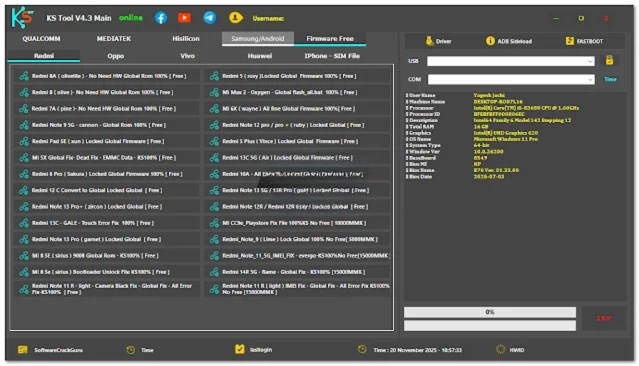
Description
KS Tool 4.4 is designed to solve a variety of Android software-related issues. From devices stuck on the boot logo to smartphones locked by FRP protection, this tool provides structured solutions within a simplified interface. The software supports flashing official firmware files to restore devices to factory condition, which helps resolve system crashes and performance problems.
One of the major advantages of KS Tool 4.4 is its broad device compatibility. It works with multiple Android brands such as Samsung, Xiaomi, Oppo, Vivo, Realme, and more. The tool ensures secure communication between the PC and smartphone when proper USB drivers are installed.
Additionally, KS Tool 4.4 includes optimized repair algorithms that improve the success rate of unlocking and flashing operations. The latest update includes bug fixes and performance enhancements, making it more reliable than earlier versions.
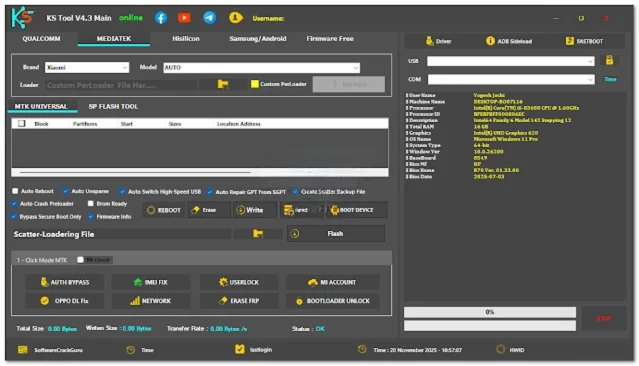
Key Features of KS Tool 4.4
Here are the main features that make KS Tool 4.4 a powerful Android servicing tool:
1. Firmware Flashing
Install or reinstall stock firmware to repair corrupted software and restore system stability.
2. FRP Lock Removal
Bypass Google Factory Reset Protection on supported Android devices.
3. Screen Lock Unlock
Remove PIN, pattern, and password locks in authorized service situations.
4. Bootloop Repair
Fix devices stuck on the startup logo or facing boot issues.
5. Factory Reset & Data Wipe
Reset devices to default settings to resolve performance and software errors.
6. ADB & Fastboot Support
Perform advanced repair functions using debugging and fastboot modes.
7. Multi-Brand Compatibility
Supports a wide range of Android smartphones and chipsets.
8. Improved Stability
Enhanced performance with reduced error rates during operations.
9. User-Friendly Interface
Simple dashboard layout designed for easy navigation.
How To Install KS Tool 4.4
Follow these steps to install and use KS Tool 4.4 properly:
-
Download the Tool
Download the KS Tool 4.4 setup package from a trusted source. -
Extract the Files
If the file is compressed, extract it using WinRAR or 7-Zip. -
Disable Antivirus Temporarily (Optional)
Some security software may block servicing tools during installation. -
Install Required USB Drivers
Ensure Android USB drivers are installed on your computer. -
Run the installer as administrator.
Right-click the setup file and select Run as Administrator. -
Complete Installation Process
Follow the on-screen instructions to finish installing. -
Restart Your PC (Recommended)
Restarting ensures proper driver integration. -
Launch KS Tool 4.4
Open the tool from the desktop shortcut. -
Connect Your Device
Put your smartphone into the required mode (ADB/Fastboot/Download) and start servicing.
Download Link: HERE
Your File Password: 123
File Version & Size: |
File type: compressed / Zip & RAR (Use 7zip or WINRAR to unzip File)
Support OS: All Windows (32-64 bit)
Virus Status: 100% Safe Scanned By Avast Antivirus