Introduction
Unlock Tool v2025.12.06.0 is the latest, upgraded, and most efficient version of the one-click mobile unlocking tool, which has been developed to meet the most common issues within the GSM industry. Through innovative customization work, users have the opportunity to access the widget anytime quickly and stably. The main supportive feature is its compatibility with numerous devices.
The brand-new release of this latest version, v2025.12.06.0, is coming on October 22nd, 2024. These are Xiaomi, Samsung, Vivo, Oppo, Realme, Tecno, and Infinix, with additional resolving of issues for keeping the tools up-to-date.
Description
Unlock Tool v2025.12.06.0 is designed to facilitate a swift and smooth phone repair.
The improvement in this latest version is part of the processor utilization; it makes use of drivers at very high speeds and on different modes of connection, which include ADB, Fastboot, EDL, Meta Mode, and Download Mode.
The tool is now updated to support the latest versions (13, 14, and the forthcoming Android 15 beta versions) of Android devices.
By means of cloud-based updates permanently announced online, Unlock Tool can be said to be one of the industry’s most updated servicing platforms.

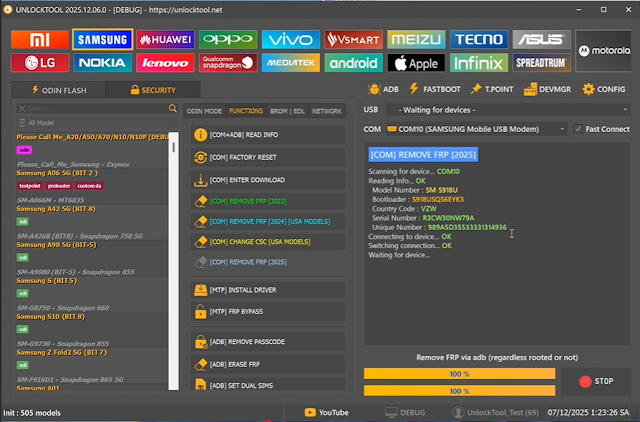
Key Features of Unlock Tool V2025.12.06.0
1. FRP Bypass (One-Click)
Supports Samsung, Xiaomi, Vivo, Oppo, Realme, Tecno, Infinix, and Motorola.
Refreshed security fixes for the latest Android updates.
MTP, ADB, Fastboot, and Download-mode-based FRP unlocking implemented.
2. Installation of Flashing for All Chipsets
Full firmware flashing across the MTK, Qualcomm, SPD, and Fastboot devices.
Support: scatter firmware, OFP, OZIP, dz, Man, XML, and IMG files.
Optimum firmware flashing performance for 2025 devices.
3. Screen Locker Break (pattern vs. pin, password, fingerprint, face)
Use on MTK and Qualcomm devices without data loss on models.
New universal lock bypass script for CPU and SoC (older/newer) structures/technologies.
4. Vote Repair/Optimus Un-bricked
Qualcomm EDL 9008 and MTK Brom modes are compatible with it.
Prevent boot loops, getting stuck in recovery, and system errors to recover.
Fixes code from logo-brick and hard-brick
5. IMEI and Network Restore
Repair devices with invalid IMEI, baseband, or network issues.
Of the two, the option for NV and QCN backup/restore will be created.
Updated patch certificates to be in much improved condition.
6. Serving Special Xiaomi—The Best Quality
Mi Account Unlock (Some models)
Backward compatibility solution
Fastboot tool
Auth bypass (UFI-like method) for new chipsets of the Xiaomi models
7. Samsung Cast of Heroes
FRP Removing (The recent patch)
Flashing Odin-like protocol
CSC change and carrier fix
8. ADB/Fastboot Toolkit
Reboot through the bootloader, EDL, recovery, side load, or to system
Removing FRP through fast protocol ADB transforming ADB debugging mode on the device will do the trick.
9. Backup & Restore
Back-taking system
NV, QCN, and IMEI backup can be done
Recovers partition safely
10. Clean, Contel
Accommodating new settings to streamline the modern look
Accelerating browser opening
Making it easy for those who are new to the website to find what they’re looking for
Keeping users connected with the cloud system to let them be in touch with the gossips of the city
How to Install Unlock Tool V2025.12.06.0
Step 1: Download Unlock Tool
Step 2: Install Required Drivers
Let the nitty-gritty of driver software installation bog you down. A good driver interface for these devices includes
MediaTek (MTK) USB Drivers
Qualcomm deluder 9008 Drivers
SPD Drivers
ADB & Fastboot Universal Drivers
To finish the task, reboot your computer.
Step 3: Disable Antivirus Temporarily
The file is a CEP use file that has antivirus software that can give a warning about it.
Step 4: Carrying out an Installation
Open the extracted folder and launch the file below:
UnlockTool_2025.12.06.0_Setup.exe
Choose the installation folders or other.
Step 5: Log in to Unlock Tool
After software installation, you run the new tool.
For logging in, use “Key” or “Password.”
Step 6: Connect Your Device
MTK into your device via Brom/Meta Mode.
Break the Qualcomm-EDL Mode 9008 boot and change
Xiaomi into Fastboot/EDL Mode.
SPD—Turn on the device to boot the download mode.
Once identified, click on your desired phone and proceed with your designated task.
Download Link: HERE
Your File Password: 123
File Version & Size: | 495.78 MB || V2025.12.06.0 |
File type: compressed / Zip & RAR (Use 7zip or WINRAR to unzip File)
Support OS: All Windows (32-64 bit)
Virus Status: 100% Safe Scanned By Avast Antivirus