Android Multi Tool v1.3.3.8 Latest Version Free Download
Android Multi Tool

Introduction
Android Multi Tool v1.3.3.8 is definitely one of the programs that you can trust and rely on, not only for mobile technicians and GSM experts but also for Android users. It comprises one of the simplest solutions suitable for patterns, FRP, device debugging, and locking problems. This present version has got a new style of interface as well as the device compatibility. If you need an effective, very small, and lightweight tool for all issues related to Android security, like unlocking passwords and FRP and performing other tasks quickly, the Android Multi Tool v1.3.3.8 is what you are looking for.
Description
Android Multi Tool v1.3.3.8 is intended for the target group who refuse to install large or complicated system requirements while conducting simple Android maintenance tasks. It handles deleting data, eliminating the device lock, and looking through the device details, as well as the ADB and Fastboot operations.
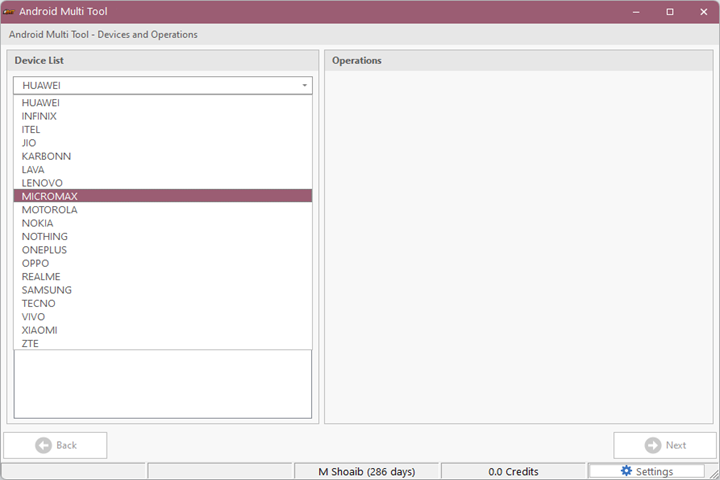
Having been massively regarded as a “go-to” tool for repair technicians, it operates on almost all Android brands, and it entails Xiaomi, Samsung, Oppo, Vivo, Realme, OnePlus, and others that support ADB/Fastboot operations. Given the repairman’s knowledge, either the device is locked with an unknown screen lock pattern, which needs FRP checks, or it is stuck in boot mode; this tool reveals to you the easiest, safest, and quickest way out for recovery.
The focus of the update is on the enhancement of performance, device connectivity, and stability. Consequently, an ADB job gets the V1.3.3.8 software for Android Multi Tool. Therefore, this is a fantastic choice for the repairmen, who want an easy and rapid job accomplished without complex commands.
Key Features of Android Multi Tool v1.3.3.8
1. Pattern Lock Removal
The program enables users to get rid of pattern, PIN, and password screens from selected Google-owned Android phones through ADB. It is useful, especially in situations when clients forget their password to unlock the screen.
2. FRP-Related Functions
Android Multi Tool v1.3.3.8 makes available different utilities to facilitate coping with FRP locks of various devices.
3. Device Information Reader
Being able to scan the information of the mobile device, including such basic points as, for instance, brand, model, general IMEI, and version of the Android operating system, as well as the boot status, stands as one of the clear advantages.
4. ADB Operations
Among the operations, this software lets you, besides other things, reboot, remove user locks, get rid of data, and clean cache. Users of it can remove these so-called minor software issues as well as the situation of stuck devices.
5. Fastboot Support
In the menu, there is included Fast Boot mode that aims to boot, unlock, flash, shutdown, and restart devices that do not start in the system or recovery.
6. Easy and Lightweight Interface
Takes very little space on the hard drive. There is nothing hard about its setting up. There is a friendly user interface even at the beginner level.
7. Wide Device Compatibility
It does work with almost all Android versions and phone brands all over the world, which makes it a universally valuable tool for the repair tasks.
How to Install Android Multi Tool v1.3.3.8
Step 1
Download the Tool
Step 2—Extract the ZIP File
After the download is finished, right-click on the ZIP file and then choose “extract” from the context menu either on the desktop or in a preferred folder. Subsequently, the executable file of the tool is placed in its directory.
Step 3—Install ADB Drivers (If Not Installed)
It would be helpful to the overall performance of the apparatus power if there is an installation of the universal ADB drivers system. Launch this essential process before running the software.
Step 4—Run the Tool as Administrator
In the directory, initiate the software so the Administrator option is activated, which allows proper rights and privileges.
Step 5—Connect the Android Device
To get the best interaction, enable the USB debugging mode on the phone before you connect it to the desktop using a USB cable. The application should identify the device fine as long as you have established communication between your PC and the ADB/Fastboot environment.
Step 6—Start Using the Features
Decide on the feature you need for any of the tasks in the unlock of the lock, device read-in, or line of commands, and then adhere to the guidelines on the screen. The meaningful thing is that it will run actions and commands autonomously.
Download Link: HERE
Your File Password: 123
File Version & Size: | 47.19 MB | | v1.3.3.8 |
File type: compressed / Zip & RAR (Use 7zip or WINRAR to unzip File)
Support OS: All Windows (32-64 bit)
Virus Status: 100% Safe Scanned By Avast Antivirus