Turbo Service Mobile V2.3.9 Latest Update
Turbo Service Mobile

Introduction
The Turbo Service Mobile V2.3.9 console version, the updated version, is now available for technicians, service centers (GSM), and other repair professionals who are in search of an all-in-one appliance for their phone repairing activities. This revision has succeeded in boosting the data swiftness as well as revamping the user interface for a cleaner look that captures Android smartphone specs well. Whether you restore phones daily or just require a trusty app for diagnostics as well as flashing or unlocking occasionally, the compact and powerful tool Turbo Service Mobile V2.3.9 brings along those smooth and consistent processes that will work on almost all modern phones.
Description
Built on the Windows platform, Turbo Service Mobile works on your smartphone with nods to basic routines like FRP removal, device improvement, advanced diagnostics, firmware flashing, and handling of system software issues. As a result, mobile repair tools target to simplify the complicated process of mobile servicing in a way that it can be done by moderately trained technicians.
This version improves the key performance indicators, the stability of protocol handling, and the algorithm efficiency that consequently speeds the upgrading of the PC-device connection. The emerging issues faced by customers have been yelled by our customers, to which Turbo Service Mobile V2.3.9 fails to recognize such incidents.
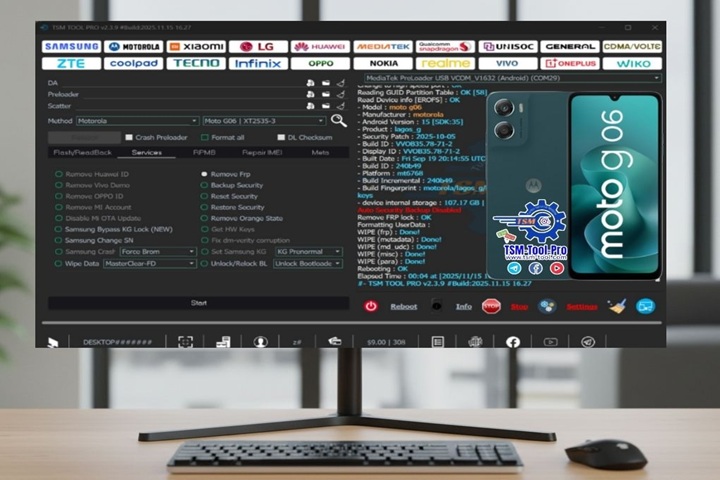
Key Features of Turbo Service Mobile V2.3.9
Below, the main advantages aren’t long in coming:
1. Enhanced FRP Bypass
With our tool, you can quickly bypass the FRP lock using different methods for various Android devices, giving the technician the freedom to unlock devices without trouble.
2. Advanced Flashing and Firmware Handling
It’s all about firmware flashing, system repairs, and backing up crucial information to the recovery area, and therefore it could be the answer to your phone boot loop or software problems.
3. Deep Device Diagnostics
By evaluating both the software and hardware elements, it carries out multiple tests, which involve battery life, CPU workload, sensor function, storage space, and other things.
4. One-Click Optimization
Using the tool, users can simply click around to clean the cache, go that extra mile to exterminate junk files, go for the reset option, and even more results can be seen in the performance of the system in the long run.
5. Device Unlock and Security Reset Choice
It is possible to bypass reset patterns, remove codes, and remove other codes that are used in repairing system security without vast programming skills through the help of the Turbumba.com website.
6. Smooth and Modern Interface
The novel UI format of the tool is more intuitive, so the time would be more efficient, and you would not have to pay a lot of attention to the details.
7. Wide Device Compatibility
Supports a multitude of branded Android handsets, which allows users to pick and swap out the devices as and when required with ease.
8. Improved Stability and Speed
These are changes, such as the optimization of core scripts, as well as new drivers that yield an increase in performance even while processing work info or performing restores.
How to Install Turbo Service Mobile V2.3.9
So you can apply the following steps to facilitate this process:
Step 1:
Below, I’ve also included the user-friendly tool for unzipping; keep it in handy mode.
Step 2:
Go to the opening of the folder after unzipping it, and then look out for the installation file.
Step 3:
It is important to note here that to run the setup properly, you must be an administrator.
Step 4:
Do so by consulting the provided text, and applying the principles to the installation process should be sufficient.
Step 5:
To begin working on the tool, connect your Android smartphone using a durable USB cable.
Step 6:
Let the driver automatically be installed if asked; hence, you are ready to perform necessary service tasks supported with the current system.
Download Link: HERE
Your File Password: 123
File Version & Size: | 190.17 MB | V2.3.9 |
File type: compressed / Zip & RAR (Use 7zip or WINRAR to unzip File)
Support OS: All Windows (32-64 bit)
Virus Status: 100% Safe Scanned By Avast Antivirus