Pulsarunlock Tool Free Download & Review 2026
Pulsarunlock Tool

Introduction
To address the stated challenges in an efficient manner, one needs a specialized servicing tool with unlocking, IQ, flashing, and maintenance abilities. This solution is the Pulsar Unlock Tool.
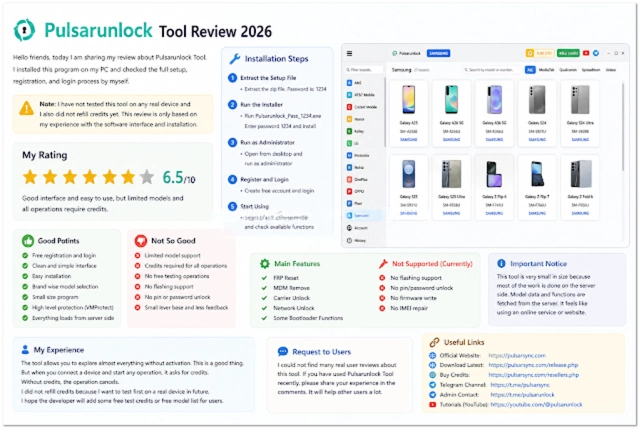
Pulsarunlock Tool is a professional Windows application targeted at smartphone servicing, including unlocking, firmware management, smartphones’ repair, and maintenance operations. This app provides multiple repair utilities for fixing Androids at a fast pace and with accuracy. These changes have hugely reduced the repair time and increased efficiency.
Overview
Pulsarunlock Tool is the perfect utility for professionals as it simplifies Android repair and unlocking, offering a broad choice of functions and tools. The platform consolidates separate onsite repair functions into a simplified and unified system for smooth and effective mobile servicing.
The tool gets connected to Android smartphones through Android Debug Bridge (ADB), fastboot, and chipset protocols. These technologies allow the software to maintain stable communication with (omit)compatible handling from third-party applications.
A considerable asset of the Pulsarunlock Tool is a feature representing multi-brand compatibility.
We didn’t just come up with an interface; we designed an ultimate, easy-to-navigate, user-friendly one. Tools are structured down into categories so that they can be quickly obtained. They are brought closer for ease of reference.
Pulsarunlock Tool is the right tool for both experts and amateurs in GSM professions, delivering the most reliable Android repair software.
Description
Pulsarunlock Tool was designed to solve software-related issues in Android gadgets and make repair service provision an efficient process. The issues that usually occur in Android smartphones are FRP locks, firmware corruption, boot loops, forgetting (omit)passwords, or software update failures.
These hitches can hinder customers from using their devices or result in such devices running in a crippled way. Pulsarunlock Tool is one of the advanced hired-hand utilities that will help technicians re-establish affected and infected phones.
Flashing firmware serves the purpose of repairing (omit)corrupted software, distributing (omit)files in the system, and troubleshooting bugs in the software.
Key Features
Device Unlocking
Get rid of supported turning on function locks, for example, passwords, patterns, and PIN locks.
FRP Removal
The Factory Reset Protection skipping feature works in advance with suitable Android mobiles.
Firmware Flashing
This feature allows downloading and setting or installing or reinstating firmware of the current devices.
Multi-Brand Support
The function was designed to work with the the majority of Android smartphones that are produced by several manufacturers.
ADB and Fastboot Support
ADB and Fastboot, which are the technical ways to communicate with smartphones and tablets at the development stage, are two types of data transfer.
Device Information Reader
Where the cell counts to almost 2000 per square millimeter, to get details of the smartphone, this tool is used.
Maintenance Utilities
The system is also incredibly easy to operate as it consolidates troubleshooting tools and repair functions.
Fast Processing Engine
Mobilizes the software in that the operations are most stable and are completed with the least amount of effort.
User-Friendly Interface
A clutter-free, efficient, and non-fiddly approach for users at different skill levels.
How to Install Pulsarunlock Tool
Step 1
Make sure you download the Pulsarunlock Tool software from genuine sources providing repair solutions like GSM.
Step 2
Decompress ZIP or RAR files you acquired using Windar or 7-Zip.
Step 3
Here, in the unzipped folder, you will find the executable file for installation.
Step 4
If there is a USB driver and sometimes an ADB driver required, do not forget that and install it for(omit) peaceful device communication.
Step 5
Launch the installer and simply follow the directions displayed on the screen .
Step 6
You can power on the software with administrative privileges.
Step 7
Settings will appear once again after USB Debugging is enabled in the Developer settings on an Android device.
Step 8
Fix phone issues by plugging the smartphone via a USB into the computer port.
The device will start to operate in service mode.
Download Link: HERE
Your File Password: Gsmlabsolution.com
File Version & Size: | 30.24 MB |
File type: compressed / Zip & RAR (Use 7zip or WINRAR to unzip File)
Support OS: All Windows (32-64Bit)
Virus Status: 100% Safe Scanned By Avast Antivirus