DEROID Unbricker Tool Pro v1.0 Latest Version Free Download
DEROID Unbricker Tool Pro v1.0

Introduction
Smartphone units may remain fixed to the boot logo, continue reboots, not reboot at all, or become completely unresponsive after firmware corruption or erroneous flashing.
Designing software that can support different brands and chipsets found on Android has made our product an irreplaceable tool for repair shops and technicians who are working as repair experts. SSMR runs swiftly, is completely user-friendly, and makes the recovery of complex smartphone data simple.
Overview
DEROID Unbricker Tool Pro v1.0 is a sophisticated Android repair gadget that is custom-made to fix and restore bricked Android phones and tablets that cannot boot. Through the tool, we combine many repair and maintenance abilities into a sole offering to let technicians perform labor operations conveniently.
The multi-brand compatibility aspect happens to be a strength of the DEROID Unbricker Tool Pro that enables it to offer the service to different brands.
The repair engine provides device detection, flashing stability, and communication speed improvements.
Description
One of the most essential functions of software experts is brick repair, which aims to help Android devices stuck at the boot logo or encountered in a boot loop to boot properly again.
A vital advantage is the device unlock feature. This allows technical workers to clear out supported passes like PIN, password, and pattern, especially during repair procedures.
This may be helpful in performing some recovery operations.
The optimized communication engine guarantees a solid connection between DEROID communication software and connected Android phones. This reduces the errors of flashing and increases the repair success rate.
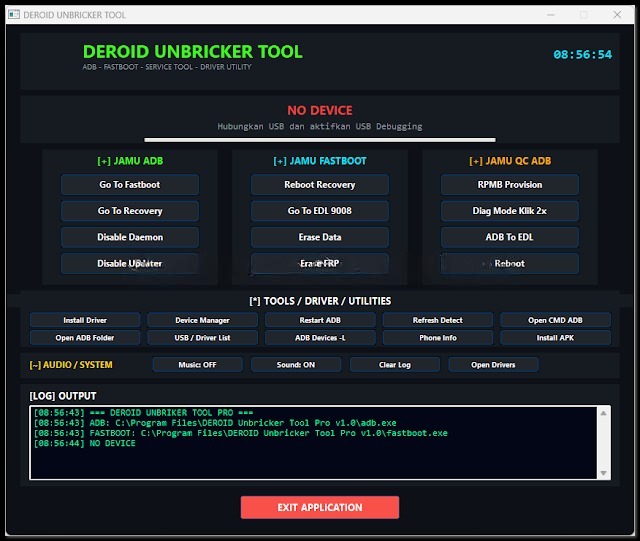
Key Features
Android brick Repair
You are most likely to get stuck with soft-bricked Android smartphones and tablets.
Firmware Flashing
Reinstall or install stock firmware as targeted.
Device Unlocking
Wizard that could remove the locked screens, PINs, and passwords.
FRP Removal
Saves you from patience-draining factory reset protection on selected devices.
Multi-Brand Support
Multi-vendor Android online and offline repair procedures are made easy with it.
ADB and fastboot support
It provides support for stable communication using the ADB and fastboot protocols.
Device Information Reader
Choosing the ‘display device’ function, you can learn all there is to know about the Android device and system info with one click.
<strong>Fast Processing Engine
Engine designed with fast and stable operation in mind.
User-Friendly Interface
It incorporates a user-friendly appearance that is easy to understand for both expert and novice technicians.
How to Install DEROID Unbricker Tool Pro v1.0
Step 1:
Obtain the DEROID Unbricker Tool Pro v1.0 management kit file from an accredited Android repair software website.
Step 2:
Build the application archive with directly embedded 7-Zip or WinRAR decompression utilities.
Step 3:
Go to the folder that has just been unzipped to find the installation file that configures the software on the
Step 4:
To establish communication between the device and the computer, make sure to install the requi
red USB and ADB drivers.
Step 5:
While a dialog box with the button “Next” will probably pop up, one should click “Next.”
Step 6:
By holding the Control, Shift, or Command key and clicking, you can select the ‘Run as administrator’ option.
Step 7:
Connect your handset to your computer using a USB cable.
Step 8:
What follows is the beginning of the process of using it to fix the brick and flash and do computer repairs.
DEROID Unbricker Tool Pro v1.0 for Android shall be ready for repairing activities on a routine basis after installation.
Download Link: HERE
Your File Password: Gsmlabsolution.com
File Version & Size: | 26.35 MB || V1.0 |
File type: compressed / Zip & RAR (Use 7-Zip or WINRAR to unzip the file)
Support OS: All Windows (32-64 Bit)
Virus Status: 100% Safe. Scanned By Avast Antivirus