Phoenix Service Tool V8.8.9 Latest Update Free
Phoenix Service Tool V8.8.9

Introduction
Nowadays, it is highly important for any mobile repair industry to have such complex Android service utilities as to render servicing software-related iPhone problems in a good way. Some common issues Android devices suffer from include soft-bricking, FRP protection, firmware corruption, crashing while in operation, and passcode loss. To fix these issues properly, experts usually take advantage of a host of tools that Phoenix Service Tool offers.
The device has been lauded for its incredibly lightweight design, appropriate speed, and user-friendly interface. The V8.8.9 update is going to make connections between a device and a computer faster, which should ensure improved programming, increased stability of the flash process, and reduced errors. These enhancements fasten the entire repair process, and the productivity level goes beyond the repair target.
Overview
The application communicates with devices running on the Android platform by utilizing technical means like Android Debug Bridge (ADB) and fastboot prototyping. Composed of these communication means are direct phone connectivity and advanced means of repair. It is simple, organized, and easy to move within.
With the V8.8.9 release, we get to play with improved flashing, better device detection, and stability in communication. These upgrades considerably contribute to decreasing operational mishaps and achieving smooth firmware updates.
Description
Phoenix Service Tool V8.8.9 specializes most in fixing typical and high-level Android software issues. It is not rare that smartphones happen to firmware corruption, system hang-ups, FRP locks, forgotten passwords, or boot loops.
The Phoenix Service Tool contains an advanced authorization giveaway that is useful for technicians in fixing defects in the device.
As this reduces operational errors and unreliability, the rate of repair success improves.
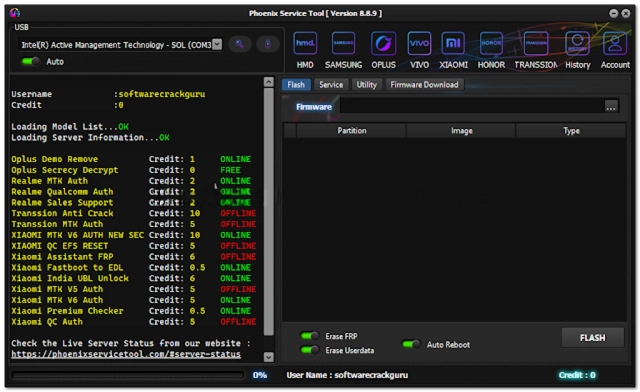
Key Features
Phoenix Service Tool V8.8.9 is a collection of well-advanced Android repair features.
Firmware Flashing
Ensure the installation or reinstallation of the latest firmware on modern Android devices.
Device Unlocking
Uncover what lies behind the abstraction that only a screen lock designed by an Android system lock developer can reveal by removing supported screen locks, PINs, passwords, and patterns.
FRP Removal
Device Compound—Visible and invisible platforms for practices in the spectrum that manufacture devices.
ADB and fastboot support
Employ the ADB and fastboot tools to guarantee stable communication between the application software and the connected mobiles.
Device Information Reader
Supply in-depth information on Android smartphones to the users.
Fast Processing Engine
The software can process swiftly with guaranteed success in all the repair operations.
Stable Performance
It keeps the line of communication stable and functional.
How to Install Phoenix Service Tool v8.8.9
Step 1:
Get the Phoenix Service Tool V8.8.9 setup package from a reliable source of Android repair, as it may be.
Step 2:
Then, to open the downloaded ZIP or RAR archive, use the archiving application WinRAR or 7-Zip, which is generally used.
Step 3:
Access your downloaded, extracted folder either from your desktop window or the already expanded folder itself and look for the software setup file.
Step 4:
Download both the required USB drivers and ADB drivers to ensure proper device communication.
Step 5:
At the setup prompt, select the downloaded file and follow the active on-screen instructions.
Step 6:
Once the computer is up and running, navigate to the directory where the program is located to open it as an administrator.
Step 7:
In the Android smartphone, the USB debugging setting can be accessed in the Developer Options section, and it must be toggled ON to communicate over USB with the computer.
Step 8:
Using a USB connector, get your smartphone connected to the laptop PC and access all that the tool is meant for.
After the software installation, share the crystal-clear outcome by making use of your newly downloaded Phoenix Service Tool V8.8.9.
Download Link: HERE
Your File Password: Gsmlabsolution.com
File Version & Size: | 75.48 MB || V8.8.9 |
File type: compressed / Zip & RAR (Use 7-Zip or WINRAR to unzip the file)
Support OS: All Windows (32-64 Bit)
Virus Status: 100% Safe. Scanned By Avast Antivirus