Introduction
Development and release of Xiaomi BD Auth V3.0 is a critical step to get around. The permission-related challenges that come along the way with legal Xiaomi devices service.
Description
The tool is designed for Windows systems and primarily controls Qualcomm chipset-based devices. In the traditional case, the device will only enter EDL mode (Emergency Download), that is, when Xiaomi servers are still locking unauthorized access. Xiaomi BD Auth V3.0 provides access permissions and hence allows the techs to proceed with repair operations that may require admin rights.
Disclaimer: Utilize this tool with your appliances or those that you own the authority to play around with only.
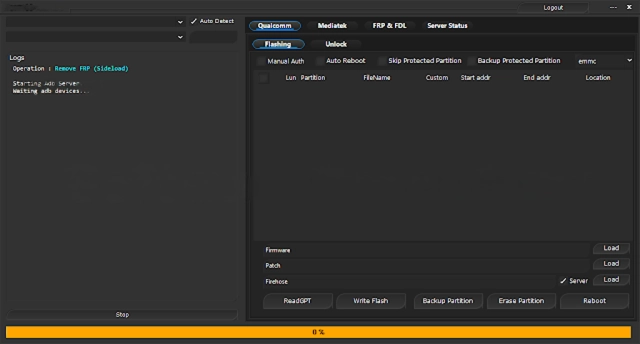
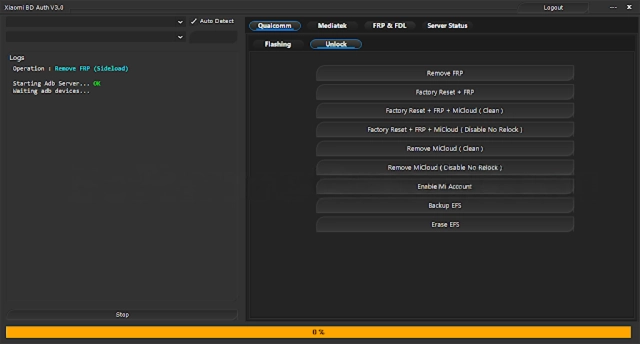
Key Features of Xiaomi BD Auth V3.0
Xiaomi Authorization Support
Enables BD {{Bootloader / Device}} authentication to be used in Xiaomi-specific actions that are definitely secured.
Qualcomm EDL Mode Compatibility
Designed to work with Qualcomm-based Xiaomi devices in EDL (9008) mode.
Supports Xiaomi, Redmi & POCO
For Xiaomi-branded devices, the utility is hardware dependent and the security level.
Improved Stability in V3.0
The new stability feature is designed to decrease connection timeouts and lost connections.
Lightweight Windows Utility
Minimal and inconspicuous kind of software that spends only a few resources.
Simple & Clean Interface
The interface is based on modern design principles, facilitating the work of both beginners and pros.
Works with Flashing Tools
This utility tool is to be employed together with Mi Flashing in conjunction with other Xiaomi services that require authorization.
Faster Authentication Process
The optimized mechanism makes the process of authorization speedier as opposed to the capabilities of older-version programs.
Regular Compatibility Updates
It is regularly updated, improving its compatibility with new device models and patches.
How to Install and Use Xiaomi BD Auth V3.0
Step 1: Download the Tool
Step 2: Extract the Files
The tool is usually provided in ZIP or RAR format.
Right-click the file
Select Extract Here or Extract to Folder
Step 3: Disable Antivirus Temporarily
It is important, hence, to have an antivirus program to avoid these implications.
Step 4: Install Required Drivers
Install these two crucial drivers on your computer:
Qualcomm USB Drivers
Xiaomi USB Drivers
Step 5: Run the Tool as Administrator
Extract the tool to a convenient location on your computer.
Open the extracted folder
Right-click on Xiaomi BD Auth V3.0.exe
Select Run as Administrator
Step 6: Connect the Device in EDL Mode
The upper left box of the Milash app lets you refresh.
Power off the Xiaomi device
Boot it into EDL (9008) mode
Connect the device to the PC via a USB cable
Step 7: Start Authentication
Start the Xiaomi BD Auth Tool
Select Authenticate/Connect.
Download Link: HERE
Your File Password: 123
File Version & Size: | 20 MB || V3.0 |
File type: compressed / Zip & RAR (Use 7zip or WINRAR to unzip File)
Support OS: All Windows (32-64 bit)
Virus Status: 100% Safe Scanned By Avast Antivirus