Introduction
In this December 2025 version of UnlockToolPRO, the program has been optimized to work faster, establish stability, and be compatible with the latest Foundation security updates. The appealing design, automation of the major processes, and the highest success rate are just some of the reasons that make UnlockToolPRO 18.12.2025 the number one choice for service shops that are looking for accurate and fast service operations.
Description
UnlockToolPRO 18.12.2025 is a software solution designed to provide the necessary maintenance and repair that an Android device might need. It is all Windows-based, and it can deal even with the most complicated software-based operations with a high level of efficiency.
By doing this, the chance of manual errors is reduced, saving the service provider time.
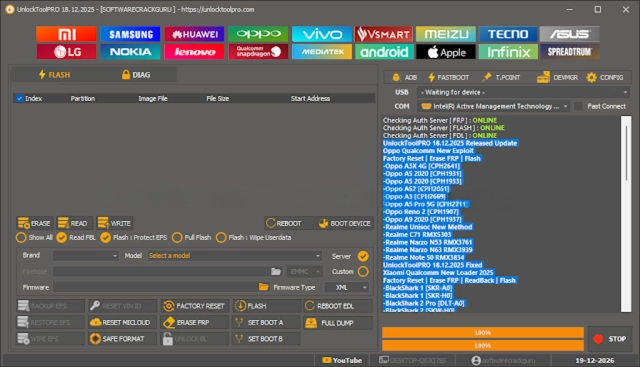
Key Features of UnlockToolPRO 18.12.2025
✔ FRP Bypass Support
Unlock Google accounts from a supported list of Android devices.
✔ Screen Lock Removal
Remove the PIN, pattern, or password locks to get through the compatible models.
✔ Multi-Chipset Compatibility
Built-in with devices having Qualcomm, MTK, Exynos, SPD, and UniSoc chipsets.
✔ Firmware Flashing
Install stock ROMs to eliminate boot loops, crashes, and corrupt system software.
✔ ADB & Fastboot Utilities
Includes reboot, cache, and the kernel system command operation.
✔ Soft Brick & Dead Boot Repair
Get the devices up and doing from the crashed logo or failed-to-start condition.
✔ Auto Device Detection
Automatically sorts out the product model and functions that are pertinent.
✔ Real-Time Logs
Run live reports to observe better and to solve the problems.
✔ Professional & Stable Interface
Crafted to face the day-to-day repair environment in GSM.
How to Install UnlockToolPRO 18.12.2025
Step 1—Download the Tool
Step 2—Extract the Files
You will need a program like WinRAR or 7-Zip to unzip the downloaded zip/var file.
Step 3—Install Required Drivers
Make way for the USB drivers to install on your PC:
Qualcomm HS-USB deluder
MTK USB VCOM/Preloader
Samsung USB Driver
ADB & Fastboot Pilots
Step 4—Run the Tool
Step 5—Login / Activate
Step 6—Connect the Device
Put the smartphone in the ADB, Fastboot, EDL, or Preloader mode and connect it to the PC with a USB data cable.
Step 7—Select Operation
Select the operation that you want the tool to perform—it can be FRP, Unlock, Flash, or Repair.
Step 8—Start the Process
Download Link: HERE
Your File Password: 123
File Version & Size: | 163.81MB || V18.12.2025 |
File type: compressed / Zip & RAR (Use 7zip or WINRAR to unzip File)
Support OS: All Windows (32-64 bit)
Virus Status: 100% Safe Scanned By Avast Antivirus