Introduction
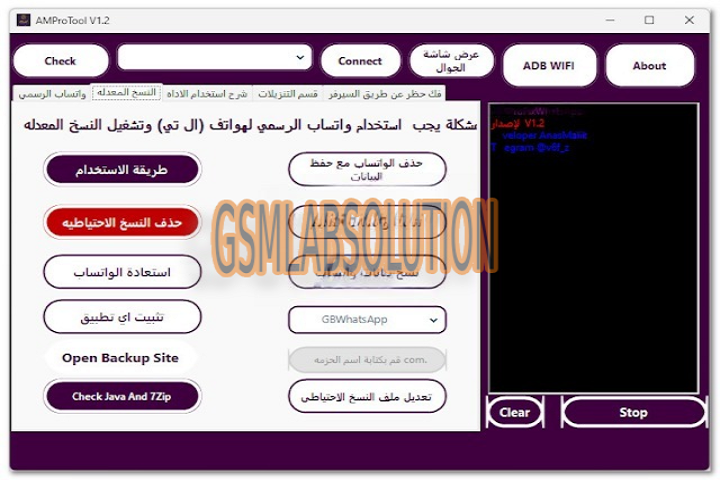
AMProTool V1.2 is the latest and best able Android application software advised for technicians, GSM adjustment experts, and adaptable enthusiasts. It provides avant-garde solutions for unlocking, flashing, repairing, and acclimation Android accessories from assorted brands. Whether you’re ambidextrous with FRP (Factory Reset Protection) locks, ashore cossack issues, or IMEI repair, AMProTool V1.2 has aggregate you charge arranged into one acute and able interface. With affiliated updates and an easy-to-use design, this adaptation brings added stability, speed, and affinity with a avant-garde ambit of devices. It’s a absolute best for users who appetite a reliable and acceptable adaptable adjustment band-aid after defective assorted tools.

Description
AMProTool V1.2 is a Windows-based apparatus congenital to abridge Android buzz aliment and servicing. It supports all above chipsets including Qualcomm, MediaTek (MTK), Spreadtrum (SPD), and Exynos, authoritative it a accurate all-in-one Android utility. The software allows users to accomplish analytical tasks such as FRP bypass, bootloader unlock, arrangement remove, beam firmware, and read/write accessory advice with aloof a few clicks.
Unlike beforehand accoutrement that crave assorted installations and drivers, AMProTool V1.2 has congenital automation that detects affiliated accessories and installs the all-important drivers automatically. This ensures bland and error-free operations alike for users who are not awful technical. The adapted adaptation has anchored several bugs from beforehand releases and now supports Android 14 devices, authoritative it accordant with the latest smartphone models from brands like Samsung, Xiaomi, Infinix, Vivo, Oppo, Realme, and Huawei.
AMProTool is additionally failing and doesn’t absorb abundant arrangement resources, which allows it to run calmly on low-end computers. Additionally, it offers an offline approach feature, so users can assignment alike after an alive internet affiliation already the apparatus is appropriately activated.
Key Features of AMProTool V1.2
FRP Bypass for All Brands: Quickly abolish Factory Reset Protection on Samsung, Vivo, Oppo, and added Android phones after defective circuitous commands or paid services.
Unlock Pattern/Pin/Password: Instantly alleviate awning locks, including pattern, PIN, or password, after accident user abstracts (depending on the archetypal and aegis patch).
Firmware Aflame Support: Beam official banal ROMs or custom firmware files easily. Supports assorted book formats including .bin, .img, .pac, and .scatter.
IMEI Adjustment and Backup: Fix invalid IMEI issues, adjustment arrangement problems, and actualize defended backups of IMEI/NVRAM data.
Bootloader & Basis Functions: Alleviate and relock bootloaders, basis accessories safely, and accomplish avant-garde arrangement modifications.
One-Click Disciplinarian Accession: Congenital accepted drivers for MTK, Qualcomm, and SPD accessories save users from chiral disciplinarian installations.
Fastboot & ADB Approach Operations: Execute operations in both Fastboot and ADB modes with automated apprehension and basal chiral configuration.
Firmware Read/Write Option: Read firmware from alive accessories and address it aback to bricked or asleep phones to accompany them aback to life.
Regular Updates & Bug Fixes: Frequent software updates ensure affinity with the latest Android versions and anew appear smartphone models.
User-Friendly Interface: The clean, avant-garde dashboard allows alike beginners to cross and use the apparatus finer after abysmal abstruse knowledge.
How to Install AMProTool V1.2
Installing AMProTool V1.2 is a aboveboard process. Follow these simple accomplish anxiously to set it up accurately on your Windows PC:
Download the Tool
Get the latest adaptation of AMProTool V1.2 from a trusted antecedent or official distributor. Make abiding you download the complete ZIP or RAR book to abstain missing files.
Extract the Files
After downloading, abstract the aeroembolism book application WinRAR or 7-Zip. You will acquisition a binder absolute the bureaucracy file, drivers, and instructions.
Install Required Drivers
Open the “Drivers” binder and install all the all-important USB drivers, including MTK, Qualcomm, and ADB drivers. This ensures able advice amid your PC and adaptable device.
Run the Bureaucracy File
Locate the AMProTool_V1.2_Setup.exe book and right-click to baddest Run as Administrator. Follow the on-screen accession instructions to complete the process.
Activate the Tool
Once installed, barrage the software. If it requires activation, affix to the internet and log in with your accreditation or activation key provided by the distributor.
Start Application the Tool
Connect your accessory to the computer via USB cable. The apparatus will automatically ascertain the accessory and affectation its information. You can now accomplish any operation like FRP bypass, flashing, or unlocking.
Download Link : HERE
Your File Password : Gsmlabsolution.com
File Version & Size : | 228.57MB | v1.2 |
File type : compressed / Zip & RAR (Use 7zip or WINRAR to unzip File)
Support OS : All Windows (32-64Bit)
Virus Status : 100% Safe Scanned By Avast Antivirus