Introduction
Phoenix Service Tool V8.1.0 is a freshly built software version from Phoenix for those engaged in mobile repairs or GSM servicing or those proficient with advanced Android experience. Phoenix service has developed a good reputation largely because of its support of flashing activities, being powerful for FRP removal, and having system-level deep repair capabilities; and the new update brings a higher level of stability and better chipset detection and joints among new versions of 2024-2025.
Description
Phoenix Service Tool V8.1.0, which provides a complete mobile servicing process for Windows PCs, will enable users to handle their Android devices in a highly accurate way.
The intelligent engine will detect devices and notify you in ADB mode, Fastboot mode, and EDL mode when you connect. This will help you streamline the device connection as well.
It stands by nearly all Android smartphones, including Samsung, Xiaomi, Poco, Redmi, Vivo, Oppo, Realme, Motorola, Nokia, Tecno, Infinix, Lava, Lenovo, and others.
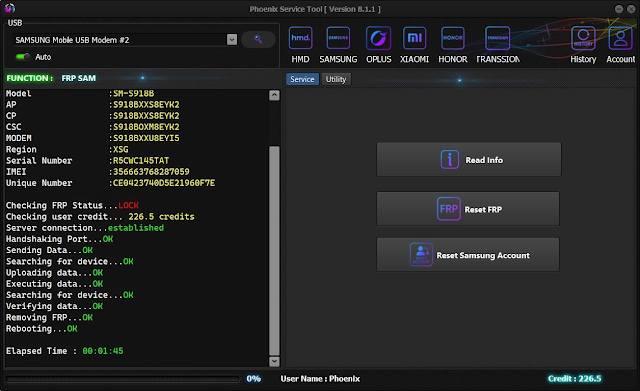
Key Features of Phoenix Service Tool V8.1.0
1. Advanced FRP Bypass (Updated for 2024–2025)
One-click FRP removal
Samsung, Xiaomi, Vivo, Oppo, Realme, Nokia, Tecno, Infinix & more
New algorithms for updated Android patches
2. Powerful Flashing Tools
Security patches for Samsung, Tecno, and Vivo:
Support for MTK, Qualcomm, and SPD devices:
Restoration of soft-brick and boot loop issues:
Such a process is fast, and the information is safe.
3. ADB Mode Operations
Discover all things about the device you are using at the moment.
Refresh your system with a complete configuration reset.
4. Fastboot Utilities
Reboot to Recovery/Bootloader modes, factory reset, data clearing, or flash system/vendor/boot images:
Unlock and also relock the bootloader of the device, and change the partition formatting:
Check information about the device and its status:
5. MediaTek (MTK) Tools
Read/write in the read/write mode and remove the password requirement. It is helpful for developers to bypass the login function.
Start/stop system applications and redirect their installation.
Implement erasure of existing data on a system or a smartphone.
6. Qualcomm (EDL) Panel
To retrieve phone details straight from an EDL, try the corresponding software.
Disorder EDL perfects into clips, pieces them together, and creates a story.
7. Spreadtrum (SPD) Support
Initiate the packet and reboot through the computer.
Get a factory data reset.
Basic diagnostics
8. Recovery & Slade Tools
Flash OTA packages and check for provided updates.
The update will include keeping the display “^” and avoiding the previous arrow.
9. Lightweight, Fast & Stable
Enables seamless usage on systems with Windows versions 7, 8, 10, and 11, without the need for significant packages and instruments.
How to Install Phoenix Service Tool V8.1.0
Step 1: Download the Tool
Step 2: Extract the ZIP File
Simply right-click on the downloaded ZIP file, and then click on “Extract Here.”
Step 3: Disable Antivirus (Temporary)
Most of the time, antivirus programs give this kind of false-positive warning.
Disabling the Windows Defender and antivirus before.
Step 4: Run the Application
After unzipping the folder, you can start the program by double-clicking the PhoenixServiceTool.exe application.
Every latest version requires a driver and does not require the installer.
Step 5: Install Necessary Drivers
ADB drivers
All drivers
MTK drivers
Qualcomm drivers
SPD drivers
Samsung USB drivers
Step 6: Connect Your Device
Use what is right for the USB cable—a good quality one—and attach it to the computer at the appropriate place preferred by you, either ADB, Fastboot, or EDL mode.
Step 7: Start Using the Features
Follow the instructions displayed on the screen and select the right function. The tool is intuitive and convenient to use for everyone.
Download Link: HERE
Your File Password: 123
File Version & Size: | 154.41 MB || V8.1.0 |
File type: compressed/zip & RAR (use 7zip or WinRAR to unzip the file).
Support OS: All Windows (32-64 Bit)
Virus Status: 100% Safe Scanned By Avast Antivirus