Phoenix Service Tool V8.0.0 Latest Update
Phoenix Service Tool

Introduction
Phoenix Service Tool V8.0.0 brings powerful mobile maintenance and seeing utility, which is aimed at professionals, servicemen, and service centers dealing with firmware flashing, device diagnostics, and advanced maintenance tasks.
The tool is designed to fix any phone or tablet, be it a smartphone, feature phone, or tablet. It provides reliable throughput and fosters professional quality in mobile device repair.
Description
It offers a wide array of Nokia and Android versions in a single-flashing environment, with easy-to-follow steps.
The tool is also generous on the features, such as improved EDL scenarios, progressive boot-repair modules, and expanding communication protocols that bring operational stability.
With Phoenix Service Tool V8.0.0, you can format the device with a safe method, perform IMEI repair (where it is legally available), use secure backup and restore functions, and use fast file handling for faster performance. Due to the presence of the advanced functions and the ease of use, it managed to become a piece of the mandatory kit for the field.
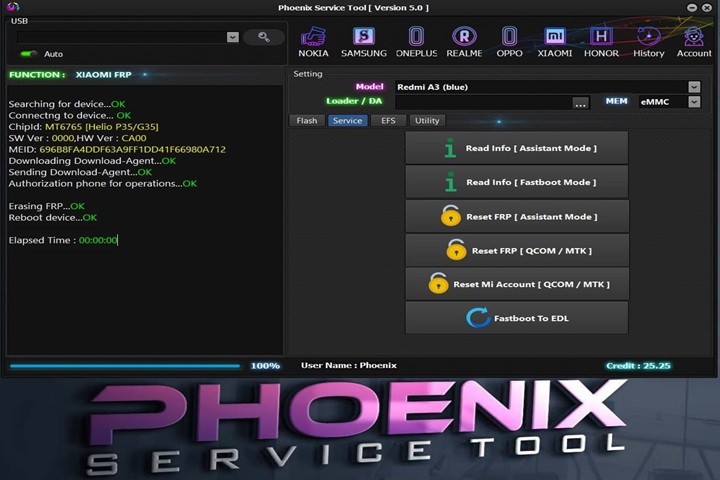
Main Features:
1. Advanced Flashing Support
The program can flash stock ROMs and firmware packages for mobile devices where Nokia OS, MTK (MediaTek), Qualcomm, SPD, or other chipsets are concerned.
This flashing tool can also work with the raw as well as with the scatter format.
Advantages of this tool are that it is fast, and the process of flashing is even more secure to avoid any problems with soft brick or bad boot.
2. Dead Boot Recovery
It includes the restart of special features, which aid in booting devices that could not have started.
3. FRP Bypass & Security Reset
In a similar light, the Phoenix Service Tool V8.0.0 can also assist in the erasing of bypasses for the Google FRP lock on supported devices.
Erase user locks, screen patterns, and PINs/passwords.
4. Backup & Restore System
This operation can be performed by putting the device backup in place before loading it with the newly configured firmware.
Restore system images, NV data, security files, and the partition tables and settings that are essential within a device.
5. IMEI & Network Repair
Bring back to the original state an unfinished job of the device to reassign the corrupted IMEI.
In some cases, this command can expose worn-out networks, the basis of problems, and an inaccurate connection.
6. Device Diagnostics & Calibration
The tool can read some abbreviations describing the device, partition, and firmware, e.g., CID, IMEI, and firmware ID, and their details.
Do a diagnostic for hardware, check the calibration for system purposes, and also do the optimization.
7. User-Friendly Interface
The view supplied covers everything from the absolute beginner to the seasoned technician.
Helps techie personnel in data logging done to assess the success of the different flashing and repair works.
8. Multi-Brand Compatibility
Additions to the drivers make the tool work with almost any device without the need to install any supplementary software.
How to Install Phoenix Service Tool V8.0.0 Installation
By following these enumerated steps, you will be ensuring a proper installation of the tool on your Windows system:
Step 1: Download the Setup File
Step 2: Extract the ZIP/RAR File
Right-click the file that you just downloaded.
Step 3: Install Required Drivers
Download and install drivers specifically for Nokia, MTK, Qualcomm, and SPD from the official sources.
Step 4: Run the Setup File
On your screen, you will see the folder with its contents after you have gone through the extraction part of the previous step.
Double-click the PhoenixServiceTool.exe in order to build a foundation for this system.
And then, follow the instructions that are coming up on your screen.
Step 5: Launch the Tool
Go into the software and tap on the desktop or the start menu.
Connect your device via. USB cable in EDL, Fastboot Download mode.
Step 6: Begin Flashing Repair
Upload the firmware and any other needed files.
Download Link: HERE
Your File Password: 123
File Version & Size: | 99.46 MB || V8.0.0 |
File type: compressed / Zip & RAR (Use 7zip or WINRAR to unzip File)
Support OS: All Windows (32-64 bit)
Virus Status: 100% Safe Scanned By Avast Antivirus