Introduction
No matter if you need to work on issues related to FRP lock, network unlocking, or the pattern lock, this tool is a one-stop point to serve different Android devices. Key-Tool is one of the most reputable tools throughout GSM’s entirety, as it offers features of the highest quality, is quite easy to use, is quick in performance, and has wide device compatibility.
The just-released Key-Tool V9.3 now offers better process stability, updated drivers, device compatibility, and a new function set. Mobile servicing keeps pace with the rapidly changing technology. This is a powerful yet small device that is ideal for accomplishing professional-grade tasks without the need for complicated systems.
For the folks out there who do need software that can smooth their job and can do their daily tasks of repair systematically, the Key-Tool V9.3 is the best solution.
Description
Key-Tool V9.3 is a Windows-based servicing tool that covers a wide range of smartphones and tablets from various companies such as Samsung, Xiaomi, VIVO, OPPO, Realme, Tecno, INFINIX, and Huawei, as well as many others. It fulfills basic functions of device servicing—FRP removal, boot repair, flash operations, and configuration management—all in one software.
It is accompanied by smart detector technologies that make the process of connecting the tool and the smartphone fast and smooth.
The program interface is user-friendly for both beginner and expert technicians.
In addition, Key-Tool V9.3 does a great job in facilitating the process of FRP and pattern unlocking. There are many new security patches that may be conflicting with the tool, the most recent being the 2024 security patch as well as the beginning of 2025 updates. The tool will be consistent with the newest devices. However, they have put the latest database updates and drivers that will guarantee flawless communication and actual operations during flashing and recovery stages.
Overall, Key-Tool V9.3 is an ideal solution for mobile technicians aspiring for ease of workflow and quick completion of numerous fixes after each cycle of service.
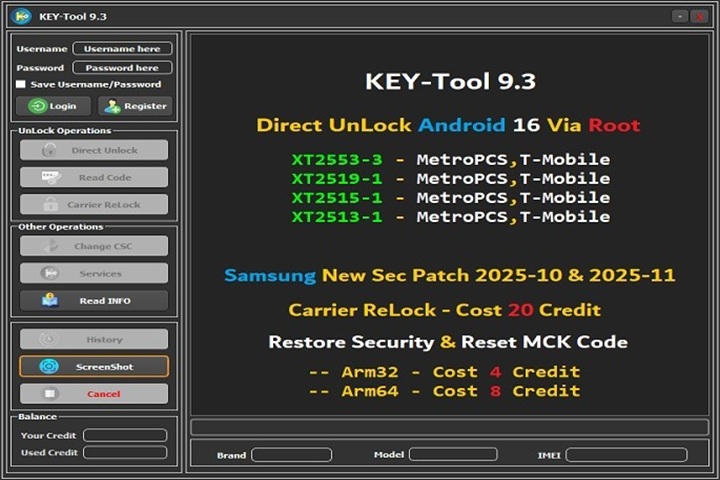
Key Features of Key-Tool V9.3
Advanced FRP Bypass Support
Apply Headless OS to unlock the Google FRP lock on many new models.
Incorporates the latest firmware to support versions up to the latest security patches.
Fast and convenient (no full firmware flashing required) FRP unlocking.
Pattern, PIN, and Password Unlock
Bypass Qualcomm, MTK, and SPD phone screen locks without data loss.
Direct unlock functions for the newest wizard-based systems.
Firmware Flashing
Available for MTK, Qualcomm, and Exynos on Spreadtrum SOCs, with Stock ROM included.
The firmware flasher also gives a safe mode hard brick.
IMEI Repair (Supported Devices Only)
Pay for usage of these tools, and you can correct the tangibility or a null value of IMEI on compatible companies.
Changing the frequency of NV/EFS partitions involves reading, writing, and making a backup.
In maintaining logs, it presents a genuine method of tracking access.
Boot and Recovery Tools
Quick boot back into Fastboot, EDL, or Recovery, even by commanding batch scripts.
Recovers dead devices with only devoid fatal outcome purposes because of the wrong flashing of your contraposition gadgets.
There are boot repairs on Qualcomm and MTKs.
Driver Auto-Installer
Keeps all the necessary drivers updated for MTK, Qualcomm, ADB, and Fastboot and thus reduces driver error.
Enables the driver to function properly in communication with your device and ensures the recovery doesn’t fail.
Wide Device Compatibility
Cover Samsung, Xiaomi, Vivo, Oppo, Realme, Tecno, Infinis, and lots more brands you can deal with using this key tool.
Works with all recently introduced Android security versions.
Backup & Restore Options
Make an initial backup of the hardly touched partition of the device before risking any possible manipulations.
Clean and User-Friendly Interface
Data with primary functions logically sorted into a separate column.
Quick functions and one-click actions for a streamlined user experience.
Regular Updates
Regularly increases the database layers per new banknote issued.
More stable, and added bug fixes to each new version.
How to Install Key-Tool V9.3
During this tutorial, we will explain how to set up Key-Tool V9.3 on your PC.
Step 1: Download Key-Tool V9.3
Download the setup.exe file from reliable sources such as GSM Crack Guru or the development company.
Step 2: Turn off Strong Protection against Antivirus or Windows Defender
However, in order to avoid this situation, you should briefly switch off the antivirus system (be it Windows Defender or the one put on by your antivirus software vendor).
Step 3: Extract the ZIP File
You will unzip the file by just right-clicking on the ZIP file itself.
Choose one of the folder extraction options using WinRAR or 7-Zip named “Extract Here…” or “Extract to Folder…”
Step 4: Run the Installer
Go to the unzipped files folder.
Inside you will find the setup.exe or something similar, e.g., KeyTool.exe.
Run it as administrator to prevent any install errors.
Step 5: Install Required Drivers
Go to the Driver folder and make sure that you download and install the drivers for ADB, Fastboot, MTK, Qualcomm, and SPD.
One more thing: do not forget to restart your computer after the installation.
Step 6: Launch the Tool
Click the main Key-Tool V9.3 shortcut on the desktop.
The system will automatically load supported and necessary modules and tabs.
Step 7: Connect Your Device
Make use of a reliable USB cord.
Turn on USB debugging (in the case of ADB function) or take the device to EDL/fastboot mode in case of need.
Step 8: Start Servicing
Choose between FRP, Flash, Unlock, IMEI Repair, etc., based on what you want to achieve.
Act according to the steps presented on the screen.
Download Link: HERE
Your File Password: 123
File Version & Size: | 63.71 MB || V9.3 |
File type: compressed / Zip & RAR (Use 7zip or WINRAR to unzip File)
Support OS: All Windows (32-64 bit)
Virus Status: 100% Safe Scanned By Avast Antivirus