Mobile Sea Service Tool V7.8.0 Latest Version
Mobile Sea Service Tool

Introduction
Mobile Sea Service Tool version 7.8.0 is the latest release and the most advanced and most powerful mobile servicing utility application. With the introduction of each fresh update, the tool announces development in capabilities to unlock, flash, and repair IMEI and FRP bypass, as well as perform critical diagnostics in different brands of Android mobiles. The V7.8.0 version of the tool evolves in the same direction. This time, it offers higher stability, faster processing, and broader support for devices.
Whether it be fixing software issues, performing factory resets, flashing firmware, or unlocking devices, Mobile Sea Service Tool will support a user throughout different repair processes. It has an easy-to-understand dashboard that enables even the most inexperienced technician to fix a phone issue in no time.
Description
It is capable of pushing a wide range of chipsets, e.g., Qualcomm, MediaTek, Spreadtrum, and Exynos, hence making it possible to work with a multitude of various brands, among which are Samsung, Vivo, Xiaomi, and Realme, to name a few.
This release focuses on bringing speed into specific repair processes such as FRP removing, pattern lock, flashing, and boot repairing. Also, the tool is removing any possible damage to the device’s worth.
The developers of this updated solution have managed to enhance the speed of scanning while maintaining the best performance of your ADB/Code Tool. Also, this version guarantees the best performance with all the recent Android security patches that you may find installed on your device. With this up-to-date and amazing version of the tool, you don’t have to worry again about almost every dead phone or nearly every FRP-claimed phone since the updated version has a solution for almost all the problems that belong to fixing such kinds of imperfections.
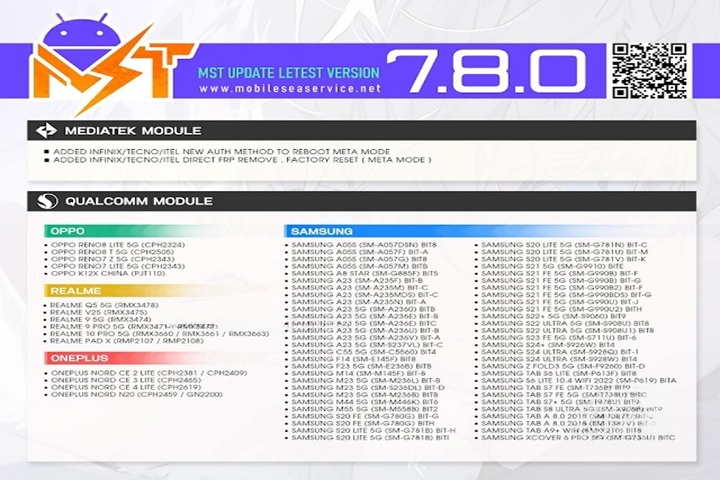
Key Features of Mobile Sea Service Tool V7.8.0
This version has FRP removal, pattern lock, firmware, and boot repair as the main features. Additionally, the program offers informative features—i.e., reading and writing the phone system information and diagnosing system-level errors.
1. FRP Bypass Support
Ready to eliminate the Factory Reset Protection as of using an easy ADB, Fastboot, or West Point method on a supported device with passing.
2. Flash Firmware Quickly
Try the highly recommended WMMC flashing while supporting multiple chipsets, provided that you get to install official firmware, custom ROM, or repair corruptible systems.
3. Unlock Pattern, PIN & Password
Give the user the ability to bypass a password screen without data loss if the given device types are recognized; also, it supports software unlocks.
4. IMEI Repair & Rebuild
The method of writing IMEI securely is applied to resolve IMEI problems on the supported device. A useful tool for devices that need a network without any software problems.
5. Remove Demo Mode / Test Mode
A useful tool helping in full activation for demonstration phone dealing, which is often required in a retail setting.
6. Dead Boot Repair
This speech is about how unique board tools can help network devices that create problems by being stuck in the bootloader or dead.
7. Backup & Restore Options
Do not lose important data; the utility keeps a copy of important partitions like NVRAM, QCN, and EFS, enabling you to restore them without risk.
8. Clean, Simple Interface
You will not hesitate a moment, even if you’re just a newbie in tech. It is because the clear tool design and proper operation steps tell you where you are.
How to Install Mobile Sea Service Tool V7.8.0
Follow these simple steps to install the tool on your PC:
Step 1: Download the Software
The very first step for using the Mobile Sea Service Tool is to download its setup file.
Step 2: Extract the ZIP File
Utilize WinRAR or 7-Zip to extract the compressed file to a location where you can easily access the folders.
Step 3: Run the Installer
Now, open the setup (.exe) file, read it, and follow the guiding instructions in the upcoming window.
Step 4: Install Drivers
Download and install all necessary or dependent drivers to be able to detect the device. It includes the following:
ADB & Fastboot drivers
Qualcomm drivers
MediaTek USB drivers
Step 5: Connect Your Device
Prepare your device accordingly to be USB debugging-enabled or use Fastboot/EDL boot modes depending on the specific purpose you will perform with the device.
Step 6: Start Servicing
Proceed with your selected option—aka FRP deletion, flashing, and/or la—by carefully executing the process.
Download Link: HERE
Your File Password: 123
File Version & Size: | 116.38 MB || V7.8.0 |
File type: compressed / Zip & RAR (Use 7zip or WINRAR to unzip File)
Support OS: All Windows (32-64 bit)
Virus Status: 100% Safe Scanned By Avast Antivirus