MDM Fix Tool V1.0.9.6 Latest Version Free Download
MDM Fix Tool

Introduction
MDM Fix Tool V1.0.9.6 is a functional and comprehensive Windows-based GSM application known for addressing one of the notable obstacles in the extended capabilities of modern Android devices—MDM management system restrictions.
The fast-growing economy of enterprise-controlled Android devices requires maximum-quality MDM support and lacks it up to the brim. The Version 1.0.9.6 update upgrades compatibility mechanisms with detected devices and improves the internal processes of efficiently supported tasks.
For regular MDM-locked or firewalled Android phones, MDM Fix Tool V1.0.9.6 is an ideal solution for GSM professionals and maintenance personnel.
Description
With the release of the new version 1.0.9.6, there is a significant impact from the back-end optimization view, with errors reduced, device identification improved, and operation as a whole resulting in better delivery.
One of my favorite aspects of the MDM Fix Tool is its interface, which is just simplistic, straightforward, and user-focused. Instead of crowding users with numerous MDM tools, the application only concentrates on the basic MDM services, thereby reducing the risk of performing wrong or irrelevant operations. It is also good for intermediate-level users, being simple and straightforward to use.
A software-based option, MDM Fix Tool, is a very affordable solution for the majority of the repair shops. Without any additional hardware like the boxes or dongles, the software is a preferable alternative because many of the technicians can have access at the same time.
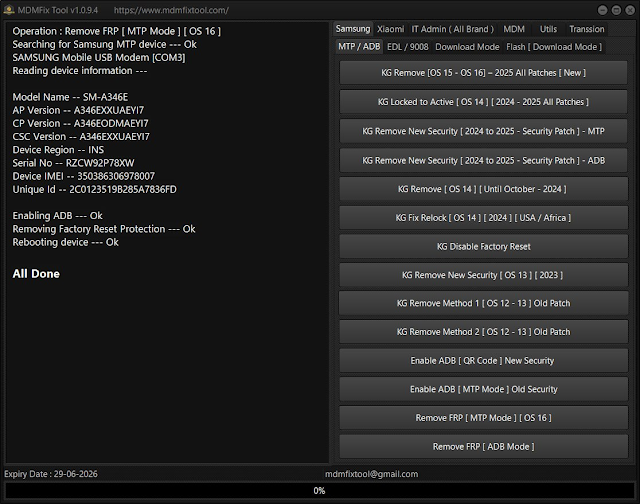
Key Features of MDM Fix Tool V1.0.9.6
MDM Fix Tool V1.0.9.6 offers a host of features with the application of the functionality that is suitable for the support of the MDM operations:
🔹 Dedicated MDM Servicing Tool
Devised only to handle the functionality of removing supported MDM locks and restrictions for Android devices.
🔹 Supports Multiple Android Brands
She’s selected Android brands and models, depending on chipset and software compatibility.
🔹 ADB & Fastboot-Based Operations
Utilizes the typical Android-compatible service modes for stable reasoning and safe communication.
🔹 Improved Stability in V1.0.9.6
This feature up-regulates the background routines of the software, which increases the number of crashes, frozen screens, and incompletely executed operations.
🔹 User-Friendly Interface
The concept of a clear, compact layout that covers the interface of the tool will keep the user at the helm of the commands.
🔹 No Box or Dongle Required
Physical box or dongle installation and the expenses related to the hardware installation are completely removed from the picture.
🔹 Lightweight Application
Low impact on system performance, allowing even low-power Windows systems to run smoothly.
🔹 Regular Updates
Continuous development improves support for new Android models and updates.
How to Install and Use MDM Fix Tool V1.0.9.6
Step 1: Download the Tool
Step 2: Extract the Files
Right-click on the file.
Choose Extract Here or Extract to Folder.
Step 3: Disable Antivirus Temporarily
GSM tools found in some cases are presumed to bes programs, and so is temporary virus protection to ensure an undisturbed
Step 4: Install Required USB Drivers
For USB connectivity, you have to install the drivers like this:
Android USB Drivers
Brand-specific USB drivers, as you may require.
Step 5: Run the Tool as Administrator
Double-click on a folder then which you have extracted the tool
Right-click on MDM Fix Tool.exe
Select Run as Administrator
Step 6: Connect the Android Device
To do that, start your phone first.
Plug your phone into your computer with a USB cable that is well-used.
Step 7: Perform the MDM Operation
Player options for this function sometimes disconnect your device from the cloud for you to work on the supported MDM operation.
After you start the process, you have to wait a moment for it to complete.
Download Link: HERE
Your File Password: 123
File Version & Size: | 113.79 MB || V1.0.9.6 |
File type: compressed / Zip & RAR (Use 7zip or WINRAR to unzip File)
Support OS: All Windows (32-64 bit)
Virus Status: 100% Safe Scanned By Avast Antivirus