MaAnt Maintenance Assistant Version 2.0.1.23 Free Download (Schematic Program)
MaAnt Maintenance Assistant

Introduction
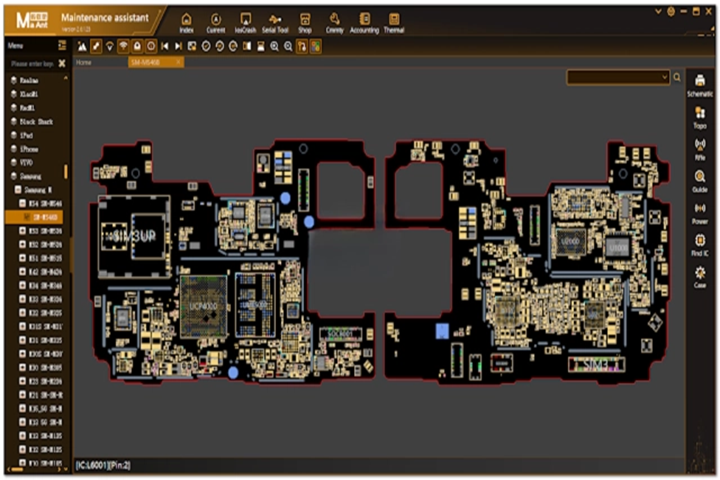
Seamless MaAnt Maintenance Assistant Version 2.0.1.23 is the breakthrough mobile service utility package for service technicians and small enterprises servicing Android equipment. For this, the application contains quick and reliable tools. MaAnt is one of the leading tools of its kind and constantly works on its imperfections, enlarges the area of supported devices, and optimizes system performance.
Description
The new MaAnt Maintenance Assistant Version 2.0.1.23 provides users with sealed maintenance, featuring some improvements and the following features to meet current demands of Android devices. This release contains valuable features that particularly work for the increment of accuracy of repair, as well as in scanning devices, as well as in the reduction of manual work through automated modules. The leading edge of the tool is its wide range of supported chipsets from MediaTek, Qualcomm, and Spreadtrum, which further gives this application broad flexibility in being applied in multi-brand repairs.
Through this system, a subsequent version is launched that integrates the patched-up stability and bug fixes, as well as the development of the functions for the latest Android security patches.
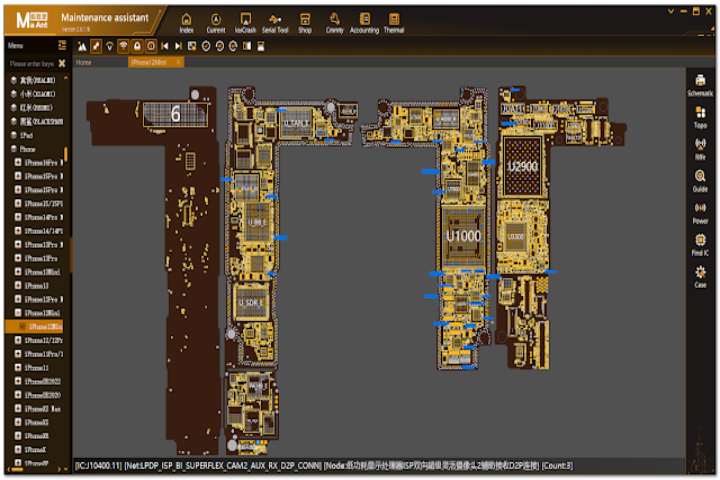
Technical support from the MaAnt Maintenance Assistant will be a considerable resource for GSM repair shops that need an in-house assistant tool for daily activities. Moreover, it’s a perfectly integrated solution for iOS devices, as it keeps things lightweight, fast, and user-friendly, therefore making it a highly recommended utility for today’s Android servicing.
Key Features of MaAnt Maintenance Assistant V2.0.1.23
Here are the most notable features of MaAnt Maintenance Assistant Version 2.0.1.23:
✔ FRP Removal Support
A quick and hassle-free option is now available to perform FRP on Android devices, including newer models.
✔ Software Repair Functions
With just the press of a button, fix common system problems like software crashes of apps, boot loops, device slowness, and software errors, among other things.
✔ System Optimization Tools
Manage cache performance for speed, improve logs, and keep some of the things running at optimal performance.
✔ Backup and Restore Options.
With this, technicians can conveniently save device data before any of the high-risk activities are done.
✔ Multi-Chipset Support
This multi-chipset work, including MTK, Qualcomm, Uniloc, etc., is compatible with many devices.
✔ User-Friendly Interface
Build with one concern, i.e., the interface is pleasant, friendly, and easy for even newbie technicians.
✔ Stable and Lightweight
The program runs at high speed on most Windows operating systems and requires very few computer resources to function.
How to Install MaAnt Maintenance Assistant V2.0.1.23
Let’s proceed with the straightforward guide for an effective setup:
Extract the Zip File
After downloading the file, unzip it by WinRAR or 7-Zip, and then save it to any location you choose.
Run the Setup File
Double-click on the installation file and commence with the instructions on your screen. It often starts by clicking next-and-finish and then the finish button.
Launch the Tool
The very moment the installation is ongoing, press the mouse within the MaAnt Maintenance Assistant shortcut from the desktop.
Connect Your Device
With a USB cable used and the required operating mode selected, whether ADB, Fastboot, or EDL, this can determine later on how well the operation you need to perform will go.
Start Servicing
One needs to just select the function they want to use and let the tool implement the repair by itself.
Download Link: HERE
Your File Password: 123
File Version & Size: | 65.97 MB | | V2.0.1.23 |
File type: compressed / Zip & RAR (Use 7zip or WINRAR to unzip File)
Support OS: All Windows (32-64 bit)
Virus Status: 100% Safe Scanned By Avast Antivirus