Introduction
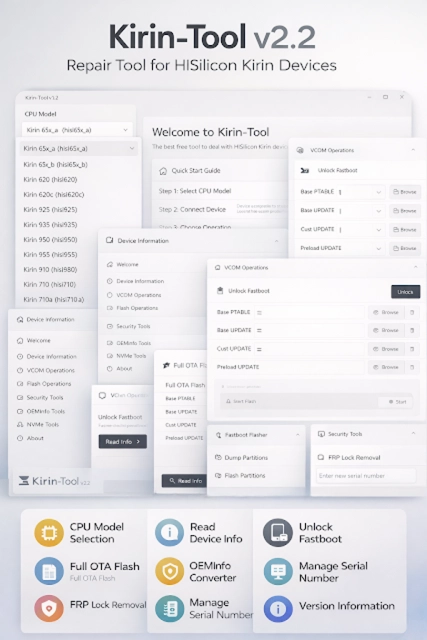
Kirin-Tool v2.2 is a specialized Android servicing utility developed for devices powered by Huawei’s Kirin chipsets. In the GSM repair industry, Huawei smartphones with Kirin processors often require dedicated tools due to their unique security structure and firmware architecture. Standard flashing tools may not fully support Kirin-based devices, which makes Kirin-Tool v2.2 an essential solution for professional technicians.
With the growing demand for Huawei repair services, especially for FRP removal, firmware flashing, and device information reading, Kirin-Tool v2.2 provides a streamlined and efficient platform. The latest version introduces improved compatibility with newer Huawei models, enhanced stability, and better support for updated security patches.
If you are searching for a reliable Huawei Kirin repair tool for Windows PC, Kirin-Tool v2.2 offers powerful features tailored specifically for Kirin chipset devices.
Overview
Kirin-Tool v2.2 is a Windows-based mobile repair software designed to work primarily with Huawei and Honor smartphones powered by Kirin processors. The tool focuses on advanced servicing tasks such as:
-
FRP (Factory Reset Protection) removal
-
Device information reading
-
Firmware flashing support
-
Bootloader status checking
-
Factory reset operations
Unlike general Android tools, Kirin-Tool is optimized for Huawei’s chipset architecture. Version 2.2 enhances detection algorithms and improves communication between the PC and device through ADB, Fastboot, and specific Huawei service modes.
The tool is widely used in GSM repair shops where Huawei devices are frequently serviced. Its simple interface combined with powerful backend functions makes it suitable for both beginner and professional technicians.
Description
Kirin-Tool v2.2 is engineered to handle the unique structure of Huawei Kirin-powered smartphones. Huawei devices often implement advanced security mechanisms, including secure boot verification and account-based protection systems. These features require precise handling during repair operations.
The tool allows technicians to safely perform operations without damaging critical partitions. It supports multiple connection modes such as:
-
ADB Mode
-
Fastboot Mode
-
Huawei USB COM Mode (where supported)
One of the major highlights of Kirin-Tool v2.2 is its ability to bypass Google FRP on supported Huawei models. It also provides options to read detailed device information, including model number, firmware version, Android version, and security patch level.
The updated version improves performance speed and reduces connection errors that were present in earlier builds. It is lightweight, easy to install, and does not require heavy system resources.
For technicians dealing with Kirin 65x, 7xx, 8xx, and 9xx series chipsets, this tool provides a practical and efficient servicing environment
Key Features:
Below are the main features of Kirin-Tool v2.2:
1. Huawei FRP Removal
Bypass Google account verification on supported Kirin devices.
2. Device Information Reader
Displays detailed phone information, including build number and security patch.
3. Factory Reset Function
Perform safe reset operations via ADB or supported modes.
4. Fastboot Operations
Supports Fastboot commands for unlocking and flashing tasks.
5. Bootloader Status Check
Identify whether the bootloader is locked or unlocked.
6. Improved Chipset Compatibility
Supports multiple Kirin processor series.
7. Stable USB Communication
Enhanced driver interaction for reliable device detection.
8. Lightweight & Easy Interface
User-friendly layout suitable for daily GSM repair work.
9. Error Log Reporting
Provides clear logs for troubleshooting purposes.
10. Regular Updates
Improved support for newer Huawei firmware and Android versions.
How To Install Kirin-Tool v2.2
Follow these steps to properly install and set up the tool:
Step 1: Download the Tool
Download Kirin-Tool v2.2 from a trusted or official GSM source.
Step 2: Extract the Package
If the file is compressed (ZIP/RAR), extract it using WinRAR or 7-Zip.
Step 3: Install Required Drivers
Install Huawei USB drivers and ADB/Fastboot drivers on your PC.
Step 4: Disable Antivirus (If Necessary)
Some repair tools may be detected as false positives by antivirus software.
Step 5: Run as Administrator
Right-click the executable file and choose “Run as Administrator.”
Step 6: Connect Device
Connect your Huawei device via USB cable in the required mode (ADB or Fastboot).
Step 7: Start Using the Tool
Select the desired operation, such as FRP removal or device info reading.
Download Link: HERE
Your File Password: 123
File Version & Size: | 64.84 MB || V2.2 |
File type: compressed / Zip & RAR (Use 7zip or WINRAR to unzip File)
Support OS: All Windows (32-64 bit)
Virus Status: 100% Safe Scanned By Avast Antivirus