Introduction
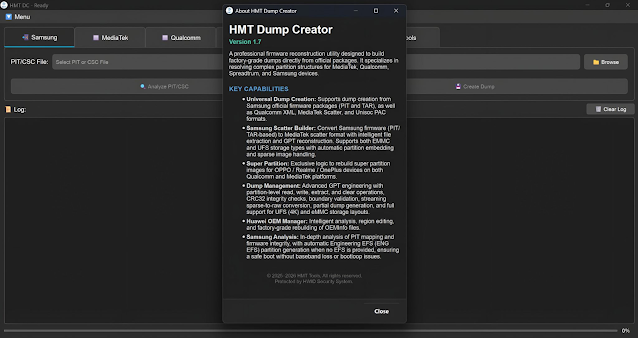
HMT Dump Creator v1.7 is a professional mobile servicing utility designed for technicians who need to create firmware dump files from supported Android devices. In the mobile repair industry, firmware dumps play a crucial role in advanced troubleshooting, backup creation, and software restoration. HMT Dump Creator v1.7 provides a simple yet powerful solution for extracting and saving device firmware data for future use.
As Android smartphones continue to receive frequent updates and security patches, having a reliable dump creation tool is essential for repair professionals. Its improved stability and expanded compatibility make version 1.7 a valuable update for mobile technicians.
Overview
HMT Dump Creator v1.7 is a Windows-based application developed specifically for creating firmware dump files from Android devices. A dump file contains important system partitions, firmware components, and configuration data extracted directly from a working device.
The tool is widely used by advanced technicians and repair centers that deal with deep-level software repairs. It supports multiple chipsets and works through USB communication.
HMT Dump Creator v1.7 simplifies a complex process by offering a structured interface that guides users through dump extraction without requiring complicated command-line operations.
Description
HMT Dump Creator v1.7 is designed for professional firmware management and backup creation. Unlike regular flashing tools that install firmware, this software focuses on extracting firmware data from a functional device. This is extremely useful when official firmware is unavailable or when technicians need a customized backup for restoration purposes.
The tool works by detecting the connected Android device and reading system partitions.
One of the key strengths of HMT Dump Creator v1.7 is its improved compatibility with newer Android versions and devices. The software also ensures stable communication between the PC and smartphone to prevent data corruption during extraction. Because firmware dumping is a technical process, users should have basic knowledge of Android partition structures before performing operations.
Key Features of HMT Dump Creator v1.7
Below are the main features of HMT Dump Creator v1.7 that make it a valuable tool for advanced mobile servicing:
1. Firmware Dump Creation
Extract complete firmware partitions from supported Android devices.
2. Partition Backup Support
Back up important partitions such as boot, system, recovery, vendor, and more.
3. Multi-Chipset Compatibility
Supports various Android chipsets depending on tool configuration.
4. Secure Data Extraction
Ensures stable communication to prevent corrupted dump files.
5. Organized File Structure
Automatically saves extracted files in structured folders for easy management.
6. USB-Based Operation
Simple USB connectivity for communication between device and PC.
7. User-Friendly Interface
Designed to simplify advanced dump creation tasks.
8. Updated Version Improvements
Version 1.7 includes performance enhancements and expanded device support.
How To Install HMT Dump Creator v1.7
Follow these steps to install and use HMT Dump Creator v1.7 properly:
-
Download the Tool
Obtain the official HMT Dump Creator v1.7 package from a trusted source. -
Extract the Archive
If the file is compressed, extract it using WinRAR or 7-Zip. -
Disable Antivirus Temporarily (Optional)
Some antivirus programs may block servicing tools during installation. -
Install Required USB Drivers
Ensure chipset-specific USB drivers are installed for proper detection. -
Run as Administrator
Right-click the executable file and select Run as Administrator. -
Connect Device in Supported Mode
Put the Android device into the required mode (EDL/Fastboot/ADB). -
Select Dump Options
Choose partitions or full firmware extraction as needed. -
Start Dump Process
Click start and wait for the extraction process to complete. -
Verify Saved Files
Check the output folder to confirm dump files were created successfully.
Download Link: HERE
Your File Password: 123
File Version & Size: | V1.7 || 72 MB |
File type: compressed / Zip & RAR (Use 7zip or WINRAR to unzip File)
Support OS: All Windows (32-64 bit)
Virus Status: 100% Safe Scanned By Avast Antivirus