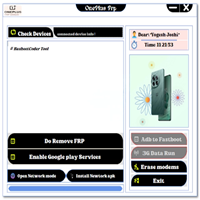
Galaxy Multi Tool V1.0 Free Download [Official Tool]
Galaxy Multi Tool

Introduction
With every new version of Android sprouting stronger shields and extra layers of defense, the time has come to create a reputable, swift, and easy-to-use multifunctional service tool.
Featuring an intuitive design, fast doing, and powerful compatibility, Galaxy Multi Tool V1.0 stands out as a critical element for any service technician’s repertoire.
Description
The tool is designed to work smoothly on most laptops and personal computers running Windows 7, 8, 10, and 11.
The most outstanding merits of Galaxy Multi Tool V1.0 are its sleek aesthetics and the speed of working. It can work perfectly on a 2 GHz CPU with 2 GB RAM. This is appreciated by workers in small shops and remote service centers. This means that computers with low-end properties are used for work.
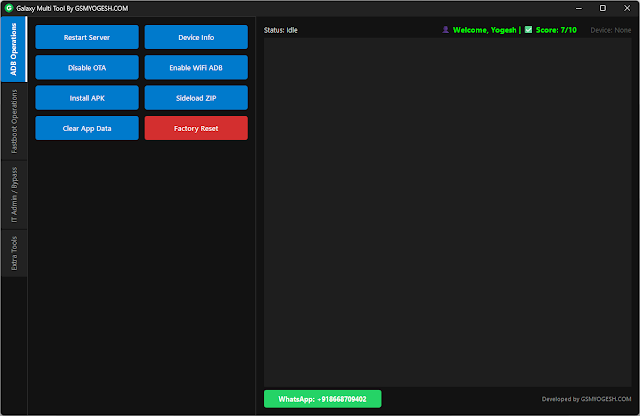
The tool’s user interface is the ILO dungeon: connect an Android device, specify the mode (MTP, ADB, Fastboot, or Download), select the function from the supported list, and run it in one click.
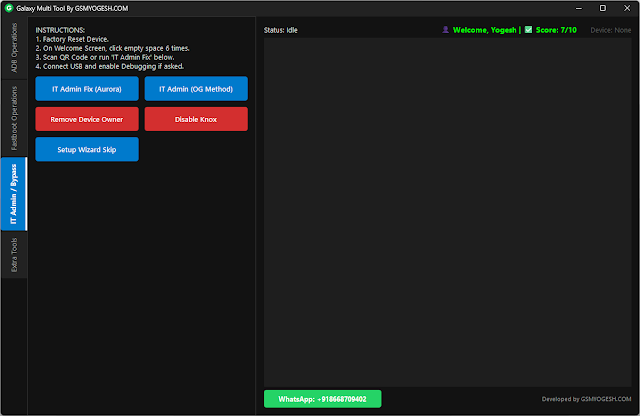
Galaxy Multi Tool V1.0, by its nature, is a hero-type for Samsung customers: from in-depth MTP FRP bypass to high-precision ADB-based elimination, unlocking the devices is like a piece of cake.
Key Features of the Galaxy Multi-Tool V1.0
1. MTP Mode FRP Bypass
– Offers an MTP way to exit FRP security
– Runs on the latest Samsung models with a more secure Android
– One of the safest and quickest one-click bypass methods
2. Advanced ADB Operations
– Get ADB mode activated with ease
– ADB method solution for Google account lock
– Device reset, information removing, log file reading, and resetting basic settings
– Easy-to-navigate utilities for ADB-enabled gadgets
3. Qualcomm & MediaTek Support
– Gets the information about the device
– Device re-enable via preloaded and USB EDL download option
4. Samsung Special Tools
– Bypass FRP using the MTP or ADB method
– Receive phone characteristics and read information on the software version
– Security features related to Knox recognize the targeted device as one of the chosen smartphones.
– It shall support all the latest series of Galaxy A, M, S, and Fold.
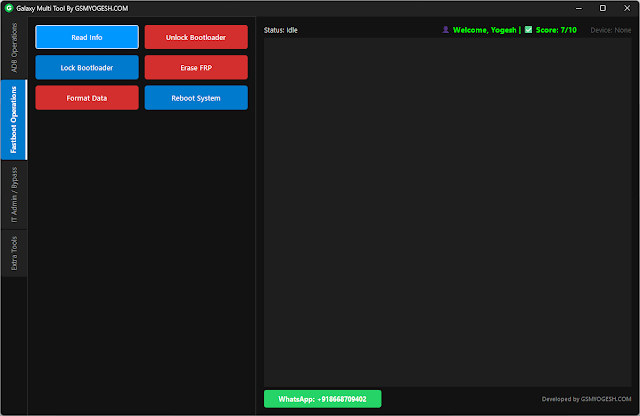
5. Fastboot Mode Functions
– Wipe out FRP
– Change the pattern/PIN lock on these models
6. One-Click Factory Reset
– Amazing point for obtaining debugged machines, services, and center plots.
7. Auto Device Detection
– Simply scan the devices connected to the PC (smartphones included)
– Recognize each device and show model number, Android version, security patch and chipset configuration
8. Simple & Lightweight Interface
– The problem is simple
– Small resource usage
– Reliable on cheap and low-end computers
9. Regular Updates
– New models are released frequently
– The fixes, new methods, and optimizations included
10. No Dongle or Activation Required
– No cost
– No login
– No subscription
– Run it offline in a jiffy
How to Install Galaxy Multi Tool V1.0
Step 1 – Download the Tool
Step 2 – Extract the File
Right-click on the ZIP or RAR file you’ve just downloaded and select the “Extract Here” option.
– Setup pack
– Driver folder
– Executable tool file
Step 3 – Install Required Drivers
– Samsung USB Driver
– Qualcomm USB Driver
– MediaTek USB VCOM Driver
A durable connection is acknowledged through these actions.
Step 4 – Run the Tool
Access the introductory folder of the application, then run the Galaxy Multi Tool V1.0.exe with already existing privileges.
No installation is needed for the interface because it is already found.
Step 5 – Connect your Device
Based on the task being performed:
– MTP mode or ADB mode can be selected, as necessary for FRP
– For scrub reset or flashing, it will be Fastboot/Download/Prelude mode.
To start, attach your device to the PC via the USB, choosing a good-quality USB data cable.
Step 6 – Allow Device Detection
Intellectually, the tracking device will:
– Recognize the model
– No misconduct in reading the chipset
– IVDA and interfere with the Android version
– Talk back about the connection
Step 7 – Select the Operation
– FRP Bypass
– ADB Enable
– Factory Reset
– Device Info
– MTK
Press the ‘Execute’ button on both.
Step 8 – Wait for Completion
Wait for the point at which the tool by itself will perform the action.
Step 9 – Restart the Device
Turn on the gadget. Implement the standings.
Download Link: HERE
Your File Password: 123
File Version & Size: | 41.81 MB || V1.0 |
File type: compressed / Zip & RAR (Use 7zip or WINRAR to unzip File)
Support OS: All Windows (32-64 bit)
Virus Status: 100% Safe Scanned By Avast Antivirus