Fast Unlocker Pro v1.2.2.5 New Update Free Download
Fast Unlocker Pro

Introduction
Fast Unlocker Pro v1.2.2.5 is the newest top-quality mobile unlocking software made for technicians who deal with locked FRP, locked screens, and other similar issues on Android. This version makes it optimized for speed, support of a vast range of devices, and fast unlock time, making it an invaluable aid to service centers and GSM professionals.
Description
Fast Unlocker Pro v1.2.2.5 is small software designed for Windows PCs that makes mobile unlocking for a great deal of brands completely effortless.
Fast Unlocker Pro v1.2.2.5 is linked with scientific research. Thanks to this, even the newest firmware versions can be rooted in a short period, and the benefit of updated patches or powerful exploit methods for a better footing is achieved. If you work in a phone repair center or enjoy fixing electronic devices at your home, this utility will contribute to your safe and easy procedure during unlocking your device.
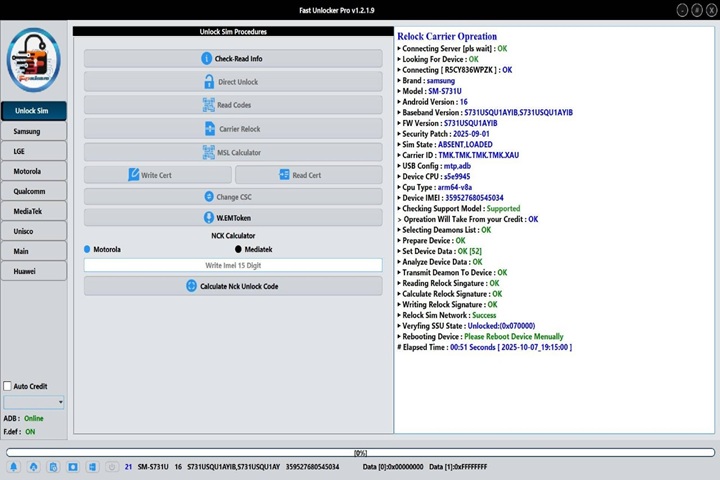
Key Features of Fast Unlocker Pro v1.2.2.5
1. FRP Lock Removal
Unblocking this same security mechanism on any device is as simple as a single checkmark.
2. Pattern, PIN, and Password Unlock
3. ADB and Fastboot Operations
It also has a command-line interface.
4. Multi-Brand Compatibility
This version goes with different brands, including Samsung, Oppo, Vivo, Xiaomi, Redmi, Realme, Tecno, Infinix, Huawei, and all kinds of MTK/Qualcomm-based phones.
5. One-Click User Interface
In this way, the app is designed for both beginner and experienced operators.
6. Improved Detection & Stability
This will help repair personnel reach completion of their chores faster.
7. No Dongle Required
Fast Unlocker Pro v1.2.2.5 has no hardware dongle or activation for the premium version, which is available to all GSM users.
How to Install Fast Unlocker Pro v1.2.2.5
Step 1:
Download the Tool
Step 2: Extract the Package
After the download completes, extract the zip or RAR file using WinRAR or 7-Zip that you have installed on your PC, resulting in the main file along with the supporting files.
Step 3: Run as administrator
Using the right-hand button, click on the eye and choose Run as Administrator. This action will allow you to proceed with the fresh installation, having no issues with permission.
Step 4: Install the Tool
All you have to do is follow the on-screen guidelines. Smooth running of the installation process is guaranteed, and the programs install in a few minutes.
Step 5: Launch the Tool
Once the installation is done by double-clicking on the downloaded tiny and lightweight binary file, you will see a screen with the option of connecting your devices with either the ADB or Fastboot mode.
Step 6: Start Unlocking
Choose the function you want—FRP removal, pattern unlock, device reset, or Fastboot action—and click the single operation option to follow advanced steps to unlock it successfully.
Download Link: HERE
Your File Password: 123
File Version & Size: |
File type: compressed / Zip & RAR (Use 7zip or WINRAR to unzip File)
Support OS: All Windows (32-64 bit)
Virus Status: 100% Safe Scanned By Avast Antivirus